

DoomDigest

Overview
Turns your doomscrolling into digestible summaries.
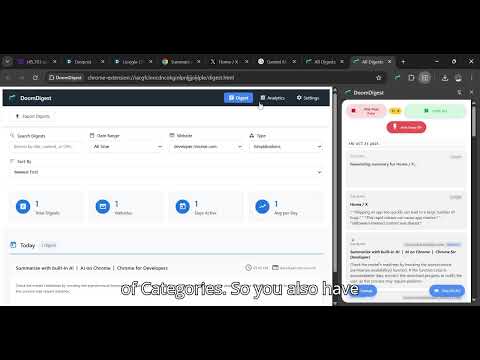
DoomDigest is your personal AI-powered reading assistant that transforms endless scrolling into meaningful knowledge. It automatically detects, summarizes, and organizes the content you consume online — from articles, PDFs, and documentation to social media posts and emails — so you can read less but learn more. 🔍 What It Does Smart Content Detection: Automatically recognizes articles, social posts, PDFs, and feeds as you browse. AI Summarization: Uses Chrome’s built-in AI (Prompt API) or Google Gemini to generate quick, insightful summaries. Note-Taking: Add your own notes or highlights while reading; everything is saved locally and synced to Google Drive. Auto Digest: Creates daily or weekly digests showing what you’ve read and how you’ve spent your time online. Export Options: Export summaries in TXT, Markdown, or JSON formats for tools like Notion, Obsidian, or Docs. Background Sync: Works quietly in the background — even when the sidebar isn’t open. 🧠 Why Install DoomDigest Organize your learning, reading, and research automatically. Save time by turning doomscrolling into quick, meaningful summaries. Build a personal digital memory of everything you’ve read. Keep your data private — all AI runs locally or through secure APIs. Ideal for students, developers, researchers, and anyone who reads daily. 💡 Use Cases Students: Summarize lecture notes, research papers. Developers: Quickly break down documentation and tutorials. Professionals: Capture insights from reports or emails automatically. Readers: Keep a digest of articles and threads without switching tabs. 🔐 Privacy-Friendly by Design DoomDigest runs entirely on your device. No data leaves your browser unless you choose to export it. OAuth integration with Google Drive ensures your files sync securely under your account only. 🧰 Tech Stack Built with HTML, Vanilla JS, and Tailwind. Uses Chrome’s AI Prompt API and Google Gemini for summaries. Stores data in IndexedDB and Chrome Storage. Integrated directly with Google Drive for backup and export. 🚀 What’s Next Smart email digests of your weekly reading. Automatic social media content detection (Twitter, LinkedIn). Team and collaborative digests for shared learning. Custom AI prompts for personalized summaries. 📣 Turn information overload into organized knowledge. Install DoomDigest today and make every scroll meaningful.
0 out of 5No ratings
Details
- Version1.0
- UpdatedNovember 11, 2025
- Offered byOla
- Size508KiB
- LanguagesEnglish
- DeveloperVerinet
Block A, Flat 4,Police Quarters, Apata, Ibadan Ibadan, Oyo 200211 NGEmail
verinetmedia@outlook.com - Non-traderThis developer has not identified itself as a trader. For consumers in the European Union, please note that consumer rights do not apply to contracts between you and this developer.
Privacy

This developer declares that your data is
- Not being sold to third parties, outside of the approved use cases
- Not being used or transferred for purposes that are unrelated to the item's core functionality
- Not being used or transferred to determine creditworthiness or for lending purposes