


Overview
Play Doodle Snake Game in Chrome — guide the snake, eat food, grow longer, and beat high scores in this unblocked classic!
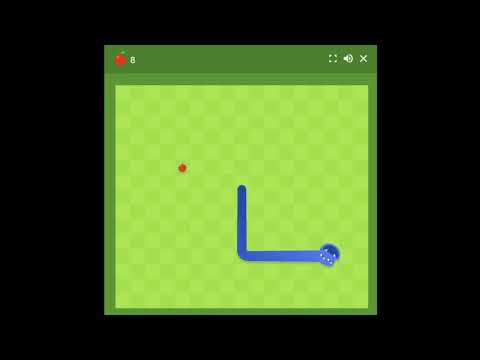
Doodle Snake Game Google Chrome Play Play a fully-featured version of the classic Snake game directly from your Chrome toolbar — no downloads, no separate tabs, no waiting on slow ad-heavy websites. This extension brings together the original snake-and-food gameplay everyone remembers with more than a dozen mode variations, adjustable board sizes, speed settings, and cosmetic customization, all accessible in one lightweight popup. A BRIEF HISTORY OF SNAKE The core idea behind Snake — steering a growing line while avoiding collisions — dates back to 1976's arcade game Blockade. The concept was later adapted into single-player form and, in 1997, Nokia pre-installed a version on the Nokia 6110, introducing it to hundreds of millions of mobile phone owners for the first time. That version's simple two-button controls and endless replayability made it one of the most-played games in history. Decades later, a browser-based version carried the same core mechanics forward with modern visuals and an expanded set of modes, board sizes, and customization options — the version this extension is built around. CORE GAMEPLAY The rules haven't changed since the original: guide your snake to food, grow longer with each bite, and avoid hitting the walls or your own tail. What has changed is everything built around that core loop — this extension gives you real choice in how you want to play each round instead of one fixed ruleset. SPEED SETTINGS IN DOODLE SNAKE GAME - Snake — the standard, balanced pace, good for most players - Rabbit — three times faster than standard, for players who want quick, intense rounds - Turtle — three times slower than standard, useful for learning movement patterns or playing more deliberately MAP SIZES - Small — a compact 10×9 grid that rewards precise, careful movement with little room for error - Regular — a balanced 17×15 board suited to standard play - Big — a spacious 24×21 board that allows for longer runs and more room to maneuver before space runs out SNAKE CUSTOMIZATION Personalize your snake's appearance with solid colors, blended gradient patterns, or the alternating Yin Yang look. These are purely visual, so you can find a style you like without changing how the game plays. SNAKE GAME MODES EXPLAINED - Classic Mode — the original ruleset. Grow with each bite, avoid the walls and your own tail, and try to clear the board of food entirely. - Wall Mode — every item eaten leaves a permanent brick wall behind it, gradually filling the board and forcing more careful routing as the round goes on. - Portal Mode — eating fruit teleports your snake to a new position on the board, rewarding players who can adjust quickly to a changed layout. - Cheese Mode — parts of your snake's body become passable, letting you thread through sections of yourself that would normally end the round. - No Borders Mode — the board's edges are removed entirely, creating a seamless, looping play area instead of hard walls. - Twin Mode — your snake's head and tail swap positions every time you eat, requiring constant recalculation of direction. - Winged Mode — the food itself moves and bounces around the board instead of sitting still, adding a chase element to each bite. - Yin Yang Mode — a second, opposite-colored snake shares the board and moves independently; colliding with it ends the round. - Key Mode — a key appears alongside a locked block. Collecting the key unlocks the block and reveals food hidden behind it. - Sokoban Mode — a puzzle-style variant where food is locked inside crates that must be pushed into specific positions to open. - Poison Mode — a second, poisonous food type appears alongside the regular one; eating it briefly scrambles your snake's movement. - Dimension Mode — food is split across two overlapping layers, and eating continuously shifts your snake's visibility between them. - Minesweeper Mode — each item eaten leaves behind a mine with a set danger radius; entering that radius starts a countdown you must escape. - Statue Mode — your snake's body (aside from the head) becomes a fixed obstacle once food is eaten, raising the stakes with every bite. - Light Mode — visibility is limited to a small circle around your snake's head, testing memory of the board as much as reflexes. - Peace Mode — a relaxed, no-fail mode you can only end voluntarily, suited to casual, low-pressure play. - Blender Mode — combine two or more of the modes above into a single custom round for a challenge you design yourself. CONTROLS - Arrow keys or WASD to steer the snake - Enter or Space to quickly restart after a round ends - In-game settings toggle sound and an on-screen timer - All controls work immediately on install, with no configuration required STRATEGY TIPS - Stay near the center early on — it gives you the most directions to escape in if food appears somewhere inconvenient. - On Small maps, plan two or three moves ahead rather than reacting one step at a time, since space runs out quickly. - In Wall Mode, try to eat in a consistent pattern so the walls you create don't box you in later. - In Portal Mode, pause briefly after teleporting to reorient before making your next move. - In Minesweeper Mode, give mines a wide berth rather than cutting close, since the danger radius is often larger than it looks. - In Blender Mode, start by combining just two modes until you're comfortable, since stacking several at once can get chaotic fast. DAILY CHALLENGE Beyond free play in any mode, a rotating daily challenge gives you a specific objective to complete each day, adding a reason to come back beyond just chasing a personal high score. PRIVACY AND PERMISSIONS This extension is lightweight and does not request unnecessary permissions. We do not collect, sell, or share personal user data — see our privacy policy for full details. The game runs locally in the popup and does not require an account or login to play. WHY PLAY IN THE BROWSER Most Snake variants online are scattered across different sites — one for extra modes, another for map size options, another for a leaderboard. This extension keeps the full set of modes, map sizes, speed settings, and customization together in one place, accessible instantly from your Chrome toolbar instead of hunting across multiple bookmarks. WHO IT'S FOR - Longtime Snake fans who want more depth than the single classic mode - Players who enjoy puzzle-style twists, such as Sokoban, Key, and Minesweeper modes - Anyone who wants a daily objective to come back to, not just endless free play - Students and employees looking for a fast, no-install way to take a short break - Players on school or work Chromebooks where installing standalone software isn't an option - Newcomers who've only heard of Snake and want an easy way to actually try it FREQUENTLY ASKED QUESTIONS Is this free to play? Yes, completely free with no account or login required. Does it work without an internet connection? Yes, once installed the game runs fully offline. How many game modes are included? Classic Mode plus more than fifteen variants, including Wall, Portal, Cheese, No Borders, Twin, Winged, Yin Yang, Key, Sokoban, Poison, Dimension, Minesweeper, Statue, Light, and Peace Mode, along with Blender Mode for combining several at once. Can I change the board size? Yes — Small, Regular, and Big board sizes are all available. Can I change how my snake looks? Yes, through solid colors, gradients, and the Yin Yang pattern option. Is there a daily challenge? Yes, a new objective rotates in daily alongside unlimited free play in any mode. Is my data collected? No. We do not collect, sell, or share personal data. See our privacy policy for details. Install the extension, click the toolbar icon, choose a mode, and see how long you can grow your snake.
0 out of 5No ratings
Details
- Version3.6
- UpdatedJuly 15, 2026
- Size38.68KiB
- Languages19 languages
- DeveloperMUHAMMAD HASSAM LATIFWebsite
181 Albert Avenue Anlaby Road Hull HU3 6PL GBEmail
houriamaryum@gmail.com - Non-traderThis developer has not identified itself as a trader. For consumers in the European Union, please note that consumer rights do not apply to contracts between you and this developer.
Privacy

This developer declares that your data is
- Not being sold to third parties, outside of the approved use cases
- Not being used or transferred for purposes that are unrelated to the item's core functionality
- Not being used or transferred to determine creditworthiness or for lending purposes
Support
For help with questions, suggestions, or problems, visit the developer's support site