


總覽
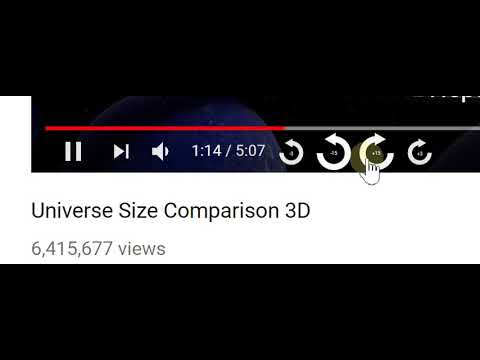
Quickly seek Youtube video playback forwards and backwards by either 3 or 15 seconds.
Quickly seek Youtube video playback forwards and backwards by either 3 or 15 seconds. ==================================== What This Extension Does ==================================== This tiny and efficient extension helps you easily seek forwards and backwards in Youtube™ videos. If you ever watch long videos and want to seek backwards a little bit so you can see something again, but get frustrated trying to drag that tiny slider just the right amount, this extension is for you! This extension will add keyboard shortcuts which let you quickly seek ahead or back by either 3 or 15 seconds (configurable). Additionally, it can also optionally add new buttons to the player which you can click to seek ahead or back. ==================================== Usage ==================================== 1) Load any web page that contains a YT-video 2) Click the video to make it play 3) The extension will automatically detect the video and add the new seek buttons to it 4) To seek forwards or backwards, you can either click the buttons, or use the Keyboard Controls *Note - like many other extensions, any webpages you loaded before installing the extension must be reloaded before the extension will work. List of Keycombos http://rehfeld.us/browser-extensions/controls-for-youtube/keyboard-controls For example, it's really easy to hold your ctrl key and then press your left arrow key twice to quickly go back 6 seconds! You can configure how far ahead and back each key takes you via the extension config page. Also, if you don't like the buttons that get added to the player, you can disable some or all of them. To see the config page, click the extension icon on the top-right of your browser, then select "options", just like on any other extension. Alternatively, goto the chrome://extensions url, click the "Details" btn for this extension, then click "Extension Options". TIP: You can skip through some advertisements by just fast forwarding! Try using the "Seek forward to end" keycombo. You can also rewind the ad, if you like. TIP2: You can modify the seek duration when you click a seek button using the mouse: ctrl + click will be half the normal duration, shift + click will be double, and shift + ctrl + click will be 5x. Non-Obvious Feature: Note that the keyboard controls work properly even when you're on a non-youtube.com website which embeds the YT-video into their webpage. When using keycombos, you don't need to give the video "mouse focus" by clicking on it, which allows you to freely interact with the parent web page without worrying about losing mouse focus due to clicking something else. This can be handy, for example, if you've scrolled to the bottom of the page to read comments, and suddenly wish to rewind or pause the video without having to scroll back to the top - just use the keys. While native YT-videos do have their own keycombos to pause the video (the space bar), it only works on non-youtube.com pages when the video currently has mouse focus. This extension offers its own pause control (Ctrl + SpaceBar) which works without the video needing focus. The same goes for all the keycombos - they all work without needing the player to have focus! The browser tab does need focus, however. Limitation: -The GUI buttons can only be added to the player if there's enough width - small players may not be wide enough. If you maximize the player, they should show up, or you can always just use the keyboard controls. ==================================== Legal ==================================== Youtube™ is a registered trademark. This extension was developed independently, by someone who is not related or affiliated with them, without any help or endorsement from them. ==================================== Privacy ==================================== http://rehfeld.us/browser-extensions/controls-for-youtube/privacy-policy ==================================== Changelog ==================================== http://rehfeld.us/browser-extensions/controls-for-youtube/changelog
4.6 分 (滿分 5 分)129 個評分
詳細資料
隱私權

這位開發者就你的資料做出下列聲明:
- 除經核准的用途外,不會將你的資料販售給第三方
- 不會基於與商品核心功能無關的目的,使用或轉移資料
- 不會為了確認信用度或基於貸款目的,使用或轉移資料
支援
如有疑問或建議,請使用電腦版瀏覽器開啟這個頁面