


Overview
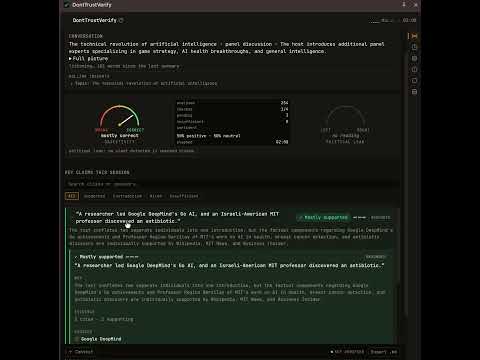
Fact-check what you hear: live mic transcription, claims extracted, cited verdicts with bias, sentiment and insight lenses.
Don't Trust.Verify - Fact Check it all. Browser extension to fact-check all audible statements in Debates, Discussions and Conversations. Think about that TV Debate, or YouTube Video you listen or watch? Don't Trust, Verify. DontTrustVerify turns your side panel into a real-time fact-checking desk. It listens to your microphone during meetings, calls, interviews, lectures and debates, transcribes the conversation as it happens, and surfaces the factual claims that actually matter — then holds each one up to four lenses so you can see, at a glance, what was said, how it leans, how it feels, and whether it stands up. It is for people who would rather check than guess: journalists, researchers, analysts, students, debate watchers, and anyone tired of taking a confident claim at face value. WHAT IT DOES As people speak, key claims rise to the top on their own — de-duplicated, so a point repeated three times appears once, with a live validated-of-total counter and instant search and verdict filters. You follow the argument without scrolling a wall of transcript. • Truthfulness, with citations. On your own Gemini key, the extension searches Google for corroborating web sources. When it finds them, the claim is cited — title, publisher, date, and a short rationale you can open yourself, alongside the counter-evidence view when a claim does not hold up. When the web has nothing to say, the claim is marked "Insufficient evidence" rather than dressed up as a result. • Political lean. The narrative slant of each claim, shown with the convention that fits the polity — the UK red/blue orientation is respected, not flattened into a US default — with the evidence behind every call. • Sentiment. The tone of each claim: framing, loaded language, and per-claim polarity, kept deliberately separate from the truth verdict so tone never colours the facts. • Key insights. The themes, the open questions, and a rolling picture of the session, gathered as it runs and exportable as a cited Markdown briefing. WHAT YOU GET • A live, claims-first view with search, verdict filters and a validated-of-total counter • Cited fact-checks when grounding finds web sources, on your own key • Bias and sentiment lenses with the evidence shown for every reading • A one-click, cited Markdown briefing you can share • Opt-in, on-device session history • Seven interface languages DontTrustVerify declares only what it uses: the side panel for its interface, storage for your settings and key (in this browser alone), and an offscreen document to run the microphone pipeline — plus a single connection to Google's Gemini API. It reads no browser tab, no history, and no other website. Don't trust. Verify. Powered by Gemini & Google Search
0 out of 5No ratings
Details
- Version0.4.8
- Updated3 September 2026
- Size878KiB
- Languages6 languages
- DeveloperWebsite
Email
jpantsjoha@gmail.com - Non-traderThis developer has not identified itself as a trader. For consumers in the European Union, please note that consumer rights do not apply to contracts between you and this developer.
Privacy

This developer declares that your data is
- Not being sold to third parties, outside of the approved use cases
- Not being used or transferred for purposes that are unrelated to the item's core functionality
- Not being used or transferred to determine creditworthiness or for lending purposes
Support
For help with questions, suggestions or problems, please open this page on your desktop browser