

DOMolish

Overview
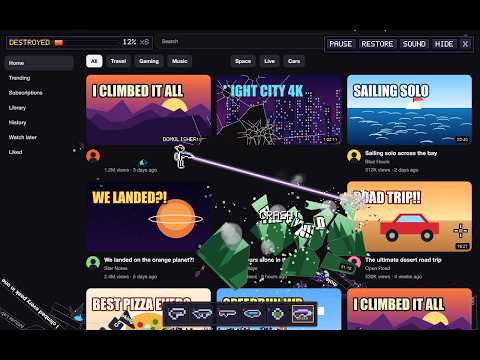
Turn the live website you're on into a 2D stickman destruction arcade. Shoot real thumbnails, images and text into physics shards.
DOMolish turns the website you're on into a 2D arcade game. A pixel-art stickman drops onto the real page, and every image, video thumbnail, headline and button becomes something you can blow apart. Shoot a thumbnail and it cracks, gets punched full of jagged holes, and finally shatters into physics shards that carry its real pixels. The pieces tumble, bounce and pile up on top of the page while everything else stays exactly where it was. How it works • Click the DOMolish button (or press Alt+Shift+D) on any normal website and the game starts right on top of the page. • The real page stays underneath. Nothing is replaced with a screenshot, and the layout never jumps. • Hit Restore at any time and the page is back exactly as it was. What you can do • Run, double-jump, crouch, drop through ledges, and fly with a jetpack. Fly near the top of the screen and the page scrolls with you. • Six weapons: pistol, blaster, shotgun, rocket launcher, bouncing grenades and a laser cutter. • Carve holes into real images, slice text with the laser, and set off chain reactions for combos. • Watch the destruction meter climb as you level the page. • Name your stickman. The name floats above your character on every site. • Pause whenever you want: the page becomes clickable again, and you pick up where you left off. • Rubble crumbles away by itself so it never buries the page, or press C to clear it. Controls A / D move · W or Space jump (double jump) · Shift jetpack · S crouch / drop · Mouse aim and shoot · G or right-click grenade · 1–6, Q / E switch weapons · C clear rubble · P pause · R restore · H help Works on most websites: video sites, social feeds, news, blogs, docs and code hosts. Chrome's own pages, the Chrome Web Store and PDFs can't be played. Privacy DOMolish only runs on the tab where you start it. It has no servers, no accounts, no analytics and no ads. The page content it breaks and the name you choose stay on your computer and are never sent anywhere.
0 out of 5No ratings
Details
- Version1.0.0
- UpdatedNovember 17, 2026
- Offered byDevity
- Size145KiB
- LanguagesEnglish
- Developer
Email
kumarcops@gmail.com - Non-traderThis developer has not identified itself as a trader. For consumers in the European Union, please note that consumer rights do not apply to contracts between you and this developer.
Privacy

DOMolish has disclosed the following information regarding the collection and usage of your data. More detailed information can be found in the developer's privacy policy.
DOMolish handles the following:
This developer declares that your data is
- Not being sold to third parties, outside of the approved use cases
- Not being used or transferred for purposes that are unrelated to the item's core functionality
- Not being used or transferred to determine creditworthiness or for lending purposes
Support
For help with questions, suggestions, or problems, please open this page on your desktop browser