

Document Preview Exporter for Google Drive

Overview
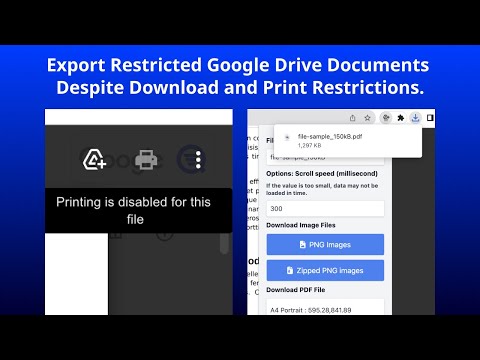
Export Google Drive document previews as PNG images, a ZIP archive of PNG images, or a PDF file.
Export pages from Google Drive document previews - including PDF, Word, and PowerPoint files - as PNG images, a ZIP archive, or a PDF. Open a file in Google Drive so that its preview is displayed, then click the extension icon and choose an export format. Key Features: * Export preview pages as PNG images, a ZIP archive, or a PDF * PDFs are image-based and do not contain selectable or searchable text * Specify an output filename * Choose PDF page size, such as A4, A3, and more * Choose PDF orientation: Portrait or Landscape Supported files PDF, Microsoft Word (.docx), Microsoft PowerPoint (.pptx), and Google Docs documents. Not supported: Google Sheets, Google Slides, and image-file previews such as JPG or PNG. For Google Sheets and Slides, use File > Download in the Google editor instead. Usage Notice This extension processes preview pages displayed in your browser; it does not grant access to documents. Use it only when you own the document, have the document owner's permission, or are otherwise authorized to save a copy. You are responsible for complying with applicable copyright, confidentiality, licensing, and organizational requirements. Release Notes: 2026-08-22 v1.5.0: The popup now shows the correct Drive preview URL when opened on a page where export is not possible. Icons by https://icons8.com/ Sample files by https://file-examples.com/
4.8 out of 5141 ratings
Details
- Version1.5.0
- UpdatedAugust 22, 2026
- Size284KiB
- LanguagesEnglish (United States)
- DeveloperWebsite
Email
support@findgrep.app - Non-traderThis developer has not identified itself as a trader. For consumers in the European Union, please note that consumer rights do not apply to contracts between you and this developer.
Privacy

This developer declares that your data is
- Not being sold to third parties, outside of the approved use cases
- Not being used or transferred for purposes that are unrelated to the item's core functionality
- Not being used or transferred to determine creditworthiness or for lending purposes
Support
For help with questions, suggestions, or problems, please open this page on your desktop browser