


Overview
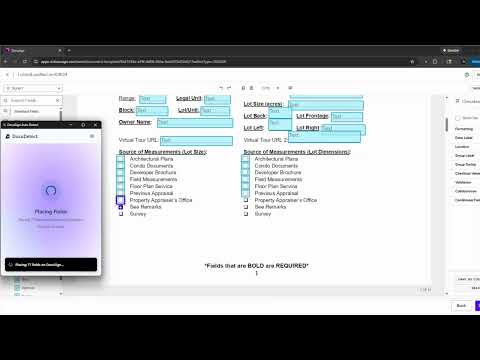
Automatically place fields on DocuSign documents
DocuDetect: Automatic Field Placement for DocuSign Stop wasting time manually placing fields! DocuDetect brings true document intelligence to your DocuSign workflow, ensuring every template is perfect in seconds. Powered by AI That Understands Our proprietary Artificial Intelligence doesn't just scan it deeply analyzes and understands the context and structure of your documents. This advanced capability allows DocuDetect to accurately identify and extract the precise locations for all necessary input elements, eliminating manual effort and ensuring perfect alignment every time. Key Features: - DocuSign Native Support: Works directly within your existing DocuSign template creation dashboard. - Laser-Precise Placement: Automatically locates and places: - Input Fields - Checkboxes - Signature Blocks - Dates - 95% Accuracy: Reduces the human errors associated with manual field dragging. - Massive Time Savings: Drastically reduces the time required to prepare complex documents and templates. How to Use (3 Simple Steps): 1. Load your DocuSign dashboard and start creating a template. 2. Click the DocuDetect extension icon in your browser. 3. Follow the simple prompts, and the system will instantly detect and place all elements onto the page. Install DocuDetect and start building flawless DocuSign templates automatically today!
0 out of 5No ratings
Details
- Version2026.4.3
- UpdatedApril 2, 2026
- FeaturesOffers in-app purchases
- Size421KiB
- LanguagesEnglish
- DeveloperMedia Save LLCWebsite
1768 N Broad St Commerce, GA 30529-1932 USEmail
contact@wayofthat.comPhone
+1 470-252-8350 - TraderThis developer has identified itself as a trader per the definition from the European Union and committed to only offer products or services that comply with EU laws.
- D-U-N-S104946641
Privacy

DocuDetect has disclosed the following information regarding the collection and usage of your data. More detailed information can be found in the developer's privacy policy.
DocuDetect handles the following:
This developer declares that your data is
- Not being sold to third parties, outside of the approved use cases
- Not being used or transferred for purposes that are unrelated to the item's core functionality
- Not being used or transferred to determine creditworthiness or for lending purposes
Support
For help with questions, suggestions, or problems, visit the developer's support site