


نظرة عامة
Create hotkeys for Google Docs
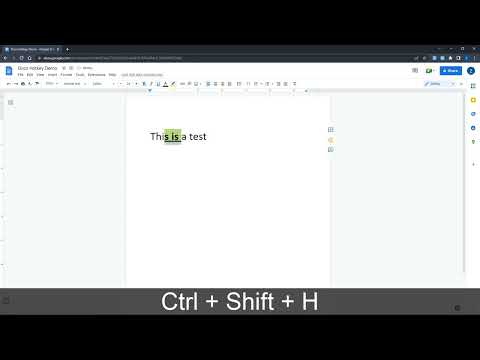
Docs Hotkey allows for complex hotkey setups with simple configuration. Hotkeys can be created to do the following: - Highlight in any color - Bold - Underline - Italicize - Change text color - Change fonts - Change font size - Set heading type (e.g., Heading 1, Normal Text, Title) - Strike through text - Change alignment and indentation - Add emoji reactions - Add bulleted lists and set their spacing - Clear all styles and remove specific styles - Execute add-ons - Insert search menu components (e.g., building blocks) A single hotkey can be configured to do several of these at once. Docs Hotkey was originally created solely for the addition of a highlight shortcut, but it has since expanded to many others. If you'd like to see a new shortcut added or if you encounter a bug, feel free to contact me. Also supports Google Slides and Google Classroom! Documentation: https://docs-hotkey.zackmurry.com
4.6 من 590 تقييمًا
التفاصيل
- الإصدار0.24
- تم التحديث4 مارس 2026
- محتوى مقدّم منZack Murry
- الحجم790KiB
- اللغاتEnglish
- مطوّر برامج
البريد الإلكتروني
zackk.murryy@gmail.com - غير تاجرلم يعرِّف هذا المطوِّر نفسه بصفته جهة تجارية. بالنسبة إلى المستهلكين في الاتحاد الأوروبي، يُرجى العِلم أنّ حقوق المستهلك لا تسري على العقود المُبرمة بينك وبين هذا المطوِّر.
الخصوصية

يُقِرّ هذا المطوِّر بأنّ بياناتك:
- لا يتم بيعها لأطراف ثالثة خارج إطار حالات الاستخدام المُتفَق عليها.
- لا تُستخدَم أو تُنقَل لأغراض غير متعلِّقة بالوظيفة الرئيسية للعنصر.
- لا تُستخدَم أو تُنقَل لتحديد الأهلية الائتمانية أو لأغراض الإعارة.
دعم
للحصول على مساعدة بخصوص الاستفسارات أو الاقتراحات أو المشاكل، يُرجى فتح هذه الصفحة على متصفّحك المتوافق مع أجهزة الكمبيوتر المكتبي