


Overview
Your Browser, Automated. Describe what you want, watch it happen.
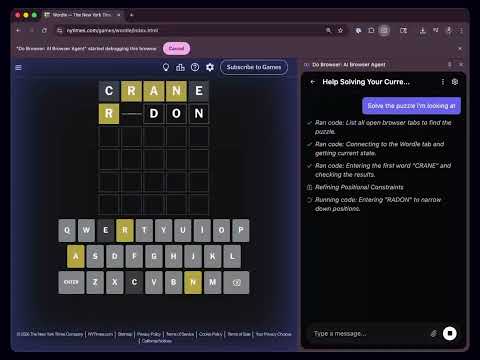
Do Browser is an AI-powered Chrome extension that lets you automate your browser using natural language. Describe what you want in plain English, and watch it happen. How It Works: 1. Describe Your Task - Tell Do Browser what you want. No coding required. 2. AI Takes Control - It navigates, clicks, fills forms, and extracts data automatically. 3. Use the Results - Download CSVs and other files. Key Features: - Natural language commands - Just describe what you want done - Works on any website - Shopping sites, social media, internal tools, and more - Visual understanding - The AI reads pages like you do, finding buttons and navigating naturally - Export your data - Download spreadsheets and files - Code generation - Writes and runs code behind the scenes to efficiently scrape and automate - Multi-tab support - Works across multiple browser tabs Common Use Cases: - Web scraping and data extraction - Form filling and automation - Shopping and price comparison - Social media drafting - Screenshot capture - Navigating complex web interfaces What Do Browser is Great For: - Automating repetitive browser tasks - Simple tasks like forms, searches, and purchases - Experimenting with AI automation Pricing: - $25/month with a 7-day free trial. Cancel anytime. - Free with bring your own Gemini api key or Claude Subscription.
3.3 out of 563 ratings
Details
- Version3.1.36
- UpdatedSeptember 23, 2026
- FeaturesOffers in-app purchases
- Size2.33MiB
- LanguagesEnglish
- DeveloperWebsite
Email
sawyer@dobrowser.io - Non-traderThis developer has not identified itself as a trader. For consumers in the European Union, please note that consumer rights do not apply to contracts between you and this developer.
Privacy

Do Browser: AI Browser Agent has disclosed the following information regarding the collection and usage of your data. More detailed information can be found in the developer's privacy policy.
Do Browser: AI Browser Agent handles the following:
This developer declares that your data is
- Not being sold to third parties, outside of the approved use cases
- Not being used or transferred for purposes that are unrelated to the item's core functionality
- Not being used or transferred to determine creditworthiness or for lending purposes
Support
For help with questions, suggestions, or problems, visit the developer's support site