


Übersicht
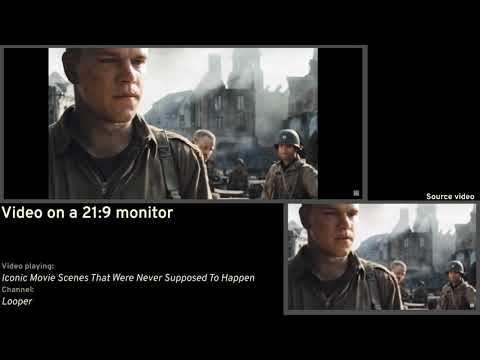
Removes double letterboxing (black bars) on ultrawide videos and offers advanced options to fix aspect ratio.
Removes double letterboxing from videos on ultrawide montiors. Youtube and Twitch are officially supported. Support for other sites is provided on "it's gonna try" basis. FEATURES ✨ Automatic Aspect Ratio Detection ✨ —————————————————————————— If the website allows, Ultrawidify will attempt to automatically detect aspect ratio and apply necessary corrections. When autodetection is active, extension will also scan for subtitles and, depending on your settings, stop while subtitles are visible. Autodetection behaviour may be changed in settings. (NOTE: Autodetection doesn't work on sites that use DRM protection or cross-origin video sources.) 🌾 Manual Correction 🌾 —————————————————————————— Extension allows you to manually set video's aspect ratio. By default, extension will ensure video fits the player (i.e. only removing double letterboxing). This behavior can be changed in settings. Note that some sites may define keyboard shortcuts that interfere with the shortcuts defined by this extension. In such cases, the shortcuts defined by this extension may not work. ⌨ Keyboard shortcuts ⌨ —————————————————————————— By default: A — triggers automatic aspect ratio detection R — resets aspect ratio to default W — sets video to fill the frame D — sets crop for 21:9 C — cycles through aspect ratios¹ Z — zooms by 5% U — unzooms by 5% [1] conflicts with youtube's shortcut for captions. You may set additional shortcuts in extension settings. In addition to that, when zoomed in, holding Shift will pan the video. 🖥️ In-player UI 🖥️ —————————————————————————— It exists and if that offends you, there's extension settings. ⬅️ Video alignment ➡️ —————————————————————————— By default, videos will be aligned to center. You can change that. 🔶 Other options 🔶 —————————————————————————— Snoop around and find out. -- Github's here: https://github.com/tamius-han/ultrawidify Full list of features (WIP): https://github.com/tamius-han/ultrawidify/wiki --
2,8 von 5335 Bewertungen
Details
- Version7.1.1
- Aktualisiert12. November 2026
- Angeboten vonTamius Han
- Größe2.79MiB
- SprachenEnglish
- Entwickler
E-Mail
tamius.han@gmail.com - Kein HändlerDieser Entwickler hat sich nicht als Händler deklariert. Für Verbraucher in der Europäischen Union gelten die Verbraucherrechte nicht für Verträge, die zwischen dir und diesem Entwickler geschlossen werden.
Datenschutz

Dieser Entwickler erklärt, dass deine Daten
- nicht an Dritte verkauft werden, außer in den genehmigten Anwendungsfällen
- nicht für Zwecke genutzt oder übertragen werden, die nichts mit der Hauptfunktionalität des Artikels zu tun haben
- nicht zur Ermittlung der Kreditwürdigkeit oder für Darlehenszwecke verwendet oder übertragen werden
Support
Wenn du Hilfe bei Fragen, Vorschlägen oder Problemen benötigst, öffne diese Seite in deinem Desktop-Browser