

Todos - Highlight text to Note
2 ratings
)
Overview
Simple note taking application from any webpage !!!
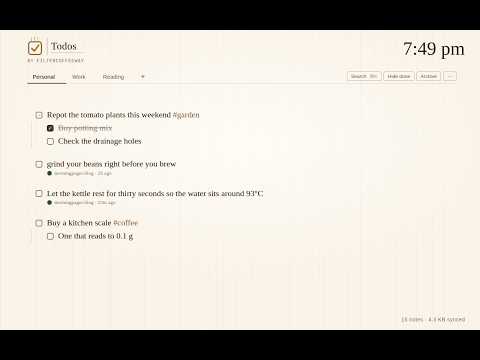
Todos turns your new tab into a lightweight note and to-do list, with one-click capture from any webpage. • Highlight text anywhere and click the toolbar icon (or press Cmd/Ctrl+E) to save it as a note — no copy-paste needed. • Right-click a selection, link, or image to save it via the context menu, straight into a chosen notebook. • Captured notes keep a source chip linking back to the page, with the exact highlighted passage scrolled into view. • Checkboxes with cascading completion, nested sub-items (Tab/Shift+Tab to indent), collapse, and archive/hide-done. • Organize notes into notebooks (tabs), and jump to anything instantly with the Cmd/Ctrl+K command palette (filter by is:, site:, after:, #tag). • Export notes as Markdown or JSON; import JSON back in. • Notes sync across your signed-in Chrome browsers via chrome.storage.sync, with local storage as the source of truth. • Light and dark themes, following your OS setting by default. Todos stores everything in your own Chrome storage — nothing is sent to any external server
5 out of 52 ratings
Details
- Version0.1.0
- UpdatedSeptember 23, 2026
- Offered byFilterCoffeeWay
- Size71.11KiB
- LanguagesEnglish (United States)
- Developer
Email
madras.coders@gmail.com - Non-traderThis developer has not identified itself as a trader. For consumers in the European Union, please note that consumer rights do not apply to contracts between you and this developer.
Privacy

This developer declares that your data is
- Not being sold to third parties, outside of the approved use cases
- Not being used or transferred for purposes that are unrelated to the item's core functionality
- Not being used or transferred to determine creditworthiness or for lending purposes
Support
For help with questions, suggestions, or problems, please open this page on your desktop browser