


Overview
Instantly sort Hacker News by points, time, comments, velocity, or heat, mark new posts, and highlight comment authors.
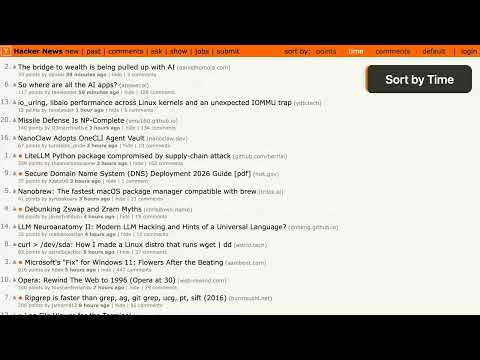
Hacker News Sorted is a Chrome extension for those times when you open HN and want to find the most upvoted stories, see what's new, or read the busiest discussions. It adds sorting controls to the Hacker News header. Pick a sort and the posts on your current page reorder immediately, without a reload. Sort by points, submission time, or comment count. Your active sort stays highlighted, and Default puts the page back in HN's original order. It works on story lists across news.ycombinator.com, including the front page, Newest, Ask HN, Show HN, Jobs, and past stories. For another view, try Velocity or Heat. Velocity ranks stories by points relative to their age, with an adjustment so a few early upvotes don't give a new post too much weight. Heat sorts by comments per point, helping you find stories with more discussion relative to their score. You can hide either option in settings. If you check HN throughout the day, orange dots help you spot posts that appeared since your last visit. They fade over an hour by default. Set the fade duration anywhere from 10 seconds to 24 hours, or turn the dots off. This works on the first page of each section. The True Time Ago option shows each story's age from its original submission timestamp. That helps with HN's "second chance" posts: a story submitted three days ago can show a much younger age when it returns to the front page. With this option on, it reads "3 days ago." It's on by default and can be turned off. In comment threads, the story author's replies get a light orange background and an OP badge. Click the diamond next to another person's name to highlight their comments. Click it again to clear the highlight, or pick someone else. Your choice stays with that thread across reloads for the browser session. OP and marked-user highlights each have a settings switch. When you're signed in to HN, your own replies get a lighter highlight and a You badge automatically. If you're the story author, the OP appearance takes priority while enabled. Follow one person's replies with the sticky comment navigation bar. Choose OP, Marked user, or You, then use Previous/Next or the [ and ] keys. Navigation follows visible comments loaded on the current page, skips collapsed branches, and stops at either end. Oldest first is the default; choose Thread order in settings to follow comments as they appear on HN. The discussion itself stays in place. Scrolling is quick and smooth, or instant if you prefer reduced motion. You can turn off the bar and its shortcuts without changing highlights, and your chosen order is kept. Prefer the keyboard for sorting? Use P for points, T for time, C for comments, V for velocity, H for heat, and D for the default order. Shortcuts stay inactive while you type in a text field. If the extension detects a key conflict with Vimium or another extension, it disables the affected set of sorting or comment-navigation shortcuts and explains the conflict. The controls still work with a click. The sorting menu adapts to the space available, from full names to compact labels or a dropdown. Click the extension icon to adjust settings in a popup that follows your system's light or dark appearance. Your sort preference, settings, and new-post history use Chrome's built-in sync storage, so they can follow you across devices when Chrome sync is enabled. No separate account is needed. If the extension can't find the page elements it needs for sorting, it shows a warning on the icon and in the settings popup. Hacker News Sorted is open source. It reads the HN page you're viewing and processes the data in your browser. There are no analytics, tracking, or external API calls. Source code: https://github.com/svyatov/hacker_news_sorted Recent changes: 2026-10-05 - v2.7.0 - Follow commenters with smooth navigation and a choice of comment order, spot your own replies, and enjoy refreshed branding and more reliable settings 2026-09-14 - v2.6.3 - Fixed post ages after another Hacker News timestamp change; behind-the-scenes tooling updates 2026-09-06 - v2.6.2 - Fixed time, velocity, and true time ago after a Hacker News markup change; fixed a false layout warning on pages without a story list 2026-07-14 - v2.6.1 - Refreshed the store description to cover all features 2026-07-14 - v2.6.0 - Velocity & Heat sorts, comment author highlighting, responsive menu, dark-mode settings
5 out of 52 ratings
Details
- Version2.7.0
- UpdatedOctober 6, 2026
- Offered byLeonid Svyatov
- Size205KiB
- LanguagesEnglish
- Developer
Email
leonid@svyatov.com - Non-traderThis developer has not identified itself as a trader. For consumers in the European Union, please note that consumer rights do not apply to contracts between you and this developer.
Privacy

This developer declares that your data is
- Not being sold to third parties, outside of the approved use cases
- Not being used or transferred for purposes that are unrelated to the item's core functionality
- Not being used or transferred to determine creditworthiness or for lending purposes
Support
For help with questions, suggestions, or problems, please open this page on your desktop browser