


概述
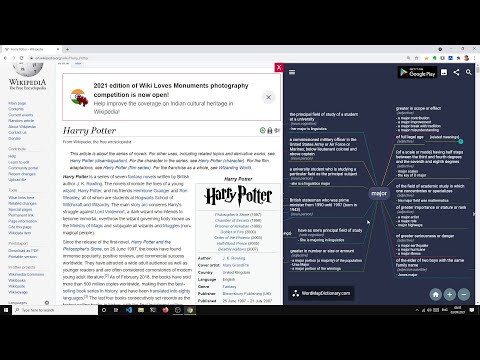
It is a visual dictionary/thesaurus. It uses a mindmap like interface to show relationships between words and definitions.
WordMapDictionary is a visual dictionary-cum-thesaurus. It uses a mindmap like interface to show relationships between words, definitions and other definitions. What makes this app different: - It uses a unique mind-map style visual interface - While normal dictionaries show definitions of words in isolation. This app presents you with a holistic mindmap around the word. It shows meanings, and how those meanings relate to each other. It allows you to go deep, or broad, or sideways, to see things in different angles. ## Usage See video for usage: https://www.youtube.com/watch?v=55RTcGoKqtE ### How to open dictionary - Select a word on any page, right click, from the dropdown, click on "Open WM Dictionary". ("Open WM Dictionary" button is only shown if you actually selected the text). - This will open dictionary view on the side. - If dictionary view is already open, you can also select any word (and it will update dictionary view with newly selected word). ### Dictionary View - To disable/enable dark mode: - Open sidebar drawer. - Toggle "Dark Mode" - To report an issue: - Open sidebar drawer - Click on "Report an issue" - To export current word definition map as png: - From app bar, click on export icon. - To share current word definition url: - From app bar, click on share icon. - To search for a word: - From app bar, click on search icon. - To zoom in/out - From bottom button bar, click on zoom in/out icon buttons. - To center current word - From bottom button bar, click on home icon button. ## Extension Options From options page, you can configure: - size of dictionary view (in percent width of the page) - side, whether dictionary view is shown on the left or the right side.
1.7 星(5 星制)3 个评分
详情
隐私权

该开发者已声明,您的数据:
- 不会因未获批准的用途出售给第三方
- 不会为实现与产品核心功能无关的目的而使用或转移
- 不会为确定信用度或放贷目的而使用或转移
支持
若有任何疑问、建议或问题,请访问开发者的支持网站