Item logo image for Distract

Distract

widgetsflow.com
5.0(

2 ratings

)
Item media 5 (screenshot) for Distract
Item video thumbnail
Item media 2 (screenshot) for Distract
Item media 3 (screenshot) for Distract
Item media 4 (screenshot) for Distract
Item media 5 (screenshot) for Distract
Item video thumbnail
Item media 2 (screenshot) for Distract
Item media 3 (screenshot) for Distract
Item media 4 (screenshot) for Distract
Item media 5 (screenshot) for Distract

Overview

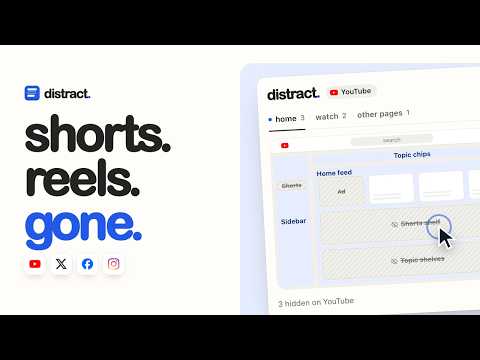
Click the parts of YouTube, X, Facebook and Instagram you don't want, and they're gone.

Distract turns the page you're on into a simple map of blocks. Click a block and that part of the site disappears. Click it again and it comes back. Works on: • YouTube: Shorts, the home feed, topic chips and shelves, Up next, comments, end cards, live chat, ads and promos, the notification bell • X: Trending, Today's news, Live on X, Who to follow, promoted posts, Premium upsells, Grok, the composer and the timeline • Facebook: Reels, Stories, suggested posts, the right-rail sponsored panel, friend requests, contacts, Marketplace and the shortcuts sidebar • Instagram: Reels, Stories, sponsored and suggested posts, the right rail, notifications and the Messages pill How it works • The popup draws the current page as a wireframe laid out like the real site • Hover a block to see that section outlined on the page. Hover a hidden one to peek at it. • Colours tell you what a block is: blue for page areas, pink for feed junk, amber for buttons • Pause Distract on any site with one switch, or bring everything back with "show all" • Hiding Shorts opens Shorts links in the normal player. Hiding Up next centres the video. Private by design Distract has no account, no analytics and no network requests. Your choices stay in your browser. Distract is not affiliated with or endorsed by Google, YouTube, X Corp., or Meta. Product names and logos belong to their owners and are used only to show which site a setting applies to.

Details

  • Version
    1.2.0
  • Updated
    October 2, 2026
  • Size
    28.27KiB
  • Languages
    English
  • Developer
    Website
    Email
    dev.muhammadjunaid@gmail.com
  • Non-trader
    This developer has not identified itself as a trader. For consumers in the European Union, please note that consumer rights do not apply to contracts between you and this developer.

Privacy

Manage extensions and learn how they're being used in your organization
The developer has disclosed that it will not collect or use your data. To learn more, see the developer’s privacy policy.

This developer declares that your data is

  • Not being sold to third parties, outside of the approved use cases
  • Not being used or transferred for purposes that are unrelated to the item's core functionality
  • Not being used or transferred to determine creditworthiness or for lending purposes

Support

For help with questions, suggestions, or problems, visit the developer's support site

Related

1Password – Password Manager

3.1

The best way to experience 1Password in your browser. Easily sign in to sites, generate passwords, and store secure information.

Save to Pinterest

3.5

Save ideas to Pinterest.

Awesome Screen Recorder & Screenshot

4.7

The best screen recorder and screen capture & screenshot tool to record screen.

Free Download Manager

4.2

Free Download Manager integration with browser

Adobe Acrobat: PDF edit, convert, sign tools

4.4

Do more in Google Chrome with Adobe Acrobat PDF tools. View, fill, comment, sign, and try convert and compress tools.

Chrome Remote Desktop

3.1

Chrome Remote Desktop extension

Adblock Plus - free ad blocker

4.4

Remove ads on YouTube and everywhere else you browse.

Screencastify - Screen Video Recorder

3.9

Used by 15M+ people. An easy-to-use screen recorder for your browser. Capture, edit and share videos in seconds.

Avira Browser Safety

4.1

Your surfing made private and secure

Zoom Chrome Extension

3.9

Schedule Zoom meetings directly from Google Calendar

Google Keep Chrome Extension

4.0

Save to Google Keep in a single click!

Office Editing for Docs, Sheets & Slides

3.7

View and edit Microsoft Word, Excel, and PowerPoint files with Google Docs, Sheets, and Slides

1Password – Password Manager

3.1

The best way to experience 1Password in your browser. Easily sign in to sites, generate passwords, and store secure information.

Save to Pinterest

3.5

Save ideas to Pinterest.

Awesome Screen Recorder & Screenshot

4.7

The best screen recorder and screen capture & screenshot tool to record screen.

Free Download Manager

4.2

Free Download Manager integration with browser

Adobe Acrobat: PDF edit, convert, sign tools

4.4

Do more in Google Chrome with Adobe Acrobat PDF tools. View, fill, comment, sign, and try convert and compress tools.

Chrome Remote Desktop

3.1

Chrome Remote Desktop extension

Adblock Plus - free ad blocker

4.4

Remove ads on YouTube and everywhere else you browse.

Screencastify - Screen Video Recorder

3.9

Used by 15M+ people. An easy-to-use screen recorder for your browser. Capture, edit and share videos in seconds.

Google apps