Item logo image for Distance Calculator

Distance Calculator

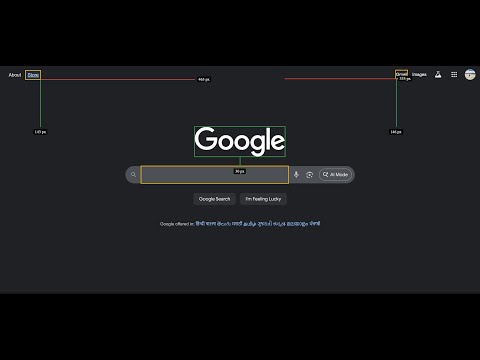
Item media 2 (screenshot) for Distance Calculator
Item video thumbnail
Item media 2 (screenshot) for Distance Calculator
Item video thumbnail
Item media 2 (screenshot) for Distance Calculator

Overview

A minimal Chrome extension (MV3) with popup, content script and service worker.

Extension to calculate distance between html elements. Basic Measurement 1. Click the extension icon to open the popup 2. Click "Start measuring" to activate measurement mode 3. Click on the first element (green outline appears) 4. Click on the second element (yellow outline appears) 5. Horizontal and vertical distance lines appear with pixel measurements Keyboard Shortcuts 1. r : Restart measurement(clears all previous measurements and starts fresh) 2. ESC: Stop measuring and clear all overlays Visual Elements 1. Blue highlight: Hover preview of target element 2. Green outline: First selected element 3. Yellow outline: Second selected element 4. Red line: Horizontal distance measurement 5. Green line: Vertical distance measurement 6. Black labels: Distance values in pixels 7. Small crosshair: Follows cursor for precise targeting

Details

  • Version
    1.0
  • Updated
    September 15, 2025
  • Size
    1019KiB
  • Languages
    English
  • Developer
    Email
    surajkumar7091@gmail.com
  • Non-trader
    This developer has not identified itself as a trader. For consumers in the European Union, please note that consumer rights do not apply to contracts between you and this developer.

Privacy

The developer has disclosed that it will not collect or use your data. To learn more, see the developer’s privacy policy.

This developer declares that your data is

  • Not being sold to third parties, outside of the approved use cases
  • Not being used or transferred for purposes that are unrelated to the item's core functionality
  • Not being used or transferred to determine creditworthiness or for lending purposes

Support

For help with questions, suggestions, or problems, visit the developer's support site

Related

View webpage as TXT

0.0

Chrome Extension to open web pages with w3.org html2txt

Agility RPA (MV3)

5.0

Agility RPA Integration with Chrome. (MV3)

Website Summarizer

5.0

A minimalist Chrome extension to summarize websites.

Zoom The Way

4.5

A Chrome extension which can perform per-tab/per-origin/per-path zooming

SPFX Workbench Manager

5.0

Chrome Extension to manage your SharePoint workbench.

Save Rendered HTML

3.0

A Chrome extension that saves the fully rendered HTML of the current tab.

ebb

5.0

Chrome extension to mitigate on-screen movement.

TLDR

5.0

A chrome extension to summarise a page content

Chrome Extension Source Viewer/Downloader

5.0

Activate this extension to access the functionality and features of Chrome extensions (CRX/ZIP)

Full Screen Video

5.0

A chrome extension to play HTML5 Video element without a full screen option, such as YT shorts and Instagram reels, in full screen.

Tag Extension Manager

5.0

A free and open-source Chrome extension to manage other extensions

HTML To Elementor

4.2

Chrome extension to help convert html web page to elementor widget

View webpage as TXT

0.0

Chrome Extension to open web pages with w3.org html2txt

Agility RPA (MV3)

5.0

Agility RPA Integration with Chrome. (MV3)

Website Summarizer

5.0

A minimalist Chrome extension to summarize websites.

Zoom The Way

4.5

A Chrome extension which can perform per-tab/per-origin/per-path zooming

SPFX Workbench Manager

5.0

Chrome Extension to manage your SharePoint workbench.

Save Rendered HTML

3.0

A Chrome extension that saves the fully rendered HTML of the current tab.

ebb

5.0

Chrome extension to mitigate on-screen movement.

TLDR

5.0

A chrome extension to summarise a page content

Google apps