


概述
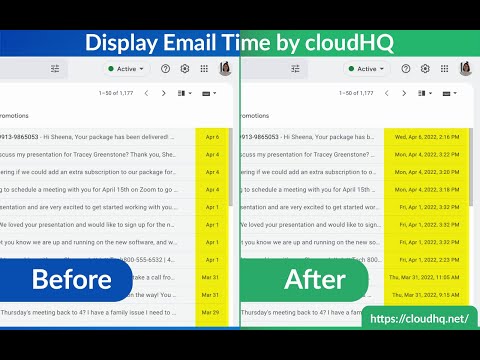
在 Gmail 中显示电子邮件的完整日期和时间
Gmail shows the date of an email in the last column of your email overview. Depending on how old the email is, the display format changes and that can cause confusion. This extension shows *the exact* time and date of the emails - no more confusing information like showing only time, showing only date, etc. Features: ✅ Custom date and time formats ✅ Custom colors ✅ Custom fonts styles and sizes ✅ Relative dates Extension to show the current time and date - Use the ShowTime extension to see the current time and date - This extension demonstrates the use of the Browser-Action component provided by the Google Chrome Extensions framework - It is a demo extension from the book Creating Google Chrome Extensions (Apress, 2016) cloudHQ. Helping your productivity, 1 click at a time. Website: https://www.display-email-time.com/ Pricing: https://www.display-email-time.com/pricing Support page: https://support.cloudhq.net/category/browser-extensions/display-email-time/ Blog: https://blog.cloudhq.net
4.1 星(5 星制)32 个评分
详情
隐私权
“Display Email Time by cloudHQ”已就收集和使用用户数据披露了以下信息。 如需了解详情,请查看开发者的privacy policy。
Display Email Time by cloudHQ会处理以下数据:
该开发者已声明,您的数据:
- 不会因未获批准的用途出售给第三方
- 不会为实现与产品核心功能无关的目的而使用或转移
- 不会为确定信用度或放贷目的而使用或转移
支持
若有任何疑问、建议或问题,请访问开发者的支持网站