Logoafbeelding van item voor Display Email Time by cloudHQ

Display Email Time by cloudHQ

cloudHQ LLC
Aanbevolen
4,1(

32 beoordelingen

)
ExtensieCommunicatie7.000 gebruikers
Itemmedia 5 (screenshot) voor Display Email Time by cloudHQ
Itemmedia 6 (screenshot) voor Display Email Time by cloudHQ
Videothumbnail van item
Itemmedia 2 (screenshot) voor Display Email Time by cloudHQ
Itemmedia 3 (screenshot) voor Display Email Time by cloudHQ
Itemmedia 4 (screenshot) voor Display Email Time by cloudHQ
Itemmedia 5 (screenshot) voor Display Email Time by cloudHQ
Itemmedia 6 (screenshot) voor Display Email Time by cloudHQ
Videothumbnail van item
Itemmedia 2 (screenshot) voor Display Email Time by cloudHQ
Videothumbnail van item
Itemmedia 2 (screenshot) voor Display Email Time by cloudHQ
Itemmedia 3 (screenshot) voor Display Email Time by cloudHQ
Itemmedia 4 (screenshot) voor Display Email Time by cloudHQ
Itemmedia 5 (screenshot) voor Display Email Time by cloudHQ
Itemmedia 6 (screenshot) voor Display Email Time by cloudHQ

Overzicht

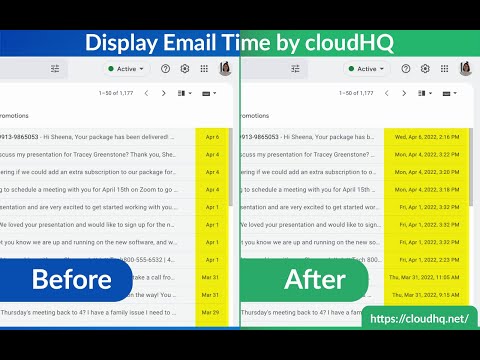
Toon volledige datum en tijd van e-mailberichten in Gmail

Gmail shows the date of an email in the last column of your email overview. Depending on how old the email is, the display format changes and that can cause confusion. This extension shows *the exact* time and date of the emails - no more confusing information like showing only time, showing only date, etc. Features: ✅ Custom date and time formats ✅ Custom colors ✅ Custom fonts styles and sizes ✅ Relative dates cloudHQ. Helping your productivity, 1 click at a time. Website: https://www.display-email-time.com/ Pricing: FREE Support page: https://support.cloudhq.net/category/browser-extensions/display-email-time/ Blog: https://blog.cloudhq.net

Details

  • Versie
    1.0.1.3
  • Geüpdatet
    29 november 2025
  • Grootte
    684KiB
  • Talen
    11 talen
  • Ontwikkelaar
    cloudHQ LLC
    2247 29th Ave San Francisco, CA 94116-1738 US
    Website
    E-mail
    support@cloudhq.net
    Telefoon
    +1 415-509-6721
  • Handelaar
    Deze ontwikkelaar heeft zichzelf aangeduid als handelaar, in overeenstemming met de definitie van de Europese Unie, en heeft zich ertoe verbonden alleen producten of services aan te bieden die voldoen aan EU-wetgeving.
  • D-U-N-S
    064785518

Privacy

Beheer extensies en ontdek hoe ze worden gebruikt in je organisatie

Display Email Time by cloudHQ heeft de volgende informatie geleverd over de verzameling en het gebruik van je gegevens. Je vindt gedetailleerdere informatie in het privacy policy van de ontwikkelaar.

Display Email Time by cloudHQ regelt het volgende:

Persoonlijk identificeerbare informatie

Deze ontwikkelaar verklaart dat je gegevens:

  • Niet worden verkocht aan derden, behalve voor de goedgekeurde toepassingen
  • Niet worden gebruikt of overgedragen voor doeleinden die niet zijn gerelateerd aan de kernfunctionaliteit van het item
  • Niet worden gebruikt of overgedragen om de kredietwaardigheid te bepalen of voor doeleinden met betrekking tot leningen

Support

Ga naar de supportsite van de ontwikkelaar voor hulp bij vragen, suggesties of problemen

Gerelateerd

Gmail Message Preview by cloudHQ

4,0

Preview emails in inbox.

Gmail Tabs by cloudHQ

4,1

Gmail-labels of Gmail-filters instellen als tabbladen

Copilot for Gmailâ„¢ by cloudHQ

4,5

Mini CRM for your Gmail

ChatGPT for Gmail by cloudHQ

4,4

Gemakkelijke en gratis online peilingen en enquêtes rechtstreeks vanuit uw Gmail

Resize Gmail Sidebar by cloudHQ

4,6

Now you can resize the label column in Gmail

Sort Gmail Inbox by cloudHQ

4,1

Find an email in seconds with free preset filters

Notes for Gmailâ„¢ by cloudHQ

4,1

Add annotations on your emails to remember something, or to coach how to craft a good email.

Gmail Inbox Zero by cloudHQ

5,0

Focusmodus voor Gmail - oplossing voor Inbox Zero

Auto Label for Google Gmailâ„¢ by cloudHQ

4,7

Automatically create filters and labels for clients, customers, prospects, etc.

Email Reply Status

4,4

Stop wasting time sorting through emails: Instantly know which of your emails needs a reply back.

Highlight Emails in Gmail by cloudHQ

4,2

Highlight Email Rows in Gmail

Email Sender Icons by cloudHQ

4,6

Identify Companies in Your Inbox.

Gmail Message Preview by cloudHQ

4,0

Preview emails in inbox.

Gmail Tabs by cloudHQ

4,1

Gmail-labels of Gmail-filters instellen als tabbladen

Copilot for Gmailâ„¢ by cloudHQ

4,5

Mini CRM for your Gmail

ChatGPT for Gmail by cloudHQ

4,4

Gemakkelijke en gratis online peilingen en enquêtes rechtstreeks vanuit uw Gmail

Resize Gmail Sidebar by cloudHQ

4,6

Now you can resize the label column in Gmail

Sort Gmail Inbox by cloudHQ

4,1

Find an email in seconds with free preset filters

Notes for Gmailâ„¢ by cloudHQ

4,1

Add annotations on your emails to remember something, or to coach how to craft a good email.

Gmail Inbox Zero by cloudHQ

5,0

Focusmodus voor Gmail - oplossing voor Inbox Zero

Google-apps
