Logobild des Artikels für Display Email Time by cloudHQ

Display Email Time by cloudHQ

cloudHQ LLC
Empfohlen
4,1(

32 Bewertungen

)
Medienelement 5 (Screenshot) für Display Email Time by cloudHQ
Medienelement 6 (Screenshot) für Display Email Time by cloudHQ
Videominiaturansicht des Artikels
Medienelement 2 (Screenshot) für Display Email Time by cloudHQ
Medienelement 3 (Screenshot) für Display Email Time by cloudHQ
Medienelement 4 (Screenshot) für Display Email Time by cloudHQ
Medienelement 5 (Screenshot) für Display Email Time by cloudHQ
Medienelement 6 (Screenshot) für Display Email Time by cloudHQ
Videominiaturansicht des Artikels
Medienelement 2 (Screenshot) für Display Email Time by cloudHQ
Videominiaturansicht des Artikels
Medienelement 2 (Screenshot) für Display Email Time by cloudHQ
Medienelement 3 (Screenshot) für Display Email Time by cloudHQ
Medienelement 4 (Screenshot) für Display Email Time by cloudHQ
Medienelement 5 (Screenshot) für Display Email Time by cloudHQ
Medienelement 6 (Screenshot) für Display Email Time by cloudHQ

Übersicht

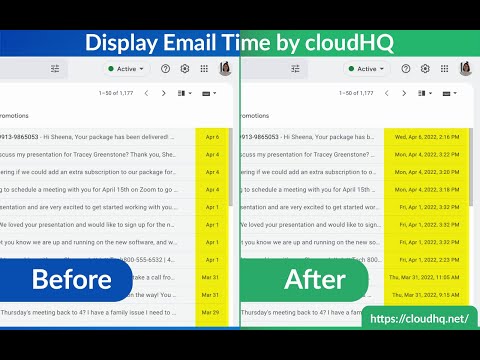
Vollständiges Datum und Uhrzeit von E-Mail-Nachrichten in Gmail anzeigen

Gmail shows the date of an email in the last column of your email overview. Depending on how old the email is, the display format changes and that can cause confusion. This extension shows *the exact* time and date of the emails - no more confusing information like showing only time, showing only date, etc. Features: ✅ Custom date and time formats ✅ Custom colors ✅ Custom fonts styles and sizes ✅ Relative dates cloudHQ. Helping your productivity, 1 click at a time. Website: https://www.display-email-time.com/ Pricing: FREE Support page: https://support.cloudhq.net/category/browser-extensions/display-email-time/ Blog: https://blog.cloudhq.net

Details

  • Version
    1.0.1.3
  • Aktualisiert
    29. November 2025
  • Größe
    684KiB
  • Sprachen
    11 Sprachen
  • Entwickler
    cloudHQ LLC
    2247 29th Ave San Francisco, CA 94116-1738 US
    Website
    E-Mail
    support@cloudhq.net
    Telefon
    +1 415-509-6721
  • Händler
    Dieser Entwickler hat sich gemäß der Definition der Europäischen Union als Händler deklariert und sich verpflichtet, nur Produkte oder Dienstleistungen anzubieten, die den Gesetzen der EU entsprechen.
  • D-U-N-S-Nummer
    064785518

Datenschutz

Erweiterungen verwalten und Informationen zur Verwendung in deiner Organisation abrufen

Display Email Time by cloudHQ hat folgende Informationen hinsichtlich der Erhebung und Nutzung deiner Daten offengelegt. Weitere Details findest du im privacy policy des Entwicklers.

Display Email Time by cloudHQ verarbeitet Folgendes:

Personenidentifizierbare Informationen

Dieser Entwickler erklärt, dass deine Daten

  • nicht an Dritte verkauft werden, außer in den genehmigten Anwendungsfällen
  • nicht für Zwecke genutzt oder übertragen werden, die nichts mit der Hauptfunktionalität des Artikels zu tun haben
  • nicht zur Ermittlung der Kreditwürdigkeit oder für Darlehenszwecke verwendet oder übertragen werden

Support

Wenn du Probleme, Fragen oder Vorschläge hast, rufe die Supportwebsite des Entwicklers auf

Ähnliche

Gmail Message Preview by cloudHQ

4,0

Preview emails in inbox.

Gmail Tabs by cloudHQ

4,1

Legen Sie Gmail-Labels oder Gmail-Filter als Registerkarten fest

Copilot for Gmail™ by cloudHQ

4,5

Mini CRM for your Gmail

ChatGPT for Gmail by cloudHQ

4,4

Einfache und kostenlose Online-Umfragen und Umfragen direkt von Ihrem Gmail

Resize Gmail Sidebar by cloudHQ

4,6

Now you can resize the label column in Gmail

Sort Gmail Inbox by cloudHQ

4,1

Find an email in seconds with free preset filters

Notes for Gmail™ by cloudHQ

4,1

Add annotations on your emails to remember something, or to coach how to craft a good email.

Gmail Inbox Zero by cloudHQ

5,0

Fokusmodus für Gmail - Lösung für Inbox Zero

Auto Label for Google Gmail™ by cloudHQ

4,7

Automatically create filters and labels for clients, customers, prospects, etc.

Email Reply Status

4,4

Stop wasting time sorting through emails: Instantly know which of your emails needs a reply back.

Highlight Emails in Gmail by cloudHQ

4,2

Highlight Email Rows in Gmail

Email Sender Icons by cloudHQ

4,6

Identify Companies in Your Inbox.

Gmail Message Preview by cloudHQ

4,0

Preview emails in inbox.

Gmail Tabs by cloudHQ

4,1

Legen Sie Gmail-Labels oder Gmail-Filter als Registerkarten fest

Copilot for Gmail™ by cloudHQ

4,5

Mini CRM for your Gmail

ChatGPT for Gmail by cloudHQ

4,4

Einfache und kostenlose Online-Umfragen und Umfragen direkt von Ihrem Gmail

Resize Gmail Sidebar by cloudHQ

4,6

Now you can resize the label column in Gmail

Sort Gmail Inbox by cloudHQ

4,1

Find an email in seconds with free preset filters

Notes for Gmail™ by cloudHQ

4,1

Add annotations on your emails to remember something, or to coach how to craft a good email.

Gmail Inbox Zero by cloudHQ

5,0

Fokusmodus für Gmail - Lösung für Inbox Zero

Google-Apps
