

Disconnectez – Premium LinkedIn Connection Manager
2 ratings
)
Overview
A luxurious LinkedIn automation tool to elegantly unfollow connections with precision and control.
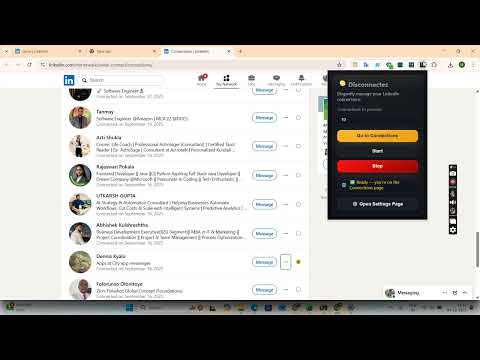
Disconnectez – Premium LinkedIn Connection Manager Disconnectez is a sophisticated and powerful browser extension crafted for professionals who want to efficiently manage and refine their LinkedIn networks. Designed to elevate the tedious task of removing unwanted LinkedIn connections, this extension offers an elegant and streamlined solution that balances automation with user control. Whether you aim to optimize your LinkedIn feed, focus on strategic networking, or cleanse distractions, Disconnectez transforms connection cleanup into a seamless, user-friendly experience. With its refined interface, Disconnectez allows users to easily select how many connections to unfollow in each session, with full control to pause, resume, or stop at any moment. This ensures a tailored approach where every unfollow action is intentional, precise, and error-free. The extension integrates smartly with LinkedIn’s connections page by deploying discreet overlays and automation scripts that execute removals behind the scenes, all within your browser, maintaining transparency and full user command. Disconnectez provides real-time feedback during the cleanup process, displaying progress, counts of completed removals, and current status through a modern popup dashboard and floating control overlay. It operates efficiently in the background using lightweight service workers and advanced scripting, ensuring a fast and reliable performance without consuming unnecessary resources. Crucially, all operations happen entirely within your browser, protecting your privacy by preventing any data from being transmitted externally. Ideal for executives, recruiters, freelancers, marketers, and any professional seeking a well-managed LinkedIn presence, Disconnectez saves hours of manual effort. It automates what used to be a slow and tiresome process, elevating social media management to a premium experience of productivity, clarity, and peace of mind. Say goodbye to endless scrolling and manual deletions—Disconnectez empowers you to maintain a focused, relevant, and meaningful LinkedIn network effortlessly. Key Features: - Targeted Unfollow Automation: Choose the precise number of LinkedIn connections to unfollow during each session for personalized network refinement. - Session Controls: Flexible pause, resume, and stop options accessible via intuitive floating overlays to maintain full control anytime. - Elegant Popup Dashboard: Quickly access extension controls, session progress, and customization options from a sleek browser sidebar. - Smart LinkedIn Integration: Works directly on the LinkedIn connections page, automatically detecting and unfollowing selected profiles smoothly in the background. - Real-Time Feedback: Monitor removal progress, counts, and active session status through both popup controls and in-page overlays. - Resource-Efficient Performance: Utilizes lightweight service workers and advanced scripting to run efficiently and reliably without draining system resources. - Privacy-Focused Design: All actions are performed locally within your browser; no personal data or connection information is sent or stored externally. How It Works: 1. Install Disconnectez from your browser’s extension marketplace. 2. Navigate to your LinkedIn connections page where your contacts are listed. 3. Open the Disconnectez popup and specify how many connections you want to unfollow. 4. Click Start to initiate the unfollowing process—watch the smart overlay track real-time progress as it removes connections one by one. 5. Use pause, resume, or stop controls at any time to fine-tune the session and avoid removing more connections than desired. 6. View detailed session statistics and status updates to stay informed throughout the cleanup operation. 7. Once complete, return to your refreshed LinkedIn network, now decluttered and optimized for meaningful professional interactions. Privacy: - No personal data collected.
5 out of 52 ratings
Details
- Version1.8
- UpdatedSeptember 4, 2026
- Offered bymukulgupta0014
- Size538KiB
- LanguagesEnglish
- Developer
Email
mukulgupta0014@gmail.com - Non-traderThis developer has not identified itself as a trader. For consumers in the European Union, please note that consumer rights do not apply to contracts between you and this developer.
Privacy

This developer declares that your data is
- Not being sold to third parties, outside of the approved use cases
- Not being used or transferred for purposes that are unrelated to the item's core functionality
- Not being used or transferred to determine creditworthiness or for lending purposes
Support
For help with questions, suggestions, or problems, visit the developer's support site