


Overview
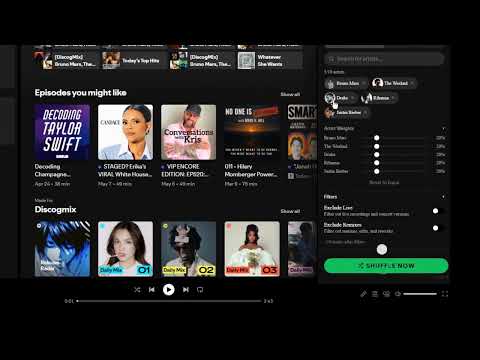
Select 2-10 artists (up to 15 with Lifetime) and shuffle their entire catalogs into a playlist.
Spotify has no way to shuffle multiple artists together. If you want The Weeknd, Dua Lipa and SZA in one mix, you have to build a playlist yourself and add every album one by one. For 3 active artists that is 40+ albums of clicking, and when you want a fresh mix next week you start over. WHAT DISCOGMIX DOES DiscogMix builds one thing: a shuffled multi-artist playlist. You set it up in the Spotify Web Player, and what you get is a normal Spotify playlist that plays everywhere you use Spotify: phone, desktop app, car, speakers. Everything in the extension supports that single workflow. HOW YOU CONFIGURE IT - Shuffle algorithm. Weighted by default so the same artist never plays back-to-back. On Pro you can set per-artist weights, like 60% one artist and 40% the other. - Track scope. Top Tracks (~10 per artist) or Full Discography (50-500+ per artist, b-sides and deep cuts included). - Track filters. Exclude live recordings, remixes, singles, and compilations. Cap how many tracks per artist make the mix. - Saved configurations. Save artist combos as named mixes and reload them with one click next time. The playlist lands in your library like any other. It shows up on your phone, in the car, on speakers, wherever you normally listen. HOW IT WORKS 1. Add the free extension from Chrome Web Store. No account needed. 2. Search and pick your artists (up to 3 free, 10 with Pro, 15 with Lifetime). 3. Choose Top Tracks or Full Discography and hit shuffle. The playlist starts playing and saves to your library. PRICING Free: - 3 mixes per week - Up to 3 artists per mix - Weighted shuffle + all filters - Top Tracks & Full Discography modes - 10 saved mixes Pro ($2.49/mo or $19.99/year): - Unlimited mixes - Up to 10 artists per mix - Per-artist weight sliders - Unlimited saved mixes - All future features Lifetime ($34 one-time): - Everything in Pro, forever - Up to 15 artists per mix - Use on 2 Spotify accounts (per license key) - No subscription needed 14-day money-back guarantee on all paid plans. No questions asked. PRIVACY DiscogMix is built to need as little from you as possible: - No analytics, no telemetry, no third-party tracking scripts. - No listening history, library data, or play counts collected. - The only thing that ever touches my server is a one-way SHA-256 hash of your Spotify user ID. It can't be reversed, and it is only used to check your tier and the free-tier weekly limit. - Spotify session credentials stay in your browser. I never see them. - Payments are handled by Lemon Squeezy. I never see or store your card data. Full policy: discogmix.com/privacy FAQ Q: Do I need Spotify Premium? A: No. Free accounts work on desktop. Spotify itself limits some playback on mobile free accounts, but the playlist still syncs to all your devices. Q: Does this create playlists in my library? A: Yes. DiscogMix creates a playlist from your selected artists and starts playing it. It stays in your library so you can replay it later. Q: Can I listen to my playlist on my phone or other devices? A: Yes. Chrome is only needed to create the mix. What it creates is a real Spotify playlist, so it syncs automatically and plays from the Spotify app on your phone, tablet, car, speakers, anywhere Spotify runs. Q: How is this different from Artist Radio? A: Artist Radio injects similar artists you didn't pick. DiscogMix ONLY plays artists you selected, from their FULL catalogs. Q: Is my data safe? A: I don't collect listening data or personal information. The only data sent to my server is a one-way SHA-256 hash of your Spotify account ID. It can't be reversed to identify you, and it is only used to validate your license tier. Q: Can I get a refund? A: Yes. 14 days, no questions asked, through Lemon Squeezy. PERMISSIONS EXPLAINED - "Read and change your data on Spotify domains": Required to inject the DiscogMix panel into the Spotify Web Player and to make Spotify API calls for artist search, discography fetching, and playlist creation using your existing Spotify session. The extension does not access any non-Spotify domain. - Storage: Saves your mix history, settings, and cached artist catalogs locally on your device. Nothing leaves your browser. - Alarms: Keeps the background service worker awake during active mix sessions. Without this, Chrome would terminate the worker mid-playback. - webRequest: Used in observation-only mode to read authentication headers from your own Spotify requests so the extension can authorize API calls. The extension does not modify, block, or redirect any network traffic. SUPPORT support@discogmix.com, or use the in-app feedback form (top-right menu in the DiscogMix panel). LEGAL DiscogMix is an independent project and is not affiliated with, endorsed by, or sponsored by Spotify AB or Spotify Technology S.A. Spotify is a trademark of Spotify AB, registered in the U.S. and other countries.
0 out of 5No ratings
Details
- Version1.3.2
- UpdatedAugust 8, 2026
- FeaturesOffers in-app purchases
- Size164KiB
- LanguagesEnglish
- DeveloperEasily Software LLCWebsite
1441 Woodmont Ln NW #1453 Atlanta, GA 30318-2866 USEmail
support@discogmix.comPhone
+1 470-713-0606 - TraderThis developer has identified itself as a trader per the definition from the European Union and committed to only offer products or services that comply with EU laws.
- D-U-N-S124687348
Privacy

DiscogMix: Multi-Artist Shuffle for Spotify has disclosed the following information regarding the collection and usage of your data. More detailed information can be found in the developer's privacy policy.
DiscogMix: Multi-Artist Shuffle for Spotify handles the following:
This developer declares that your data is
- Not being sold to third parties, outside of the approved use cases
- Not being used or transferred for purposes that are unrelated to the item's core functionality
- Not being used or transferred to determine creditworthiness or for lending purposes
Support
For help with questions, suggestions, or problems, please open this page on your desktop browser