

Dimensional Shift - Tab Navigator

Overview
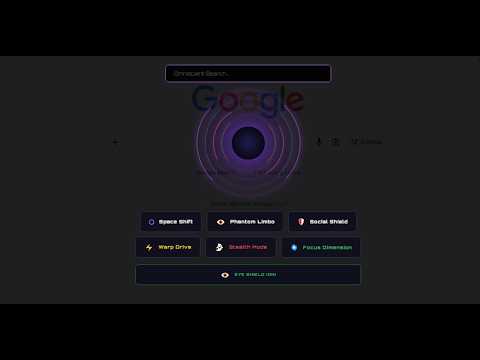
Navigate Chrome tabs through a cinematic spatial portal.
With this extension you can Navigate Chrome like a spatial rift. Switch tabs, restore the closed, and search bookmarks through a cinematic portal without losing your zoom...Dimentional shift extension turns standard Chrome navigation into a dimensional engine. Instead of digging through menus, you open the Space shift portal and warp between your open, closed, and bookmarked tabs instantly. you can also open any tab on Stealth Mode (instantly clone any tab into Incognito without closing the original). The Dimensions: ✅ Space Shift: Instantly warp between open tabs. Your zoom, scroll position, and visual context stay perfectly locked in place. No loading screens, no lost context. ✅ Phantom Limbo: Retrieve recently closed tabs from the void. Bring back what was lost with a single click. ✅ Warp Drive: Navigate through your bookmarks like a spatial map. The Protection Protocol: ✅ Social Shield: Set time limits for distracting websites. The portal tracks your active usage and displays a visual warning inside the portal when you hit your limit. Counters automatically reset every day. ✅ Eye Defender: A silent 20-20-20 timer. Get visual alerts every 20 minutes to protect your eyes from screen fatigue. 🔥 Premium Unlock: Unlock advanced spatial features including Omniscient Search, Warp Drive, and Stealth Mode (instantly clone any tab into Incognito without closing the original). unlock them all with a PayPal donation of $5 or more to support our work and future updates! What features would you like to see in the next release? Your feedback matters! And once you donate, we'll send you your activation key. Note : You can change the Alt+Q shortcut anytime in your Chrome Extensions settings: Go to Chrome Extensions → click the menu icon (⋮) in the top-right → select 'Keyboard shortcuts' and set your preferred key combination."
0 out of 5No ratings
Details
- Version1.0
- UpdatedJuly 31, 2026
- FeaturesOffers in-app purchases
- Size82.01KiB
- LanguagesEnglish (United States)
- Developer
Email
traderrentable1@gmail.com - Non-traderThis developer has not identified itself as a trader. For consumers in the European Union, please note that consumer rights do not apply to contracts between you and this developer.
Privacy

This developer declares that your data is
- Not being sold to third parties, outside of the approved use cases
- Not being used or transferred for purposes that are unrelated to the item's core functionality
- Not being used or transferred to determine creditworthiness or for lending purposes
Support
For help with questions, suggestions, or problems, visit the developer's support site