


Overview
Dim any page below your screen's minimum, with warmth, color tones and gradient overlays. Your browsing never leaves your device.
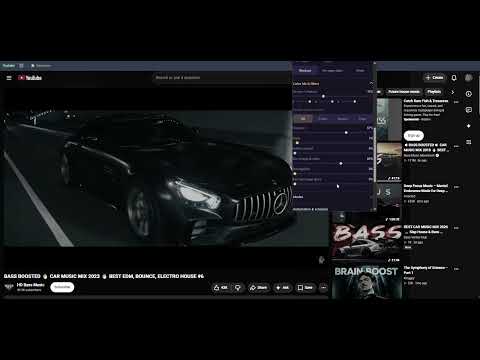
DIM turns any web page down past the point your monitor's brightness key gives up, then layers warmth, color and gradients on top so late-night reading stops feeling like staring into a torch. The dial is the point. You turn it like a lamp knob: the amber light behind it recedes as the room gets darker, and warmth sits beside it as a separate, cooler instrument. Drag it and the page responds instantly. FREE, WITH NO TIME LIMIT - Software dim on any page, further than your hardware allows - Independent warmth / blue-light layer - Color tones with a full palette and custom picker - Gradient overlay: directional or radial, your own colors, plus presets - Vignette edge darkening - Grayscale - Keyboard shortcuts, right-click menu, toolbar badge - Pause for 5, 15 or 60 minutes - Eye-rest reminders PRO - Per-site profiles, always/never rules and wildcards like *.reddit.com - Auto-schedule: sunset to sunrise or your own hours, plus named windows and ramps - Spotlight mode and reading ruler - Colour lab: true blue-light warmth, RGB gains, gamma, colour-blind assist - Smart dim, saved presets, regions, mini dial and more PRIVACY The dimmer never touches the network. No analytics, no telemetry, no location, and DIM reads no page content. Your settings stay on your machine. The only exception is buying Pro, which is handled by ExtensionPay and Stripe. PRICING $1.99 per month, $9.99 per year, or $19.99 once for lifetime. Cancel a subscription any time and it reverts to free at the end of the period you paid for. All sales are final. EDGE CASES HANDLED Already-dark sites are capped so they stay readable. Fullscreen video stays watchable. DIM is a graceful no-op on chrome:// pages and the Web Store.
0 out of 5No ratings
Details
- Version1.0.0
- UpdatedJuly 20, 2026
- Size119KiB
- LanguagesEnglish
- DeveloperYu Xiang WuWebsite
224 Pump Hill Rise Southwest Calgary, AB T2V 4C8 CAEmail
celexlytech@gmail.comPhone
+86 183 0125 2573 - TraderThis developer has identified itself as a trader per the definition from the European Union and committed to only offer products or services that comply with EU laws.
Privacy

DIM · Screen Dimmer & Gradient Overlay has disclosed the following information regarding the collection and usage of your data. More detailed information can be found in the developer's privacy policy.
DIM · Screen Dimmer & Gradient Overlay handles the following:
This developer declares that your data is
- Not being sold to third parties, outside of the approved use cases
- Not being used or transferred for purposes that are unrelated to the item's core functionality
- Not being used or transferred to determine creditworthiness or for lending purposes