

DigUp – Web Scraper to CSV, Excel & Google Sheets
1 rating
)
Overview
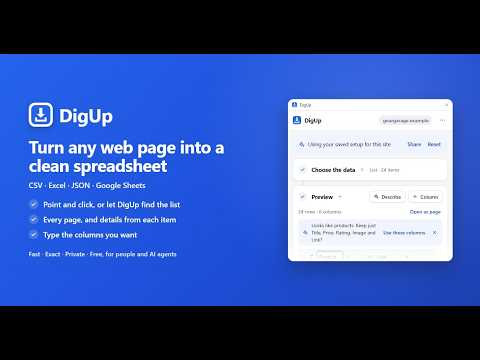
Point-and-click web scraper to CSV, Excel and Google Sheets. Fast, exact, private and free, for people and for AI agents.
Turn any web page into a clean spreadsheet in one click. No account, no limits, and nothing you copy leaves your browser. DigUp is a point-and-click web scraper. It finds the tables and lists on a page, gives the columns clear names, and exports every row to CSV, Excel, JSON or Google Sheets. It follows the Next button for more pages, adds details from each item's own page, and can check a page for changes every day. It reads files on your computer too: saved web pages, CSV, Excel, JSON, Word and PDF files, and scans or photos of text, all into one table, and it can read a whole list of web addresses with one setup. Fast, exact, private and free, for people and for AI agents. Great for - Lead and contact lists from directories and member pages - Tickets, boards and dashboards from ticket trackers and project tools - Price tracking and product research on shop pages - Job research: titles, companies, locations and salaries - Listings, events, reviews and search results - Tables and data for research, school, journalism or analysis How to use it 1. Open a page with a table or a list, then click the DigUp icon (or press Alt+Shift+D). DigUp finds the tables and repeating lists on the page and picks the best match. Not the right one? Press "Pick on page" and click any item. 2. Check the preview. Use Quick columns (products, jobs, contacts and more), type the columns you want with "Describe", or rename, reorder, delete and add columns yourself. 3. Export as CSV, Excel (.xlsx), JSON or PDF, copy the rows straight into Google Sheets or Excel, or send them to a new Google Sheet or a webhook. Want to fix something first? "Open as page" lets you edit and clean up the table like a spreadsheet before you save. What's new in 1.9 - Save any page from Chrome's right-click menu, straight into the collection you choose - A price alert for each item, and price history kept for up to a year - Choose how DigUp tells rows apart, so a row that changed is updated instead of shown as gone and new - Run again keeps the new rows from the last check that found any - Keep a collection in a Google Sheet, and choose which columns each collection keeps - Match a table on two columns, and add the rows found only in the other table - Sorting is remembered with your clean-up What's new in 1.8 - Usage sharing, your choice: DigUp asks once whether to share which features you use and on which sites, so it gets better where you need it. Never page addresses or the data you copy, and "No thanks" changes nothing else - "Tell us about this page": send a short report on a page DigUp didn't read well, and see exactly what is sent first What's new in 1.7 - Boards: a board of cards (To do, In progress, Done) is read as one table with a row per card and the column it sits in - Dashboards: each table is named after the box it sits in, and all of them go out as one Excel file with a sheet each - A file each time: a page check can also save a dated Excel or CSV file on your computer - Run again: read a page you check again in one click, and see only the rows that are new since last time - One Google Sheet, kept up to date: every check updates the same sheet in your own Google Drive, adding new rows, updating changed ones and marking the ones that are gone - Clean-up that repeats itself: do your clean-up once, and DigUp does the same steps every time it reads that site - Price history: see how each item's price moved, and get a desktop alert when a price reaches the amount you choose - Collections: save the page you are on as one row with a single key (Alt+Shift+S), and build a list while you browse - New tools for your table: match it with another table, find the contact details each row's website shows publicly, and (optional, with your own Anthropic API key) ask a question about every row Also new in 1.6: one-click clean-up of your table, a pasted list of web addresses read into one table, desktop alerts for page checks, your own Anthropic API key for Describe and AI columns, and a short tour with sample files. Also new recently: files on your computer (saved pages, CSV, Excel, JSON, Word, PDF, and scans read with on-device OCR), invoice and bank statement help, editing results like a spreadsheet, PDF export, Everything on this page, and DigUp in Spanish, Portuguese, French, German and Japanese. Why DigUp - Fast: thousands of rows in seconds, and up to 50 pages in one run - Exact: every row is copied as the page shows it, never guessed or rewritten, so no item or value goes missing - Private: pages are read on your device; rows go only where you send them - Free: no account, no subscription, no credits, no row limits - Repeatable: DigUp remembers your setup and your clean-up for each website, and Run again reads a page again in one click Features - Auto-detects tables and repeating lists (product grids, search results, directories) and ranks them, with a sample of each - Click-to-pick: click one item and DigUp finds all the items like it - Everything on this page: every email, link, image or phone number on the page in one click, even where there is no list - Smart, clean columns: names such as Email, Phone, Price, Date and Title, with links, image URLs, prices and numbers as clean values - Rename, reorder, delete and add columns, type the columns you want, or use Quick columns - AI columns: a summary, category, sentiment or keywords for each row, written on your device by Chrome's built-in AI where it is installed, and marked (AI) - Unlimited rows, with a check for repeated rows and mostly empty columns before you export - Multiple pages: the suggested "Next" button or infinite scroll, with a page limit and a delay, and Stop at any time - Details from each page, started by you and limited to the site you are scraping - Files on your computer: saved pages, CSV, Excel, JSON, Word, PDF, and scans or photos read with on-device OCR, into one table - A list of web addresses: one setup for every page, read one page at a time with a pause, with a column for each page's address - Edit the results like a spreadsheet (cells, columns, rows, sort, find and replace, undo) and save as CSV, Excel, JSON or PDF - Clean up: trim spaces, change case, keep only the numbers, fill blanks, split columns, remove duplicate and empty rows - Export to CSV (UTF-8), Excel (.xlsx), JSON, PDF, or copy for Google Sheets / Excel; or open every row as a page - Send the rows to a new Google Sheet or a webhook, and check a page for changes on a schedule while Chrome is open, with an optional desktop alert - Remembers your setup per website; share a setup with someone or import theirs - For AI agents (optional, off until you turn them on): AI apps on your computer that support MCP can find and scrape lists through a small local program, and browser AI agents can ask DigUp to scrape the page they are on. DigUp never gets past bot checks or sign-in pages - Light and dark mode, and works in a narrow side panel. Most of the panel can be used with the keyboard; "Pick on page" needs a mouse because you click an item on the page Privacy Everything runs on your device. DigUp never sends the data you copy to the developer. There is no account, no ads and no remote code. Usage sharing is your choice: the first time you open DigUp it asks once, and with "Accept" it sends once a day which features you use and the names of the sites you use them on (never page addresses or the data you copy) to Google Analytics; "No thanks" sends nothing, and you can change it any time in the menu. Rows leave your browser only when you send them to a Google Sheet or a webhook you chose. If you add your own Anthropic API key (optional, off by default), Describe and AI columns send the words you type, column names, a few sample values or the cell text they read to Anthropic, for your account; nothing else is sent. Saved site setups and page checks stay in your browser. When you ask for details from each page, or paste a list of web addresses, DigUp fetches those pages one at a time from their own sites, with your existing sign-in for that site; if a page redirects to another site, the browser follows it as usual and DigUp discards that result. With the optional "Allow DigUp on all sites" setting on, DigUp also rescans a page when it reloads in a tab where its panel is open. After a few exports DigUp may show an occasional rating reminder, at most once a day; "Don't ask again" stops it. When you remove DigUp, Chrome opens a short page on DigUp's website with quick fixes and an optional feedback form; its address carries only the version number. Please respect each website's terms of use. Only collect data you are allowed to use, and keep the delay between pages reasonable. Support / feedback: digup@healthyailabs.com
5 out of 51 rating
Details
- Version1.9.0
- UpdatedNovember 19, 2026
- Offered bySatya Sampathirao
- Size3.57MiB
- Languages6 languages
- Developer
Email
satya.sampathirao@gmail.com - Non-traderThis developer has not identified itself as a trader. For consumers in the European Union, please note that consumer rights do not apply to contracts between you and this developer.
Privacy

DigUp – Web Scraper to CSV, Excel & Google Sheets has disclosed the following information regarding the collection and usage of your data. More detailed information can be found in the developer's privacy policy.
DigUp – Web Scraper to CSV, Excel & Google Sheets handles the following:
This developer declares that your data is
- Not being sold to third parties, outside of the approved use cases
- Not being used or transferred for purposes that are unrelated to the item's core functionality
- Not being used or transferred to determine creditworthiness or for lending purposes
Support
For help with questions, suggestions, or problems, visit the developer's support site