

diffusion-ui — live page mirror

Overview
A real-time AI-diffused mirror of your tab in a side panel, plus bundled Draw/3D/page playgrounds. Bring your own fal key.
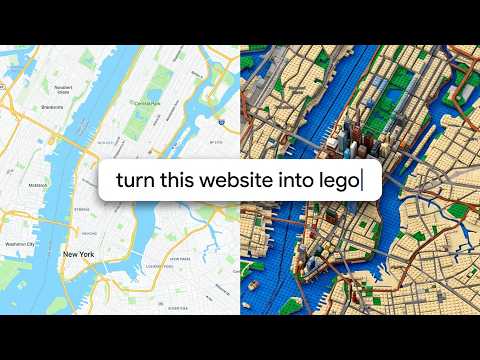
This is an experimental Chrome extension that mirrors your active browser tab in real time and restyles the page from a prompt, using live image diffusion. It grabs your active tab a couple of times a second, runs each frame through a realtime img2img model, and shows the result in a side panel next to the real page. Scroll or type on the page and the mirror keeps repainting it as Claymation, Lego, Van Gogh, Manga, a wooly Wool/Felt world, or any of 35+ other prompts you can pick or write yourself. It's a bit laggy and expensive to run, so it's not meant for production. But it's a fun way to experiment with image diffusion models, and a glimpse of where this kind of thing might go. Expect roughly 2 frames a second. How it works It runs on the FLUX.2 [klein] model on fal.ai. - Capture: it screenshots your active tab with Chrome's tabs.captureVisibleTab, about twice a second. - Diffuse: each frame goes to fal's realtime img2img model (via @fal-ai/client) with your prompt. - Render: the result streams into a side panel next to the page, following whatever tab you're on. Everything runs client-side with your own fal API key. There's no backend of mine in the loop. Each frame goes straight from your browser to your fal account. Getting started 1. Make a fal account at https://fal.ai and add credits (generation is pay-as-you-go). 2. Create an API key at https://fal.ai/dashboard/keys. 3. Open the side panel, paste your key, pick a style, and watch your tab repaint. Also bundled A few self-contained playgrounds for poking at the same engine without capturing any tabs: a drawing pad, a small walkable 3D scene, and some mock pages. They diffuse only their own page. Follow fal's terms of service and privacy policy.
0 out of 5No ratings
Details
- Version0.1.0
- UpdatedJune 26, 2026
- Size4.6MiB
- LanguagesEnglish (United States)
- Developer
Email
ccraig.dev@gmail.com - Non-traderThis developer has not identified itself as a trader. For consumers in the European Union, please note that consumer rights do not apply to contracts between you and this developer.
Privacy

diffusion-ui — live page mirror has disclosed the following information regarding the collection and usage of your data. More detailed information can be found in the developer's privacy policy.
diffusion-ui — live page mirror handles the following:
This developer declares that your data is
- Not being sold to third parties, outside of the approved use cases
- Not being used or transferred for purposes that are unrelated to the item's core functionality
- Not being used or transferred to determine creditworthiness or for lending purposes