

Dictionify: Dictionary + Translation for Any Word, Phrase or Paragraph

Overview
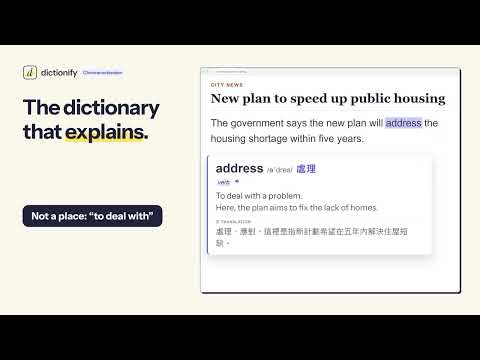
The dictionary that explains: double-click a word or highlight a phrase for its meaning in your sentence, plus translation.
📖 The dictionary that explains. A dictionary gives you ten meanings and leaves you guessing. Dictionify reads your sentence and explains the one meaning it has right there, in plain words and in your language. Double-click a word, or highlight a phrase or a whole paragraph, on any website. A small card appears right beside it: what it means in YOUR sentence, how to say it, and a translation. No copying, no new tab, no wall of text. ━━━━━━━━━━━━━━━━━━━━ ✨ WHAT IT DOES 🎯 The meaning in context: "run the team" and "a run in my tights" get different answers, because they are different 🎓 Plain words by default, or Expert for the precise terms of finance, law, medicine and science 🔊 Pronunciation (IPA), part of speech, and read aloud with your computer's own voice 🌏 The word's translation right beside it, in 18 languages including 繁體中文, 简体中文, 廣東話, 日本語, 한국어, Tiếng Việt, ไทย, Español, Français, Deutsch and العربية, or type any other 🌐 Translate: the whole explanation in your language, one tap 💬 Examples: two new sentences using the word, with translations 🔀 Similar & opposite words: click one to explain it too 🔍 Follow-ups: click any word inside an explanation to open the next card, as deep as you like (on Free, each counts as a lookup) 📝 Highlight a whole paragraph to explain it, summarise it or polish it 🔎 Look-up box (Pro): heard a word in a video, a meeting or a PDF? Type or paste it in the side panel, add the sentence if you have it, and get the meaning that fits ⭐ Every word is saved to your words list in Chrome's side panel: search, star, notes, CSV or JSON export, and backup import ☁️ Word sync: sign in on another computer and your words, notes and flashcard progress are there too (you can turn it off in Settings) 🧠 Flashcards with spaced repetition, like Anki, so new words stick ✉️ Works in Gmail, Notion and other web editors ━━━━━━━━━━━━━━━━━━━━ 💰 PLANS 🎁 7-day free Pro trial when you sign in with Google. No credit card needed for the trial. 🆓 Free forever: 10 lookups a day (words, phrases, paragraphs and follow-ups), 5 translations and 10 examples or word lists, plus 5 Summaries or Polishes a week. Pronunciation, word translations, saved words and flashcards are always free. 💎 Pro: no daily limits for normal use (fair use: up to 500 lookups and 100 Summaries or Polishes a day), plus the look-up box for words you type or paste. US$4.99 / month or US$39.99 / year (save 33%), shown in your local currency where available. ━━━━━━━━━━━━━━━━━━━━ 🔒 PRIVACY When you look something up, only the text you select or type, its sentence, and the page's title and domain name are sent. Signing in shares your Google email. With word sync on (the default), your saved words, notes and review progress are kept with your account so every device shows the same list; the full page address is never stored, and turning sync off deletes that copy. Text in password and form fields is never sent, and common sign-in and payment pages are off by default. Full policy: https://dictionify.com/privacy
0 out of 5No ratings
Details
- Version1.0.8
- UpdatedOctober 14, 2026
- FeaturesOffers in-app purchases
- Size114KiB
- Languages4 languages
- Developer
- TraderThis developer has identified itself as a trader per the definition from the European Union and committed to only offer products or services that comply with EU laws.
- D-U-N-S664340400
Privacy

Dictionify: Dictionary + Translation for Any Word, Phrase or Paragraph has disclosed the following information regarding the collection and usage of your data. More detailed information can be found in the developer's privacy policy.
Dictionify: Dictionary + Translation for Any Word, Phrase or Paragraph handles the following:
This developer declares that your data is
- Not being sold to third parties, outside of the approved use cases
- Not being used or transferred for purposes that are unrelated to the item's core functionality
- Not being used or transferred to determine creditworthiness or for lending purposes
Support
For help with questions, suggestions, or problems, visit the developer's support site