


Overview
Voice typing for any website: speak, and Dictaly types clean, punctuated text without the "um"s, in about 100 languages.
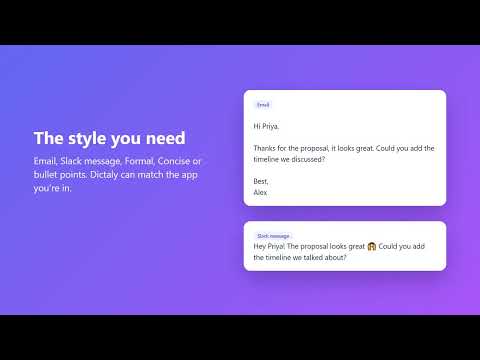
Dictaly is voice typing for Chrome: speech to text that turns your voice into clean, ready-to-send text, right where you type. Press Alt+Shift+D in any text box, speak, and press it again. Unlike plain dictation, Dictaly removes filler words like "um" and "uh", fixes punctuation and capitalisation, and puts the text at your cursor. Or click the Dictaly icon, press the button and copy the result into any email, document, chat or form. (Google Docs: press Ctrl+V.) NEW IN 0.4 • Dictaly Pro: unlimited words (fair use) and unlimited custom styles, with a 7-day free trial. The free plan stays free • Custom styles: describe your own way of writing, such as a short status update or a friendly reply, and Dictaly writes in it • Mixed-language writing: speak a language mixed with English (such as Hinglish) and choose how it's written: in the language's own script, mixed with English, or in English letters • Fix mistakes: correct a saved dictation, and Dictaly offers to add corrected names to your dictionary so it gets them right next time • Send to…: send any dictation straight to your team's chat, notes or issue tracker, or to your own automations with a webhook, or open it in your messaging or email app, so there's no copying and pasting • Share Dictaly with friends and groups, with a ready-made message • Copied text can end with "Written by voice with Dictaly." (turn it off in History) • Email verification and password reset with an emailed code IN 0.3 • Styles: Neutral, Casual, Formal, Concise, Bullet points, and formats for emails and chat messages, with an option to match the style to the site you're on • Spoken commands: say "new paragraph", "new line", "bullet point" or "scratch that" • Rewrite by voice: select text, press Alt+Shift+R and say what to change ("make it shorter", "more polite") • Snippets: say a short trigger phrase to insert text you use often • Translate what you say into another language • Meeting mode: record a long conversation and get a transcript with speaker labels, a summary and action items • Transcribe audio or video files (up to 200 MB) • History tools: search, filters, pins and favourites; export as TXT, Markdown or Word; share a link to one item; clean up an old dictation again in a different style • Stats: words dictated, time saved compared with typing, words per minute and your daily streak • Invite friends: you both get 1,000 extra words a week • Sign in with Google, Apple or Microsoft, and a short guided first dictation ALSO • Dictate straight into email, chat, social and other websites, with the shortcut or an optional mic button • Works in about 100 languages, with Auto-detect or a language you pick • A personal dictionary for names and terms Dictaly should spell exactly • Playback of saved recordings • Free plan with a weekly word allowance; Dictaly Pro for unlimited words, bought securely on dictaly.ai Your privacy: audio is sent to Dictaly's servers only while you dictate or upload a file. The extension doesn't read the pages you visit. Text goes to another app only when you choose Send to…. We never sell your data or use it for advertising. You can turn off saved recordings and delete your history and recordings at any time from Privacy Settings. Requires a free Dictaly account. Privacy Policy: https://dictaly.ai/privacy
0 out of 5No ratings
Details
- Version0.4.2
- UpdatedNovember 22, 2026
- Size157KiB
- LanguagesEnglish (United States)
- DeveloperGenAI Adept TechnologiesWebsite
8 the green ste b dover, DE 19901 USEmail
contact@genaiadept.comPhone
+1 717-460-6962 - TraderThis developer has identified itself as a trader per the definition from the European Union and committed to only offer products or services that comply with EU laws.
Privacy

Dictaly – Voice Typing & Speech to Text has disclosed the following information regarding the collection and usage of your data. More detailed information can be found in the developer's privacy policy.
Dictaly – Voice Typing & Speech to Text handles the following:
This developer declares that your data is
- Not being sold to third parties, outside of the approved use cases
- Not being used or transferred for purposes that are unrelated to the item's core functionality
- Not being used or transferred to determine creditworthiness or for lending purposes
Support
For help with questions, suggestions, or problems, visit the developer's support site