Item logo image for DialogDrive

DialogDrive

Item media 6 (screenshot) for DialogDrive
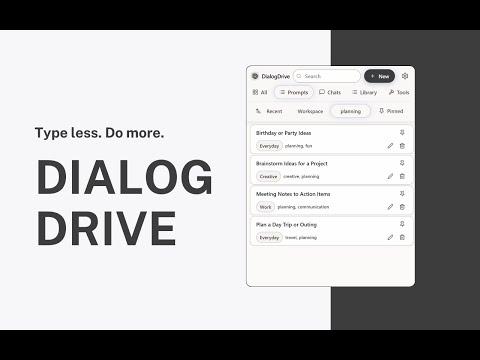
Item video thumbnail
Item media 2 (screenshot) for DialogDrive
Item media 3 (screenshot) for DialogDrive
Item media 4 (screenshot) for DialogDrive
Item media 5 (screenshot) for DialogDrive
Item media 6 (screenshot) for DialogDrive
Item video thumbnail
Item media 2 (screenshot) for DialogDrive
Item media 3 (screenshot) for DialogDrive
Item media 4 (screenshot) for DialogDrive
Item media 5 (screenshot) for DialogDrive
Item media 6 (screenshot) for DialogDrive

Overview

Save, organize, and reuse prompts anywhere. Bookmark chats, build a personal portable AI workspace, and launch ideas with one click.

DialogDrive is a local-first workspace for prompts and AI chats. Save, create, and reuse prompts anywhere. Bookmark conversations and insert saved prompts with a single keystroke, without copy-paste clutter. What you can do - Save and reuse prompts; bookmark chat sessions to revisit - Create new prompts with placeholders (e.g., [name], [deadline]) - Launch your library from any textbox with \ and insert in seconds - Organize with Workspaces, tags, pins, and favorites - Find anything fast with instant, library-wide search - Work from the toolbar popup or side panel on any site How it works - Save a prompt or capture a chat you want to reuse - Organize with Workspaces, tags, and pins - Press \, search, and insert Why it’s faster - One-keystroke command palette for text - No copy-paste loops; fill fields and insert - Keyboard-first flow that keeps you in context - Availability & integrations Always available in Chrome via the toolbar or side panel Page-level enhancements (capture, inline insert) are currently optimized for ChatGPT Additional site-specific enhancements may be added over time; when enabled, the extension will request only the minimum additional host permissions required Privacy - Local-first data: prompts, bookmarks, counts, and settings stay on your device - No analytics. No tracking. No external servers - Optional Chrome Sync if you want your library across devices - Permissions used - storage — Save your library and settings locally - activeTab — Insert into the current tab after a user action - clipboardWrite — Optional fallback for paste support - contextMenus — Right-click “Save” and “Paste latest” - notifications — Lightweight confirmations after saves - sidePanel — Persistent view of your workspace - Host access limited to domains required for page-level features (currently: chat.openai.com, chatgpt.com) Why DialogDrive Minimal, fast, and reliable. A clean, dense UI that stays out of your way—and a keyboard-first workflow for people who work with AI every day. Attribution & trademarks DialogDrive is an independent project and is not affiliated with, sponsored by, or endorsed by OpenAI, Anthropic, Google, Microsoft, Perplexity, or any other provider. All trademarks and brand names are the property of their respective owners and are used for identification only.

Details

  • Version
    1.1.0
  • Updated
    October 10, 2025
  • Size
    305KiB
  • Languages
    English (United States)
  • Developer
    Email
    dialogdrive@outlook.com
  • Non-trader
    This developer has not identified itself as a trader. For consumers in the European Union, please note that consumer rights do not apply to contracts between you and this developer.

Privacy

The developer has disclosed that it will not collect or use your data.

This developer declares that your data is

  • Not being sold to third parties, outside of the approved use cases
  • Not being used or transferred for purposes that are unrelated to the item's core functionality
  • Not being used or transferred to determine creditworthiness or for lending purposes

Related

WorkVivo Chat Favorites

5.0

Pin chats, track @mentions, auto-save drafts, search messages, manage threads, set custom status & create instant Google Meets.

Chat Box: Chat with all AI models (DeepSeek, Cerebras, Ollama, etc.)

5.0

AI chat, advanced web search, document interaction, and more into a convenient sidebar.

Tabrr Dashboard - New Tab with AI

4.5

New tab with AI. The personal dashboard organizes bookmarks, favorite websites, and provides access to ChatAI from the start page.

Grok to Obsidian and Html

5.0

Save and export your Grok AI chat conversations to markdown files easily. Backup your AI chats with one click

QuickAssist: Pop-Out for ChatGPT | Gemini | Copilot

5.0

Instantly access ChatGPT, Gemini, Copilot or any AI assistant through a sleek popup window, making your workflow smarter and faster.

Perplexity to Notion - Batch Export

3.9

Bulk Export all your PerlexityAI conversations to Notion with one click

Savelore – Save & Organize ChatGPT & Claude Responses | Local & Private

3.7

Save and organize ChatGPT & Claude responses with one click. Local, private, offline, and fully searchable.

Saved Prompts

4.8

An extension for saving and copying useful Chatgpt prompts with headings.

My Prompt Manager

5.0

Personal prompt library for AI platforms. Store, organize, and instantly insert your best prompts with one click.

Perplexity to obsidian - Batch Export

4.0

Bulk Export all your PerlexityAI conversations to markdown files with one click

RCP (Right-Click Prompt): AI Prompt Manager

4.9

Boost AI productivity: Save, organize, and reuse your best prompts with one click. Never lose a brilliant prompt again!

MagicPrompt - AI Prompt Generator

5.0

The ultimate AI prompt generator for ChatGPT, Claude, Gemini, and MidJourney. Save, optimize, and launch prompts in one click.

WorkVivo Chat Favorites

5.0

Pin chats, track @mentions, auto-save drafts, search messages, manage threads, set custom status & create instant Google Meets.

Chat Box: Chat with all AI models (DeepSeek, Cerebras, Ollama, etc.)

5.0

AI chat, advanced web search, document interaction, and more into a convenient sidebar.

Tabrr Dashboard - New Tab with AI

4.5

New tab with AI. The personal dashboard organizes bookmarks, favorite websites, and provides access to ChatAI from the start page.

Grok to Obsidian and Html

5.0

Save and export your Grok AI chat conversations to markdown files easily. Backup your AI chats with one click

QuickAssist: Pop-Out for ChatGPT | Gemini | Copilot

5.0

Instantly access ChatGPT, Gemini, Copilot or any AI assistant through a sleek popup window, making your workflow smarter and faster.

Perplexity to Notion - Batch Export

3.9

Bulk Export all your PerlexityAI conversations to Notion with one click

Savelore – Save & Organize ChatGPT & Claude Responses | Local & Private

3.7

Save and organize ChatGPT & Claude responses with one click. Local, private, offline, and fully searchable.

Saved Prompts

4.8

An extension for saving and copying useful Chatgpt prompts with headings.

Google apps