

BrowseAI

Overview
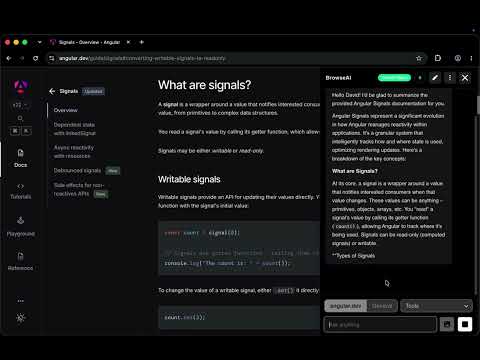
On-device AI chat for any web page via Chrome's Gemini Nano. No cloud calls, no tracking — fully private and offline-capable.
Chat with any web page using Chrome's built-in Gemini Nano. Everything runs on your device. No cloud, no tracking, and it works offline. BrowseAI - AI Help on Any Page BrowseAI puts Google's Gemini Nano model right in your browser. Ask questions about the page you're on, or just chat without any page context. The model runs on your computer, so it works offline and nothing gets sent anywhere. Your chats, browsing data, and prompts stay on your machine. You can summarize a page, ask follow-up questions, or switch to general chat mode at any time. ⚠️ SYSTEM REQUIREMENTS You need Google Chrome 151 or newer with built-in AI turned on. The first time you open BrowseAI, click "Download Model" to get Gemini Nano (about 2-4 GB). Make sure you have enough free disk space. ■ FEATURES (TOOLS) → Form Filler - Paste in plain text, like your resume, and BrowseAI suggests what to put in each form field on the page. How to use Form Filler: 1. Open the "Tools" menu and pick "Form Filler". 2. Paste your text, press Enter, and wait while it fills in the form. 3. Check each suggestion and accept or dismiss it, or use "Accept All" or "Dismiss All". → Tables Extractor - Finds all the tables on the current page and gets them ready to download. How to use Tables Extractor: 1. Open the "Tools" menu and pick "Tables Extractor". 2. Press Enter. You can add a prompt if you want, but you don't have to. 3. Use the download menu in the chat box to get CSV, Excel, JSON, or Markdown files in one zip. ■ FEATURES (MIX) → AI Bookmarks - Sorts the pages you visit into groups on its own. You can browse, open, and delete them right from the chat panel. How to use AI Bookmarks: 1. Open Settings and leave "AI Bookmarks" turned on. 2. Browse like normal. BrowseAI sorts pages into groups and saves them on your device. 3. Open the menu at the top of the chat, pick "AI Bookmarks", then open a group to view, open, or delete pages. → Multimodal Support (Images & Audio) - Add images or audio files to your question. Ask about diagrams, charts, or pictures, or add a recording to get a transcript or ask about what's said. → Capture Visible Area - Take a screenshot of what you can see on the page and add it to your question. → Snip & Capture - Drag to select part of the page and add just that part to your question. → Selection Highlighting - The text you selected shows up in the chat, so you know what BrowseAI is looking at. → Context Mode Toggle - Switch between page mode (BrowseAI reads the whole page) and general mode (plain chat, no page) with one click. → Real-time Streaming (Live Responses) - Answers show up word by word as they're written, so you can start reading right away. → Context Window Usage - Shows how much of Gemini Nano's memory for the current chat is used up. ■ HOW TO GET STARTED Install BrowseAI and click the floating BrowseAI button to open the chat. When asked, click "Download Model" to get Gemini Nano. Once it's ready, you're good to go. Select some text and ask about it, or just ask for a summary of the page. Use the toggle at the bottom of the chat to switch between page mode and general mode. ■ GOOD FOR Writers who need to summarize research. Students trying to understand hard topics or docs. Developers reading code and API docs. Researchers pulling info from several pages. Anyone who has to get through long reports. ⚠️ IMPORTANT DISCLAIMER BrowseAI can make mistakes. Its answers and tool results may be wrong, incomplete, misleading, or out of date. Always check the results before you rely on them, especially for legal, money, medical, security, or other important decisions. Don't use BrowseAI for anything illegal, harmful, or deceptive, or to misuse other people's content or services. The developer is not responsible for misuse of the extension or for problems caused by mistakes in its answers or tool results.
0 out of 5No ratings
Details
- Version1.2.0
- UpdatedOctober 24, 2026
- Offered bydavidmarjanidze
- Size209KiB
- LanguagesEnglish (United States)
- Developer
Email
davidmarjanidze5@gmail.com - Non-traderThis developer has not identified itself as a trader. For consumers in the European Union, please note that consumer rights do not apply to contracts between you and this developer.
Privacy

This developer declares that your data is
- Not being sold to third parties, outside of the approved use cases
- Not being used or transferred for purposes that are unrelated to the item's core functionality
- Not being used or transferred to determine creditworthiness or for lending purposes