

Dexly
3 ratings
)
Overview
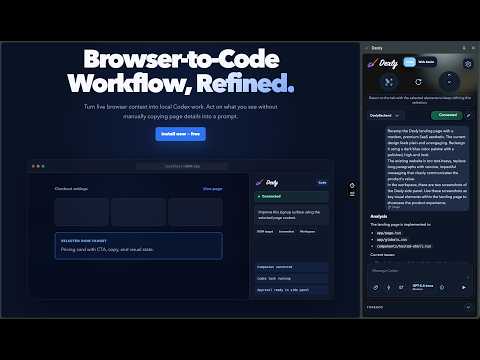
Capture browser context and send tasks to your local Code Assist agent.
Dexly brings browser context into your local coding-agent workflow so you can act on what you see without manually copying page details into a prompt. Dexly works with the coding agent you already use, running locally on your machine: - Codex CLI (OpenAI) - OpenCode (Beta) - DeepSeek Harness (Preview) - Cursor Agent (Preview) You choose the agent during setup and can pick a different agent for Code Assist and Web Assist later in Settings. Dexly has two focused modes: Code Assist - Select one or more elements from the active webpage - Refine selections by moving to parent or child elements - Attach full-page, section, or selected-element screenshots - Type prompts or use optional browser voice typing - Send the task to a saved local workspace - Review streamed agent output, file changes, and approval or permission requests in Chrome Web Assist - Ask read-only questions about the current webpage - Opt into context from the full page or a selected field or section - Safely explore supported collapsed form sections and restore their prior state - Press Cmd/Ctrl+Shift+Enter to analyze a full-page screenshot and read or copy the rendered Markdown answer on the page, even when the side panel is closed; code blocks, inline code, and quotes have individual copy controls - Press Cmd/Ctrl+Shift+Space to attach the visible viewport without sending, repeat it for multiple images, then send with Cmd/Ctrl+Enter—even when the side panel is minimized or unfocused - Optionally let your agent inspect relevant files in a selected workspace - Use Browser context only when no workspace or local-file evidence is needed - Type prompts or use optional browser voice typing - Receive structured answers, field guidance, source references, and extraction warnings Web Assist is advisory and read-only. It does not fill, save, continue, submit, authenticate, or handle one-time passwords on a webpage, and it does not modify workspace files. OpenCode, DeepSeek Harness, and Cursor Agent run Web Assist in a separate read-only process, and Dexly validates their structured answers before showing them. How Dexly works: 1. Install Dexly Companion. 2. Open Dexly in Chrome's side panel and choose your agent. Dexly can install the pinned Codex, OpenCode, or DeepSeek Harness runtime after you confirm; Cursor Agent is installed and signed in by you. 3. Choose Code Assist or Web Assist. 4. Select the browser context and optional screenshots you want to share. 5. Review the prompt and send it to your local agent. 6. Review live output and, in Code Assist, any approval or permission requests. Enabling Dexly on a page: Dexly is not injected into every site at install time. The first time you use it on a page, open the Dexly side panel there and, if asked, choose Enable Dexly on this site. After that the Web Assist keyboard shortcuts work on that page with the side panel minimized. If a shortcut does nothing on a page, open the Dexly side panel on that tab once and try again. Privacy and data handling: - Page content is accessed only for a user-invoked inspect, extraction, exploration, or screenshot action. - Prompts, selected page context, screenshots, workspace paths, and agent output are sent through Dexly Companion to the user's selected local agent runtime. They are not sent to Dexly's hosted billing service. - Recent prompts, compact page context, page metadata, and final results may be saved in Chrome's local extension storage so local task history can be reopened. - Optional voice typing uses Chrome's browser-provided speech recognition after a separate microphone prompt. Dexly uses the recognized text as prompt input and does not retain microphone audio. - The user's selected Codex, OpenCode, DeepSeek Harness, or Cursor Agent runtime may send task inputs to its configured model provider. That processing is governed by the user's agent configuration, account, and provider terms. - Dexly's hosted service is used for sign-in, billing, entitlements, client compatibility configuration, and usage accounting. Requirements: - Google Chrome - Node.js 20 or newer (22.19 or newer for DeepSeek Harness) - Dexly Companion - At least one supported local agent: Codex CLI, OpenCode, DeepSeek Harness, or Cursor Agent, with that agent's own sign-in or API key - macOS, Windows, or Linux A Dexly account is not required for the first 3 successful guest preview sends. Continued use and paid features may require sign-in.
5 out of 53 ratings
Details
- Version2.0.1
- UpdatedSeptember 18, 2026
- FeaturesOffers in-app purchases
- Offered byVoyager
- Size1.39MiB
- LanguagesEnglish (United States)
- Developer
Email
dexly.extension@gmail.com - Non-traderThis developer has not identified itself as a trader. For consumers in the European Union, please note that consumer rights do not apply to contracts between you and this developer.
Privacy

Dexly has disclosed the following information regarding the collection and usage of your data. More detailed information can be found in the developer's privacy policy.
Dexly handles the following:
This developer declares that your data is
- Not being sold to third parties, outside of the approved use cases
- Not being used or transferred for purposes that are unrelated to the item's core functionality
- Not being used or transferred to determine creditworthiness or for lending purposes
Support
For help with questions, suggestions, or problems, visit the developer's support site