Item logo image for DevTools Full-Spectrum Assistant

DevTools Full-Spectrum Assistant

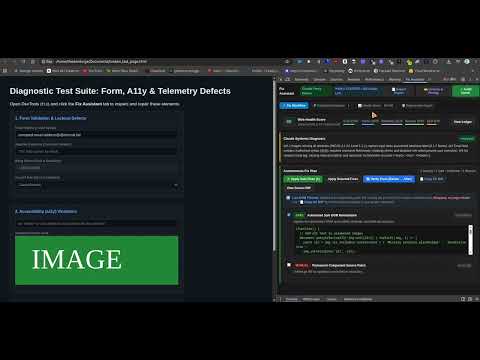
Item media 6 (screenshot) for DevTools Full-Spectrum Assistant
Item video thumbnail
Item media 2 (screenshot) for DevTools Full-Spectrum Assistant
Item media 3 (screenshot) for DevTools Full-Spectrum Assistant
Item media 4 (screenshot) for DevTools Full-Spectrum Assistant
Item media 5 (screenshot) for DevTools Full-Spectrum Assistant
Item media 6 (screenshot) for DevTools Full-Spectrum Assistant
Item video thumbnail
Item media 2 (screenshot) for DevTools Full-Spectrum Assistant
Item media 3 (screenshot) for DevTools Full-Spectrum Assistant
Item media 4 (screenshot) for DevTools Full-Spectrum Assistant
Item media 5 (screenshot) for DevTools Full-Spectrum Assistant
Item media 6 (screenshot) for DevTools Full-Spectrum Assistant

Overview

Developer tool to inspect, audit, and repair forms, accessibility, and runtime errors in your web apps via DevTools (F12).

Inspect forms, accessibility, and runtime errors in Chrome DevTools. Preview fixes, export code diffs, and verify results. Find web application problems, understand what caused them, and review suggested repairs directly inside Chrome Developer Tools. DevTools Full-Spectrum Assistant adds a Fix Assistant panel to Chrome DevTools. It brings form checks, accessibility checks, and JavaScript and network diagnostics into one workflow: scan your page, inspect the evidence, review a repair plan, preview supported fixes, and export suggested source changes. Built for web developers, QA engineers, and teams testing web applications. THREE CORE AREAS • Forms: Inspect form controls for usability and accessibility issues, including missing labels and problematic attributes. • Accessibility: Identify common issues involving accessible names, image alternatives, landmarks, and page structure. • Runtime and network errors: Review captured JavaScript errors, failed requests, and broken resources to help diagnose reliability problems. KEY FEATURES • Page health score: See a score out of 100 with category breakdowns to help prioritize repairs. • Collected evidence: Inspect the page signals behind findings across forms, accessibility, and reliability. • Actionable repair plans: Review suggested fixes grouped as Safe, Review, or Manual, with explanations for each recommendation. • Live DOM previews: Apply supported attribute and accessibility repairs to the inspected page so you can evaluate their effects. • Source diff export: View and copy suggested HTML, JSX, and React code changes for review in your editor. • Before-and-after verification: Rescan after applying repairs to compare results and check for remaining issues or regressions. • Local audit engine: Run built-in auditing and repair generation on your device without an external AI service. • Optional AI connections: Configure your own compatible endpoint, including local inference services or cloud models, for additional contextual analysis. HOW TO USE IT 1. Open the web application you want to inspect in Chrome. 2. Open Chrome DevTools and select Fix Assistant. 3. Click Rescan Tab. 4. Review the findings in Collected Evidence and Remediation Plan. 5. Use Apply Safe Fixes to preview supported changes on the page. 6. Review and copy the suggested source diff. 7. Select Verify Fixes to compare the results. Live DOM changes are temporary previews. Review exported changes and apply them to your source files to make repairs permanent. Automated checks help identify common problems; they do not establish complete accessibility compliance. PRIVACY The default local engine processes audit evidence on your device. If you configure an optional AI endpoint, diagnostic evidence is sent to the destination you choose. Review that provider’s privacy practices before using it with sensitive pages. LINKS & SUPPORT • Homepage: https://archpanda.xyz/devtools-fixer/ • Privacy Policy: https://archpanda.xyz/privacy-devtools-assistant.html • Support: support@archpanda.xyz

Details

  • Version
    1.0.5
  • Updated
    October 5, 2026
  • Size
    67.07KiB
  • Languages
    English (United States)
  • Developer
    Scott A. Davis
    329 W 1st St Apt 2 Bloomington, IN 47403 US
    Website
    Email
    tattvamasi68@gmail.com
  • Non-trader
    This developer has not identified itself as a trader. For consumers in the European Union, please note that consumer rights do not apply to contracts between you and this developer.

Privacy

Manage extensions and learn how they're being used in your organization
The developer has disclosed that it will not collect or use your data. To learn more, see the developer’s privacy policy.

This developer declares that your data is

  • Not being sold to third parties, outside of the approved use cases
  • Not being used or transferred for purposes that are unrelated to the item's core functionality
  • Not being used or transferred to determine creditworthiness or for lending purposes

Support

For help with questions, suggestions, or problems, visit the developer's support site

Related

BugHerd: Visual Feedback & Bug Tracking Tool

4.3

BugHerd is a visual feedback and bug tracking tool for websites

Web Developer Tools

5.0

500+ Web development tools to inspect, debug, edit, test, optimize and audit websites. Privacy-first developer utility.

ALT-DEV TOOLS

5.0

A powerful sidebar DevTools alternative — Elements, Console, Network, Sources & Application panels right in your browser sidebar

DevTools Unlock Open

0.0

Open-source unlock for sites that block DevTools (e.g. disable-devtool): stop reloads, wipes, and detection.

[Experiment] Edit and Resend: Ajax Request Debugger in Chrome DevTools

3.8

Enhance Chrome DevTools with a new tab. Edit and resend fetch() / XHR requests. Efficiently debug or test your web applications.

SignalR Inspector

0.0

Inspect ASP.NET Core SignalR messages, invocation flows, and connection timelines in DevTools.

UI Bug Detector

5.0

Visually detect UI bugs in user-selected sections of a web page.

HackTools++

4.9

HackTools++: Repeater, Intruder, Decoder, and Scanner in DevTools. Capture, edit, and replay HTTP requests for testing.

LT Debug

3.4

Best tool you can ask to debug and ship web based products faster!

Network Overrides API (DevTools)

0.0

Debugging tool that intercepts and overrides network API responses from DevTools panel or popup. For developers only.

PostHog Debugger (Unofficial)

0.0

Debug PostHog analytics and Web Scripts in DevTools: config, events, network, identity, flags, replay, and privacy.

nekuda WebMCP Workbench

5.0

WebMCP devtools + AI assistant: inspect, run, eval and audit your page's tools - then chat with any site through them.

BugHerd: Visual Feedback & Bug Tracking Tool

4.3

BugHerd is a visual feedback and bug tracking tool for websites

Web Developer Tools

5.0

500+ Web development tools to inspect, debug, edit, test, optimize and audit websites. Privacy-first developer utility.

ALT-DEV TOOLS

5.0

A powerful sidebar DevTools alternative — Elements, Console, Network, Sources & Application panels right in your browser sidebar

DevTools Unlock Open

0.0

Open-source unlock for sites that block DevTools (e.g. disable-devtool): stop reloads, wipes, and detection.

[Experiment] Edit and Resend: Ajax Request Debugger in Chrome DevTools

3.8

Enhance Chrome DevTools with a new tab. Edit and resend fetch() / XHR requests. Efficiently debug or test your web applications.

SignalR Inspector

0.0

Inspect ASP.NET Core SignalR messages, invocation flows, and connection timelines in DevTools.

UI Bug Detector

5.0

Visually detect UI bugs in user-selected sections of a web page.

HackTools++

4.9

HackTools++: Repeater, Intruder, Decoder, and Scanner in DevTools. Capture, edit, and replay HTTP requests for testing.

Google apps