

DevTools Export
2 ratings
)

Overview
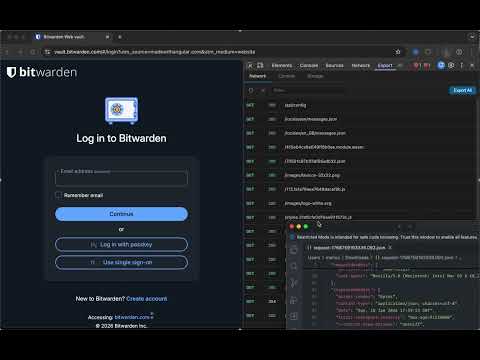
Export Console Logs, LocalStorage, HTTP requests from DevTools with headers, body, and response data for easy debugging and sharing.
Export DevTools data fast — network, console, and storage — with one‑click copy/download or share them via link. Turn DevTools into a shareable debugging powerhouse. DevTools Export adds a clean “Export” panel that captures the most important data you need to troubleshoot issues or hand off to teammates—without digging through raw DevTools tabs. Why you’ll love it • Export network requests with headers, bodies, and response data • Capture console logs and errors as structured JSON • Dump storage (localStorage, sessionStorage, cookies, IndexedDB) instantly • One‑click copy or download • Fast filtering to find exactly what you need • Optional iframe log capture for complex apps Perfect for • Bug reports • QA handoffs • Support tickets • Team collaboration Notes • Some pages may override console hooks; results can vary • Restricted URLs (chrome://, Chrome Web Store, etc.) are not capturable
5 out of 52 ratings
Details
- Version1.0.2
- UpdatedJuly 10, 2026
- Offered byMarius B.
- Size410KiB
- LanguagesEnglish
- Developer
Email
marius@eyloo.com - Non-traderThis developer has not identified itself as a trader. For consumers in the European Union, please note that consumer rights do not apply to contracts between you and this developer.
Privacy

This developer declares that your data is
- Not being sold to third parties, outside of the approved use cases
- Not being used or transferred for purposes that are unrelated to the item's core functionality
- Not being used or transferred to determine creditworthiness or for lending purposes
Support
For help with questions, suggestions, or problems, visit the developer's support site