


Overview
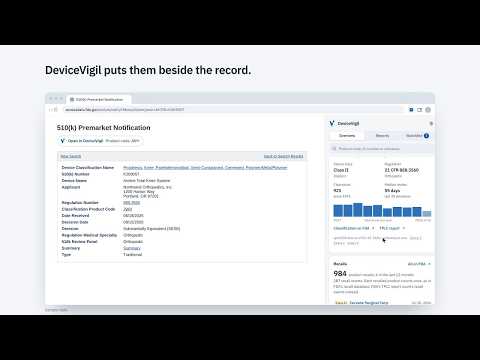
See a device's FDA clearances, recalls and MAUDE adverse event reports in a side panel beside any FDA 510(k), PMA or recall record.
DeviceVigil is a Chrome and Edge extension for medical device regulatory, quality and R&D teams. The panel is free; DeviceVigil Pro is an optional paid plan. Open a device record on the FDA's website (a 510(k), De Novo, PMA, classification or recall page on accessdata.fda.gov) and DeviceVigil opens a side panel next to it. The panel shows the clearances, recalls and MAUDE adverse event reports for that type of device, so you don't have to search each FDA database separately. What the panel shows for the device's product code • Device class, regulation number and medical specialty, and its classification facts: implant, life-sustaining, GMP exempt, third-party review, summary malfunction reporting, submission type and review panel • Every clearance (or, for PMA devices, every PMA decision) since the first one, with a chart by year and the median review time of recent decisions • Recalls, with their recall class and how many there were in the last 12 months • MAUDE adverse event reports from the last 12 months by type (deaths, serious injuries, malfunctions) and the most reported device problems • UDI device records and registered establishments • The latest decisions, with applicant and review time Read the MAUDE adverse event reports The MAUDE tab lists the individual reports, newest first: event type, brand, manufacturer, report number, device and patient problems, and the event narrative. Narrow them to the record's brand or manufacturer, or to reports that cite its submission number, and filter by event type and date received (the last 3, 6, 12 or 24 months, 5 years, all years, or your own range). A chart shows the reports by month, split into deaths, serious injuries and malfunctions, and marks a month above its usual level (a screening view, not signal detection). Each report links to its page on the FDA's site. Preview any K-number Hover over (or tab to) a 510(k), De Novo or PMA number on an FDA page to see the device, applicant, decision date and review time without leaving the page. See what changed Watch a product code or a company (the free version watches one): press Watch, or type it in the Watchlist tab and see what it is before you add it. Every day at 8:00 AM (or weekly, or at a time you choose), DeviceVigil checks the FDA's data and tells you about new clearances, PMA decisions, recalls and MAUDE reports since you started watching, in one notification and a "What changed" list. New MAUDE reports are counted by type, so deaths and serious injuries stand out, and you're also told when existing reports are reclassified as deaths or serious injuries. A check missed while your computer was asleep runs when you next open the browser. Export and cite with sources Export clearances, recalls and MAUDE reports to CSV (the newest 100 rows in the free version). Every row records the openFDA query it came from and when it was retrieved, ready for a regulatory file. Copy citation puts a one-paragraph reference on your clipboard (source, scope, dates and query) for a DHF, CER or post-market surveillance write-up. New to DeviceVigil? The (i) button walks you through the panel in seven short steps. DeviceVigil Pro (optional, paid) Sign in with your work email (a 6-digit code, no password) to watch up to 200 product codes and companies, get a daily email digest on the days something changed (or weekly), export up to 5,000 rows, and print a predicate dossier for any 510(k), De Novo or PMA: the decision and review time, the product code's history, its recalls (the applicant's highlighted), MAUDE adverse event reports, the latest clearances, and every openFDA query behind them, saved as a PDF. The Team plan adds a watchlist shared by up to five people. Private by design The free version needs no account and has no tracking. Your watchlist and settings stay in your browser, and it only contacts openFDA (api.fda.gov), the FDA's public data service. If you sign in to Pro, your email address, watchlist and alert schedule are kept on DeviceVigil's servers to run your plan and alerts; nothing about the pages you browse is ever sent. Every number in the panel links to the exact query behind it. Optional: if your browser has a built-in on-device AI model, DeviceVigil can summarize MAUDE report narratives into recurring problems. It runs on your computer and is labelled as a summary to check. DeviceVigil is an independent tool from Thump LLC and is not affiliated with or endorsed by the U.S. Food and Drug Administration. openFDA data can lag the FDA's own databases and is not validated; check the FDA record before relying on it.
0 out of 5No ratings
Details
- Version0.2.0
- UpdatedNovember 2, 2026
- FeaturesOffers in-app purchases
- Size177KiB
- LanguagesEnglish (United States)
- DeveloperThump LLCWebsite
30 North Gould Street STE N Sheridan, WY 82801 USEmail
contact@thumpapp.comPhone
+1 307-393-2333 - TraderThis developer has identified itself as a trader per the definition from the European Union and committed to only offer products or services that comply with EU laws.
- D-U-N-S146638687
Privacy

This developer declares that your data is
- Not being sold to third parties, outside of the approved use cases
- Not being used or transferred for purposes that are unrelated to the item's core functionality
- Not being used or transferred to determine creditworthiness or for lending purposes
Support
For help with questions, suggestions, or problems, visit the developer's support site