

Deus — Visualize Any Tab Audio (In a cool way)

Overview
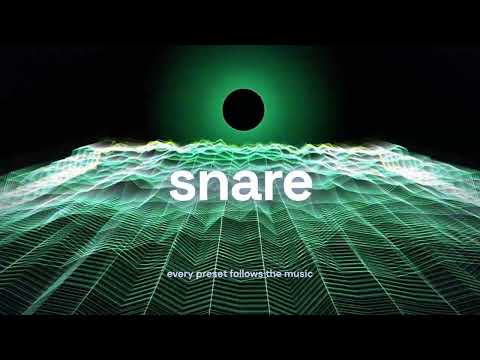
Music visualizer for Spotify and any tab: 1100+ MilkDrop and WebGL presets, 70+ themes, fullscreen. Free, no account.
Turn any browser tab into a live music visualizer. Play a song, a video, a stream or internet radio in your browser, click Deus and choose "Visualize this tab". The visuals open next to it or in their own window. Drag them to a second screen or TV and go fullscreen. It's free and there's no time limit. Deus also runs right inside the Spotify, YouTube Music and Yandex Music web players, and on more sites (full list at deus-soft.com). Your playlists, queue and playback controls stay where they are, and Deus adds live visuals and a new look around them. Each service has its own switch in Settings, and the popup can still open the classic view or full screen for that page. On YouTube, Deus can recolour the whole site around the videos, and an optional glow around the video moves with the sound: it swells on the bass, flashes on hits, takes its colours from the picture and calms down when people are talking. Turn both on in the popup. What you get: - 1100+ audio-reactive presets in four groups: WebGL, Canvas 2D, MilkDrop and Oscilloscope, from originals like Event Horizon and Rain Window to a large library of classic MilkDrop visuals - Visuals that follow bass, mids, treble, kicks, snares, hi-hats and notes, and stand still in silence - A separate view in its own page or window, with fullscreen - Magic mode, on by default: a hands-off show with nothing to set up. The visual changes every few seconds, colours drift and filters come and go by themselves, so it keeps looking fresh - Automatic rotation on a timer, with shuffle, or keep one playing - Star your favourites and rotate only those - Community ratings on everything, sorted by rating by default, with search - See how many people are vibing with Deus right now - A Tune panel for adjusting the current visual live - Deus Studio: write your own presets in GLSL with a live preview, sliders and colour controls, or start from an editable copy of any built-in WebGL one. Yours appear in their own Custom category. - 70+ interface themes, from Frutiger Aero and Art Deco to Lava Lamp and Pop Art, including Chameleon, which takes its colours from the current track's artwork. One look covers every supported player and site, Deus Studio and the Deus page, and it can change on a timer by itself. - MP4 video export of your own audio files with any preset or a chain of them, up to 4K and 60 fps. On the Free plan videos carry a small Deus watermark - Keyboard shortcuts: arrow keys, P, S, F, H, Esc Deus Pro adds: - The analyzer: live spectrum and a scrolling graph of every feature the visuals react to - Videos without the Deus watermark - Picture-in-picture: the visuals in a small floating window that stays on top of your other windows and apps - The pet: a small see-through visual that floats over the page you're on and follows you from page to page while the sound plays Every preset and theme, Deus Studio and video export are free. See deus-soft.com/pricing/ for the current Free and Pro offer. Video export only uses audio files you provide. It does not record streaming services. Privacy: Deus analyzes audio locally in your browser to drive the visuals. Audio is never recorded, stored, uploaded or sent to Deus servers. Deus does not show ads. Deus runs only on the Spotify, YouTube Music and Yandex Music web players and on the artwork and CDN hosts those services need. The other supported sites are optional: Deus asks Chrome for access to one of them only when you turn it on, and works there the same way. There are three more exceptions, and you start each of them yourself. When you choose "Visualize this tab" in the popup, Deus uses Chrome's tab-capture permission to read audio from that one page, only while the visuals are open. The optional pet (Pro) asks Chrome for access to all sites the first time you turn it on, so it can float over the pages you visit. It only adds its own small overlay: it does not read page content, and page addresses and browsing history are never sent anywhere. This permission is never requested otherwise. The optional video glow and site recolouring ask for access to youtube.com when you turn them on. The glow listens to the video playing on that page through the browser's audio API, inside the page, and adds a glow around the player; recolouring only changes the page's colours. Nothing from that site is recorded or sent anywhere. Presets you write in Deus Studio are stored locally in your browser. Deus may contact deus-soft.com for: - license activation and status checks - community ratings - the number of people using Deus right now - referral rewards - attribution claims from Deus invite pages - a limited set of anonymous usage events that help improve the extension Usage events describe extension actions such as install, opening the popup or settings, starting the visualizer, capture status, fullscreen use, turning the pet on and off, and actions on visuals. When you capture a page's sound, the events can include a broad category of that site (for example a video site or "other"), never its address. They never include audio, track names, playlist contents, page text, browsing history or screenshots. Events also include the interface language, the browser's language and name, and the country of the connection (the server never stores the IP address). When a visual fails to draw, Deus reports the error type, which visual it was, the general type of graphics chip, the Chrome version and the operating system. License checks may send your license key, a random installation ID and the extension version. Referral and usage events use anonymous installation and client IDs. While the visuals are open, Deus sends an anonymous client ID and whether sound is playing about once a minute, so it can show how many people are vibing right now. Ratings use a separate random device ID. The popup loads its fonts from Google Fonts. Chameleon may fetch the current track's artwork from the service's image hosts to calculate a colour palette locally. Getting started: Deus works with sound playing in your browser, not in desktop apps. If you usually listen in a desktop app, open the same service's web player in Chrome. 1. Install Deus and pin it to the Chrome toolbar. 2. Play audio in your browser. 3. Click Deus and choose "Visualize this tab", in a page or a window. 4. Press P to pick a visual, S to tune it, and F to go fullscreen. On a supported site, open the web player, start a track and turn Deus on from the popup. Deus works in desktop Chrome. It does not change native desktop or mobile apps. Capturing a page's sound depends on browser and page support. Deus is an independent extension and is not affiliated with, endorsed by, or sponsored by Spotify, YouTube or any other service it works with.
5 out of 54 ratings
Details
- Version25.0.0
- UpdatedOctober 26, 2026
- FeaturesOffers in-app purchases
- Size10.99MiB
- Languages35 languages
- DeveloperWebsite
Email
denislopatkin011@gmail.com - Non-traderThis developer has not identified itself as a trader. For consumers in the European Union, please note that consumer rights do not apply to contracts between you and this developer.
Privacy

This developer declares that your data is
- Not being sold to third parties, outside of the approved use cases
- Not being used or transferred for purposes that are unrelated to the item's core functionality
- Not being used or transferred to determine creditworthiness or for lending purposes