

Deus — Spotify Music Visualizer & Themes
2 ratings
)
Overview
Audio-reactive music visualizer with custom themes for Spotify and Yandex Music — real-time WebGL visuals in your browser.
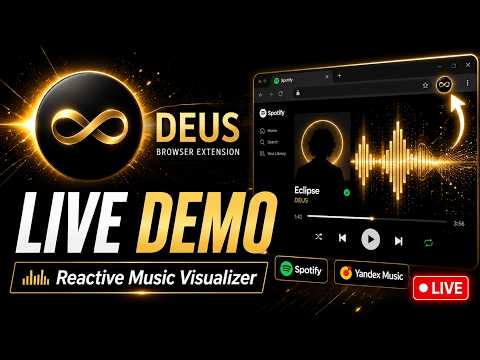
Deus — Spotify Music Visualizer & Themes Turn your browser into a living, music-reactive light show. Deus replaces the static player surface of Spotify with real-time, audio-reactive visualizers and beautiful custom interface themes — all rendered locally in your browser, in sync with whatever is playing. Yandex Music is supported too. Whether you're working, gaming, hosting a party, or just relaxing to your favorite playlist, Deus brings your music to life with smooth WebGL graphics that pulse, bloom, and flow to every beat, note, and drum hit. ──────────────────────────────────────── 🎵 WHAT IT DOES ──────────────────────────────────────── Deus listens to the audio playing in your Spotify tab and drives a gallery of hand-crafted visual presets in real time. Bass, treble, transients, drum onsets (kick, snare, hi-hat) and even musical notes are detected on the fly, so the visuals genuinely move WITH the song instead of just flickering randomly. On top of the visualizer, Deus can re-skin the music interface with premium design themes — from black-and-gold ceremonial looks to artwork-adaptive palettes that recolor the UI to match your current track's cover. Works on: • Spotify (open.spotify.com) • Yandex Music (music.yandex.ru / .com / .by / .kz / .uz) ──────────────────────────────────────── 🌈 18 AUDIO-REACTIVE VISUALIZERS ──────────────────────────────────────── A growing collection of GPU-accelerated WebGL shaders and Canvas presets: • Deus — a stable audio-reactive fractal with color shimmer • Deus Rainbow — a white fractal whose mirrored note sectors bloom with chromatic light (Pro) • Acid Tunnel — a fast kaleidoscopic tunnel pulsing across the live spectrum (Pro) • Liquid Tunnel — a soft MilkDrop-style tunnel with rotating spectral ribbons • Radial Spectrum — classic circular analyser bars with bloom and motion trails • Particle Bloom — glowing particles that orbit and burst on transients • Oscilloscope Ribbons — layered waveform ribbons with chromatic drift • Prismatic Equalizer — a mirrored segmented spectrum with shifting prismatic color • Audio Terrain — a retro neon landscape whose grid rides the spectrum • Hexagon Pulse — a rotating hex field that blooms from transients • Hexagon Spectrum 3D — tilted spectral hex columns rising from their frequencies (Pro) • Hexagon Spectrum 3D Gray — the same columns in a graphite-silver palette (Pro) • SpaceTravel — a layered audio-reactive fractal starfield • Wake Up — falling digital glyphs crossed by a live waveform (Pro) • Waveform Tunnel — a tunnel of stacked oscilloscope rings • Kaleidoscope Scope — mirrored waveform segments in a rotating kaleidoscope • Wireframe Cube — an orbiting wireframe cube with audio-reactive scale and glow • Note Bloom — twelve families of orbiting particles that heat up and cool down with detected musical notes (Pro) ──────────────────────────────────────── 🎨 CUSTOM INTERFACE THEMES ──────────────────────────────────────── Redesign your player with a full set of curated skins: • Deus Noir — a black-and-gold Deus-branded skin with ceremonial contrast • Graphite Lime — matte graphite surfaces with electric lime highlights • Aurora Glass — soft color fields and translucent glass panels (Pro) • Midnight Pulse — deep contrast, neon dividers, sharp surfaces (Pro) • Chameleon — builds the entire palette from your current track's artwork (Pro) • Paper Day — a bright daylight skin with warm translucent surfaces (Pro) • Sakura Neon — pink neon haze and glossy violet glass (Pro) • Ocean Prism — deep teal with refracted sea-light panels (Pro) • Velvet Sunset — wine shadows, copper glow, warm dusk gradients (Pro) • Lemon Drop — sharp citrus yellow on near-black (Pro) • Espresso — roasted browns with warm caramel glow (Pro) • Matrix Code — black void with electric green cyber-grid neon (Pro) • Blood Moon — crimson lunar glow and smoldering ember accents (Pro) • Midnight Iris — deep indigo with electric violet halos (Pro) ──────────────────────────────────────── ⚡ FEATURES & CONTROLS ──────────────────────────────────────── • One-click on/off from the toolbar popup — audio capture starts and stops automatically with the visualizer • Fullscreen mode — launch any visualizer full-screen for an immersive light show • Auto-switch / shuffle — rotate through your favorite presets on a timer • Single preset OR custom active list — curate exactly which visualizers play • Opacity control — blend the visualizer over the original interface • Live equalizer in the popup — instantly confirm audio is being captured • Replace native visuals — hide the service's built-in background for a clean canvas • Drum onset detection — punchy, responsive kick / snare / hi-hat reactions • Note detection — pitch-aware presets that react to the actual melody • Smooth 60fps GPU rendering via WebGL fragment shaders ──────────────────────────────────────── 🔒 PRIVACY FIRST ──────────────────────────────────────── Deus processes audio entirely on your own device. Tab audio is analyzed locally to drive the graphics — nothing is recorded, uploaded, or sent to any server. No account is required to start visualizing. No tracking. No ads. ──────────────────────────────────────── ⭐ FREE vs PRO ──────────────────────────────────────── Deus is free to use with a generous set of visualizers and themes built in. A Pro license unlocks the full collection — every premium visualizer (Deus Rainbow, Acid Tunnel, Note Bloom, Hexagon Spectrum 3D and more) and the complete set of interface themes — activated instantly with a license key in Settings. ──────────────────────────────────────── 🚀 GETTING STARTED ──────────────────────────────────────── 1. Install Deus and pin it to your toolbar. 2. Open Spotify and start playing a track. 3. Click the Deus icon and toggle the visualizer ON. 4. Pick a preset, go fullscreen, and enjoy the show. Bring your music to life. Install Deus and let every track paint your screen.
5 out of 52 ratings
Details
- Version0.5.0
- UpdatedJune 25, 2026
- FeaturesOffers in-app purchases
- Offered bydenislopatkin011
- Size179KiB
- LanguagesEnglish (United States)
- Developer
Email
denislopatkin011@gmail.com - Non-traderThis developer has not identified itself as a trader. For consumers in the European Union, please note that consumer rights do not apply to contracts between you and this developer.
Privacy

This developer declares that your data is
- Not being sold to third parties, outside of the approved use cases
- Not being used or transferred for purposes that are unrelated to the item's core functionality
- Not being used or transferred to determine creditworthiness or for lending purposes