

DesignPicker - Color Picker & Font Detector

Přehled
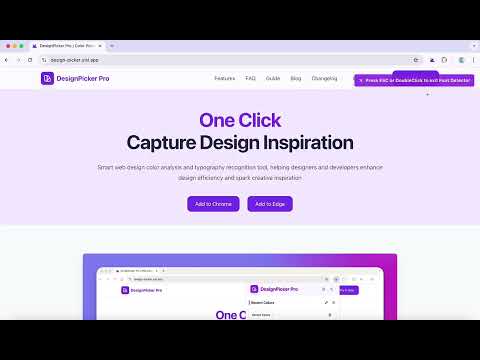
A smart developer tool that supports color picking and font detecting, making develop design easier.
DesignPicker: Advanced Color Picker, Eyedropper & Font Finder🎨 Stop guessing colors and fonts! DesignPicker is the essential Chrome browser extension for web designers, front-end developers, and creatives needing instant color picking, eyedropper functionality, and font identification. Speed up your design workflow with this powerful design tool, featuring advanced color detection and web font recognition. It's one of the most useful design tools in your browser toolkit. ✓ Key Features: 🌈 Effortless Color Picking, Extraction & Detection: ✦ Website Color Extractor: Use our webpage color extractor to grab ALL colors from any website with a single click. An excellent tool for quick color palette generation. ✦ Screen Eyedropper Tool: Employ the versatile screen color picker (eyedropper) to capture colors from anywhere on your screen – apps, images, code editors. Essential for web design and graphic design tasks. ✦ Instant Color Code Copy: Get HEX, RGB, and HSL (if supported) color codes copied instantly for CSS or design software. ✦ Build & Analyze Palettes: Easily create, view, and analyze website color schemes for consistent design systems. 🪄Instant Font Identification & Recognition: ✦ Web Font Detection Tool: Hover over text to instantly identify fonts used on any webpage. It’s like having WhatTheFont functionality built right into your browser workflow for quick checks. ✦ Detailed Typography Analysis: Access comprehensive font details including font family, size, weight, style, and color. Check font information quickly without digging into code. ✦ Font Preview: Visualize font styles directly within the font finder interface. Perfect for typography projects. 🔔 How to Use DesignPicker: ✦ Pin the Icon: After installing, pin the DesignPicker icon to your Chrome toolbar for quick access. ✦ Pick Colors: ◇ From Screen: Click the DesignPicker icon, select the 'Screen Picker' (eyedropper), then click anywhere on your screen. ◇ From Webpage: Click the icon, go to the 'Page Colors' tab to see all extracted colors. ◇ Click any color swatch in the extension window to instantly copy its code (HEX, RGB, HSL). ✦ Identify Fonts: ◇ Click the DesignPicker icon and activate the 'Inspect Fonts' mode (or similarly named feature). ◇ Hover your mouse over any text on the current webpage. ◇ A tooltip will appear showing detailed font information (family, size, weight, color). 😊✓ Why Choose DesignPicker? ✦ Intuitive & Fast: This efficient browser plugin saves valuable time on every project, acting as a rapid asset capture tool. ✦ Accurate Results: Get reliable and accurate color values and font details you can trust for professional work. ✦ Seamless Workflow Integration: Optimize your process. A must-have developer tool and designer assistant right in Chrome. Integrates smoothly with your existing design tools. ✦ Active Development: We continuously improve based on user feedback, aiming to be the best color picker extension and font identifier tool. 🎊Perfect For: ✦ Quickly grabbing color codes (HEX, RGB, HSL) for CSS styling and development. ✦ Font recognition for unknown web fonts or competitor analysis. ✦ Creating mood boards and style guides for UI/UX design and graphic design. ✦ Matching colors accurately when working with component libraries like shadcn ui. ✦ Serving as a focused inspect element alternative for visual assets. ✦ Streamlining the design-to-development handoff process. ✦ Any task requiring a reliable online color picker or font checker. 🚀 🚀 ✦ Install DesignPicker today and revolutionize your design process! The ultimate color picker, eyedropper, and font finder browser tool for Chrome awaits. 📮 Contact & Support: Email: hi@yisi.app Website: https://design-picker.yisi.app
5 z 58 hodnocení
Podrobnosti
- Verze1.8.0
- Aktualizováno3. března 2026
- Velikost296KiB
- JazykyJazyky: 20
- VývojářWeb
E-mail
aheychuang@gmail.com - Neobchodnický subjektTento vývojář se neidentifikoval jako obchodník. Spotřebitele v Evropské unii upozorňujeme, že se na smlouvy mezi vámi a tímto vývojářem nevztahují spotřebitelská práva.
Ochrana soukromí

Vývojář deklaruje, že vaše údaje
- Nebudou prodány třetím stranám, s výjimkou schválených případů
- Nebudou použity nebo předány za účelem, který nesouvisí s hlavní funkci položky
- Nebudou použity nebo předány pro potřeby určení úvěruschopnosti nebo za účelem poskytnutí půjčky
Podpora
Pokud potřebujete pomoc s dotazy, návrhy nebo problémy, otevřete si v prohlížeči na počítači tuto stránku