

Design Token Extractor
3 ratings
)
Overview
Extract design system tokens (colors, spacing, typography) from any website
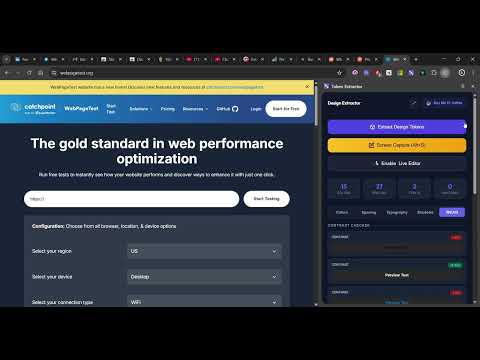
Extract colors, spacing, typography, shadows, and WCAG data. Edit pages, annotate screenshots, and export design tokens directly from Chrome. Design Token Extractor is a practical design and front-end toolkit for understanding how a webpage is built and testing visual changes without opening DevTools or modifying source code. Open it beside any webpage to inspect its visual system, select and edit elements in place, capture a region of the page, annotate the screenshot, redact sensitive information, and export the results for use in your own projects. Inspect Design Tokens Scan the page for visual values used by its elements. The extension deduplicates and organizes repeated values so they are easy to identify and reuse. Colors: View background, text, border, and other visible colors with HEX and RGB values and color swatches. Click any value to copy it. Spacing: Inspect margin, padding, and gap values alongside the elements that use them. Typography: View font families, sizes, weights, line heights, and grouped typography combinations with real text samples. Shadows: Identify box-shadow values used throughout the page. WCAG: Check color contrast to help identify potential accessibility issues. Dynamic Pages: Works with static pages and content rendered by React, Vue, Angular, CSS-in-JS, CSS modules, and other modern web technologies. Edit Any Page Visually Enable Live Editor mode, hover over the page to highlight selectable elements, and click an element to open its computed styles in the Side Panel. Changes are applied immediately to the page, allowing you to prototype and compare visual ideas without modifying the original website. Edit font family, font size, font weight, line height, text color, background color, border color, padding, and margin. The editor also supports CSS copying, per-element reset, and undo/redo using the panel buttons or Ctrl/Cmd+Z and Ctrl/Cmd+Shift+Z. Smart Capture and Screenshot Annotation Press Alt+S or start Screen Capture from the Side Panel. Drag across the page to select the area you need, then annotate the captured screenshot before copying or downloading it. Capture-editor tools include: Pencil, highlighter, arrow, line, rectangle, and ellipse. Text labels with adjustable size and bold styling. Auto-numbered Step Markers for tutorials and walkthroughs. Solid redaction for covering sensitive information. Blur and pixelate redaction for hiding content while preserving the visible layout. Select, drag, resize, duplicate, lock, delete, and reorder annotation layers. Snap-to-grid, custom colors, undo, redo, and high-DPI export for sharp Retina screenshots. Copy the finished image to the clipboard or download it as a PNG. Export Token Data Export extracted design tokens directly from the Side Panel in formats suited to different workflows. JSON for structured data, documentation, or custom tooling. CSS for CSS custom properties. SCSS for Sass variables and stylesheets. Tailwind for Tailwind-compatible color, spacing, and typography configuration. Chrome Side Panel Workflow Design Token Extractor stays open in Chrome's native Side Panel while you inspect the page. Use the tabs for Colors, Spacing, Typography, Shadows, and WCAG, then switch to Live Editor when you need to change an element. Minimize the panel to a draggable floating bubble when you need more page space, then reopen it with one click. The header also includes a keyboard-shortcuts reference for Smart Capture and Live Editor commands. Privacy Token extraction, editing, and screenshot annotation happen locally in your browser. The extension does not send page content, screenshots, or extracted tokens to an external service. No browsing history tracking or analytics are included. The extension is built with Manifest V3 and works offline after installation, apart from Chrome's own page and clipboard capabilities. Common Uses Audit and document an existing design system. Compare a competitor's visual language during design research. Extract tokens before a migration or redesign. Prototype font, color, and spacing changes on a live webpage. Create annotated product feedback, bug reports, and tutorials. Capture screenshots while hiding private or sensitive information. Bootstrap CSS, SCSS, JSON, or Tailwind design-token files. How to Use Open a webpage in Chrome. Open Design Token Extractor from the toolbar or Chrome Side Panel. Select Extract Design Tokens to analyze the page. Browse the Colors, Spacing, Typography, Shadows, and WCAG tabs. Export the tokens as JSON, CSS, SCSS, or Tailwind. Enable Live Editor to experiment with page styles. Use Screen Capture to annotate, redact, copy, or download a screenshot. Design Token Extractor brings inspection, experimentation, screenshot markup, and token export into one focused browser workflow for designers, developers, QA teams, and anyone documenting a web interface. What's New in v2.1.0 Blur and pixelate redaction in Smart Capture, alongside solid redaction. New Line, Ellipse, and Step Marker annotation tools. Live Editor undo/redo from the sidebar or keyboard shortcuts. New Keyboard Shortcuts panel for capture and editing commands. High-DPI capture fixes for accurate annotation alignment and full-resolution exports on Retina displays. Live Editor reliability fix for the pre-enable console error.
5 out of 53 ratings
Details
- Version2.1.0
- UpdatedSeptember 25, 2026
- FeaturesOffers in-app purchases
- Offered bykodekenobi
- Size79.29KiB
- LanguagesEnglish
- DeveloperRuth Nonkolo Nkanunu
3109 Ndosi St Tsakane 1550 ZAEmail
kodekenobi@gmail.comPhone
+27 63 029 1420 - TraderThis developer has identified itself as a trader per the definition from the European Union and committed to only offer products or services that comply with EU laws.
Privacy

This developer declares that your data is
- Not being sold to third parties, outside of the approved use cases
- Not being used or transferred for purposes that are unrelated to the item's core functionality
- Not being used or transferred to determine creditworthiness or for lending purposes
Support
For help with questions, suggestions, or problems, please open this page on your desktop browser