

Design Mode - Page's Rich Text Editor
15 valoraciones
)
Descripción general
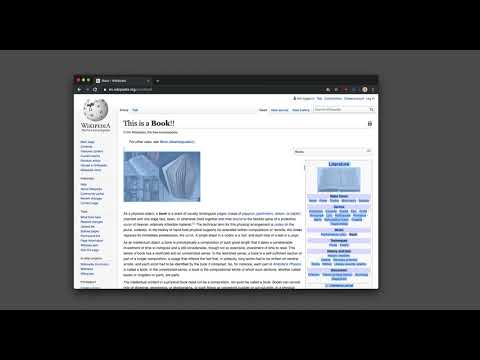
Edite el contenido de cualquier página en modo diseño para modificar texto y mover imágenes como en un editor de Word.
This extension modifies the current document attributes so that it acts almost like a content edible document (Similar to MS Word, or Open Office) which allows the user to edit the page text, drag and drop assets, and remove elements that cause chaos on the page. It is even possible to insert new images. With this extension, you can simply edit the entire document and when it is ready, toggle back to the read-only mode (normal mode). This modified document can be printed or saved like a normal HTML page. Notes: 1. To enable the extension press the toolbar button once. When the document is editable, the toolbar button is blue and you will get a desktop notification 2. When editing is over, to switch back to the normal mode, press the toolbar button once more. In the normal mode, the color is gray. 3. You can save the modified document in HTML or MHTML or print it. To save in MHTML you will need to install an extension. 4. To change the formatting of a text into bold, select the text then press Ctrl + B. For italics, press Ctrl + I 5. As of version 0.1.2, the extension inserts a helper toolbar so that you can simply access the rich text editing tools from a floating panel.
4,7 de 515 valoraciones
Detalles
- Versión0.2.4
- Actualizado19 de febrero de 2025
- Ofrecido porbrian.girko
- Tamaño64.37KiB
- Idiomas14 idiomas
- Desarrollador
Correo electrónico
brian.girko@gmail.com - No operadorEste desarrollador no se ha identificado como operador. Los consumidores residentes en la Unión Europea deben tener en cuenta que los derechos de los consumidores no son aplicables a los contratos que suscriban con este desarrollador.
Privacidad

Este desarrollador declara que tus datos:
- No se venden a terceros, excepto en los casos de uso aprobados
- No se usan ni se transfieren para fines no relacionados con la función principal del elemento.
- No se usan ni se transfieren para determinar la situación crediticia ni para ofrecer préstamos.
Ayuda
Si tienes alguna pregunta, sugerencia o problema, visita el sitio de asistencia del desarrollador.