Item logo image for denoise

denoise

denoise.social
1.0(

1 rating

)
Item media 6 (screenshot) for denoise
Item video thumbnail
Item media 2 (screenshot) for denoise
Item media 3 (screenshot) for denoise
Item media 4 (screenshot) for denoise
Item media 5 (screenshot) for denoise
Item media 6 (screenshot) for denoise
Item video thumbnail
Item media 2 (screenshot) for denoise
Item media 3 (screenshot) for denoise
Item media 4 (screenshot) for denoise
Item media 5 (screenshot) for denoise
Item media 6 (screenshot) for denoise

Overview

Boost your LinkedIn feed productivity.

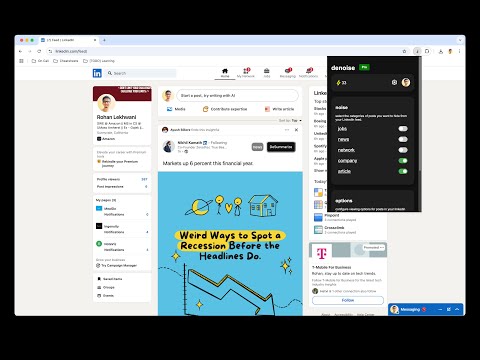
Have you felt your LinkedIn feed getting noisy with posts like these: - "I'm thrilled to announce..." (goes on to self-congratulate themself) - A 500 word post of how someone failed an exam in school and now works at Google. - People using LinkedIn as Instagram. You're not alone! denoise can do the following for you: - 🗂️ Categorize posts by categories YOU define. - 📝 Summarize lengthy posts within a few words. - 🔍 Adjust summary lengths (spoiler: it can even be 1 word !) - 🚫 Abstract away posts marked as "noise". - ✨LinkedIn can be demotivating when everyone's an achiever. Motivate yourself on abstracted posts.

Details

  • Version
    2.1.3
  • Updated
    November 25, 2024
  • Features
    Offers in-app purchases
  • Size
    371KiB
  • Languages
    English (United States)
  • Developer
    Website
    Email
    rohanlekhwani@gmail.com
  • Non-trader
    This developer has not identified itself as a trader. For consumers in the European Union, please note that consumer rights do not apply to contracts between you and this developer.

Privacy

Manage extensions and learn how they're being used in your organization

denoise has disclosed the following information regarding the collection and usage of your data. More detailed information can be found in the developer's privacy policy.

denoise handles the following:

Authentication information
Website content

This developer declares that your data is

  • Not being sold to third parties, outside of the approved use cases
  • Not being used or transferred for purposes that are unrelated to the item's core functionality
  • Not being used or transferred to determine creditworthiness or for lending purposes

Support

Related

Linkgage Ai

5.0

An intelligent LinkedIn commenter.

LinkGrow

0.0

Your AI-Powered LinkedIn Growth Partner

CritPost - LinkedIn Content Analyzer

5.0

Analyze your LinkedIn posts with AI-powered feedback

LinkedIn Suggested Hider

5.0

Hides suggested posts on LinkedIn.

Clear LinkedIn

0.0

Clear LinkedIn hides post images and filters posts by word count to improve productivity and reduce distractions on LinkedIn feed.

CareerZen Connector

5.0

Connects CareerZen with your LinkedIn profile.

HappyInAI - LinkedIn Text Formatter for Post Editor

4.0

Enhance your LinkedIn posts with advanced text formatting options directly in the editor.

Cringe Filter for LinkedIn

5.0

Filter out cringe posts, memes, and motivational content from your LinkedIn feed

LinkedIn Post Improver

5.0

Apply social media best practices to LinkedIn posts

LinkedIn Jobs Comments

0.0

Comment anonymously on LinkedIn job posts.

LinkedIn Post Formatter: Bold, Italic & More

5.0

Elevate your LinkedIn posts with easy formatting

LinkedIn Post Enhancer

5.0

Make your LinkedIn posts stand out with bold, italics & lists. Enhance readability and keep your audience engaged effortlessly.

Linkgage Ai

5.0

An intelligent LinkedIn commenter.

LinkGrow

0.0

Your AI-Powered LinkedIn Growth Partner

CritPost - LinkedIn Content Analyzer

5.0

Analyze your LinkedIn posts with AI-powered feedback

LinkedIn Suggested Hider

5.0

Hides suggested posts on LinkedIn.

Clear LinkedIn

0.0

Clear LinkedIn hides post images and filters posts by word count to improve productivity and reduce distractions on LinkedIn feed.

CareerZen Connector

5.0

Connects CareerZen with your LinkedIn profile.

HappyInAI - LinkedIn Text Formatter for Post Editor

4.0

Enhance your LinkedIn posts with advanced text formatting options directly in the editor.

Cringe Filter for LinkedIn

5.0

Filter out cringe posts, memes, and motivational content from your LinkedIn feed

Google apps