


Overview
Draw annotations on web pages with arrows, boxes, and circles
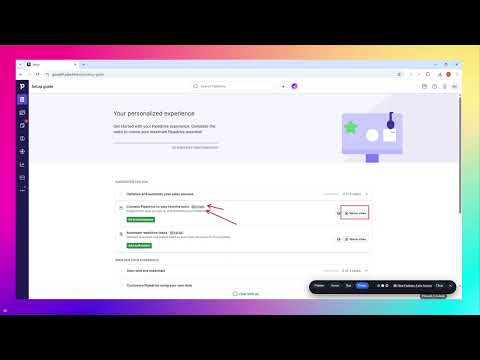
Demo Marker lets you draw directly on any webpage — and focus the room with a presenter-style SPOTLIGHT. Draw on any webpage during live demos, presentations, Zoom calls, training sessions, and screen sharing. Lightweight Chrome annotation tool for highlighting, explaining, and guiding attention live. Perfect for teaching, onboarding, workshops, and product walkthroughs. Explain faster. Point clearly. Stay in control. Highlight what matters during live demos, training , presentations, walkthroughs, and screen sharing — without screenshots or editing tools. Perfect for founder demos, saas demos, product walkthroughs, training sessions, and stakeholder reviews, Demo Marker gives you simple visual annotation tools right inside the browser. Use DemoMarker to: Draw on screen during presentations Annotate webpages instantly Highlight important areas while screen sharing Use Spotlight Mode to focus attention on a specific part of the screen during presentations and walkthroughs Guide attention during live demos Draw arrows, boxes, and circles over browser content Improve software demos and walkthroughs Explain ideas visually during Zoom or Google Meet calls Demo Tool Quick screenshot Perfect for: Product demos Online teaching Technical workshops Customer training Team presentations Live walkthroughs Remote support sessions Features: Screen annotation tools Browser annotation overlay Draw directly on webpages Highlight screen content live Lightweight presentation tool Real-time annotation during screen sharing Simple floating toolbar Fast keyboard shortcuts Privacy-friendly design What you can do: Spotlight mode — darken everything except a circular area around your cursor for crisp focus during demos Draw arrows to guide attention Highlight sections with boxes Emphasize areas using circles Switch colors instantly Clear everything with one click Built for live demos Works on any website Clean floating toolbar that stays out of the way Fast keyboard shortcuts for smooth presenting Annotations stay visible during screen sharing Nothing is saved or uploaded Keyboard shortcuts A – Arrow B – Box C – Circle P – Exit drawing mode H – Hide or show the toolbar S - Spotlight mode Delete / Backspace – Clear all annotations Privacy-first DemoMarker runs entirely in your browser. No accounts. No tracking. No data collection. If you present, explain, teach, or sell — DemoMarker helps you show, not just tell. Linkedin: www.linkedin.com/in/demomarker --------------------- DemoMarker is part of a broader approach to better software demos — focused on clarity, control, and real-world demo execution. Explore the thinking, frameworks, and real demo breakdowns at DemoSecret.com — where high-stakes demos are deconstructed, not just discussed. Explore real-world demo strategies, breakdowns, and frameworks: https://demosecret.com https://www.linkedin.com/company/demosecret/
5 out of 52 ratings
Details
- Version1.1.1
- UpdatedJune 5, 2026
- Size754KiB
- LanguagesEnglish
- DeveloperWebsite
Email
apexdigitalstudioaustralia@gmail.com - Non-traderThis developer has not identified itself as a trader. For consumers in the European Union, please note that consumer rights do not apply to contracts between you and this developer.
Privacy

This developer declares that your data is
- Not being sold to third parties, outside of the approved use cases
- Not being used or transferred for purposes that are unrelated to the item's core functionality
- Not being used or transferred to determine creditworthiness or for lending purposes
Support
For help with questions, suggestions, or problems, visit the developer's support site