

TikTok Followers & Following Exporter

Overview
Export TikTok followers and following lists to CSV for audience analysis.
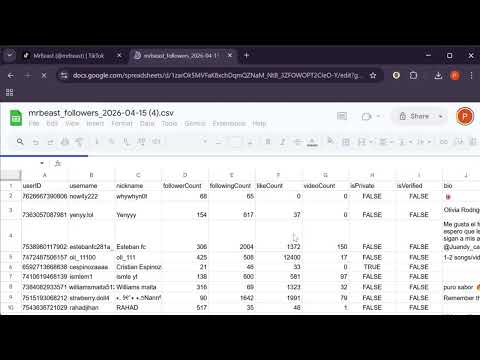
TikTok Exporter is an efficient way to export TikTok follower and following lists directly to structured CSV files. Whether you are a marketer, researcher, or creator, this tool allows you to analyze audience data and build influencer lists effortlessly. By running entirely within your browser and using your existing session, TikTok Exporter ensures your data remains safe while providing a high-performance scraping experience. 🚀 KEY FEATURES Full Profile Exports: Extract detailed lists of any public profile's followers or following. Detailed Data Points: Capture UserID, Username, Nickname, Follower/Following counts, Bio, Verification status, and Profile URLs. Smart History Dashboard: Every export is saved locally. Filter, manage, and download past tasks anytime. Bulk Downloads: Select multiple export tasks and bundle them into a single ZIP archive. Anti-Bot Protection: Intelligent rate-limiting with randomized delays and automatic cooldown pauses to keep your account safe. Zero Configuration: No API keys or passwords required. Just navigate to a profile and click export. 🛡️ PRIVACY & SAFETY Local Processing: All data collection and storage happens locally on your machine. No Data Collection: We do not store or transmit your scraped data to external servers. Secure Handling: We never ask for your TikTok password. The extension uses your current browser session to fetch authorized data. 📖 HOW TO USE IT Install the extension and open the TikTok Exporter popup. Enter the @username of the profile you want to analyze (or visit their profile to auto-fill). Select "Followers" or "Following" and set your record limit. Click Start Export—your tab will navigate to the profile and begin processing. Once complete, download your CSV or visit the History Dashboard for bulk management. 🛠️ SUPPORT & FEEDBACK Developed by the Sonar Seed Team. For usage instructions, feedback, or feature requests, please visit: https://www.sonarseed.com/tools/tiktok-exporter Note: TikTok Exporter is an independent tool and is not affiliated with, endorsed by, or sponsored by TikTok or ByteDance Ltd.
0 out of 5No ratings
Details
- Version2.3.2
- UpdatedApril 17, 2026
- Offered bySonar Seed
- Size265KiB
- LanguagesEnglish
- Developer
Email
info@sonarseed.com - Non-traderThis developer has not identified itself as a trader. For consumers in the European Union, please note that consumer rights do not apply to contracts between you and this developer.
Privacy

This developer declares that your data is
- Not being sold to third parties, outside of the approved use cases
- Not being used or transferred for purposes that are unrelated to the item's core functionality
- Not being used or transferred to determine creditworthiness or for lending purposes
Support
For help with questions, suggestions, or problems, visit the developer's support site