


Overview
Export and save DeepSeek conversations to PDF with image-based or selectable text rendering. Single & bulk export supported.
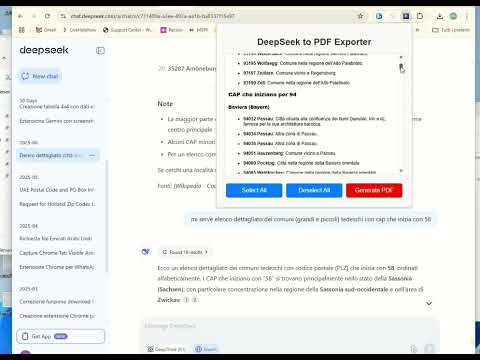
DeepSeek to PDF Exporter allows you to select questions and answers obtained on DeepSeek and save them to your computer in PDF format 📄. You can select only the parts that interest you and the formatting of the answers will be unchanged in the PDF. Therefore, if there are tables, links, images or emoticons in the chat, these will be saved as is in the PDF document. 🚀 New in Version 5.2.0: 🖼️ Dual PDF Export Modes Export your chats in two different formats: Image-based PDF (screenshot mode): preserves the exact layout and appearance of the chat (perfect for visual fidelity) Text-based PDF: allows text selection, search, and editing (ideal for productivity and documentation) 📚 Bulk Chat to PDF Exporter Select and export multiple chats at once into PDF, saving time and boosting productivity. 🛠️ Using the app is simple: Open the DeepSeek chat Open the DeepSeek to PDF Exporter extension View and select the questions and answers to export Click on GENERATE PDF to save the PDF file 💡 Why download DeepSeek conversations as PDF? 1. Easy Reference & Offline Access 📥 A PDF allows you to access the conversation without an internet connection. You can revisit important discussions anytime without reopening DeepSeek. 2. Documentation & Record-Keeping 🗂️ Saves useful information, such as research notes, coding solutions, or troubleshooting guides. Helps track progress on ongoing projects or conversations. 3. Sharing & Collaboration 🤝 Easily share the conversation with colleagues, friends, or clients in a professional format. Useful for team discussions, academic work, or business documentation. 4. Security & Backup 🔒 Keeps a personal copy of the conversation instead of relying on cloud storage. Useful for sensitive or confidential discussions. 5. Legal & Compliance Reasons ⚖️ Provides proof of conversation history in business, legal, or contractual matters. Helps maintain transparency in communications.
3.2 out of 537 ratings
Details
- Version5.3.0
- UpdatedAugust 26, 2026
- FeaturesOffers in-app purchases
- Size505KiB
- LanguagesEnglish
- DeveloperWebsite
Email
webservice2t@gmail.com - Non-traderThis developer has not identified itself as a trader. For consumers in the European Union, please note that consumer rights do not apply to contracts between you and this developer.
Privacy

This developer declares that your data is
- Not being sold to third parties, outside of the approved use cases
- Not being used or transferred for purposes that are unrelated to the item's core functionality
- Not being used or transferred to determine creditworthiness or for lending purposes
Support
For help with questions, suggestions, or problems, please open this page on your desktop browser