

DeepSeek Chat to PDF Exporter

Обзор
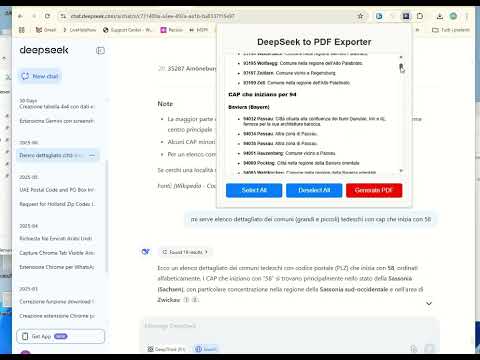
Save DeepSeek chats as Unicode searchable PDF in any language, or as screenshot PDFs. Single and bulk export.
DeepSeek to PDF Exporter allows you to select questions and answers obtained on DeepSeek and save them to your computer in PDF format 📄. You can select only the parts that interest you and the formatting of the answers will be unchanged in the PDF. Therefore, if there are tables, links, images or emoticons in the chat, these will be saved as is in the PDF document. 🚀 New in Version 5.4.0: 🖼️ Dual PDF Export Modes Export your chats in two different formats: Image-based PDF (screenshot mode): preserves the exact layout and appearance of the chat (perfect for visual fidelity) Text-based PDF: allows text selection, search, and editing (ideal for productivity and documentation). Support any language! 📚 Bulk Chat to PDF Exporter Select and export multiple chats at once into PDF, saving time and boosting productivity. 🛠️ Using the app is simple: Open the DeepSeek chat Open the DeepSeek to PDF Exporter extension View and select the questions and answers to export Click on GENERATE PDF to save the PDF file 💡 Why download DeepSeek conversations as PDF? 1. Easy Reference & Offline Access 📥 A PDF allows you to access the conversation without an internet connection. You can revisit important discussions anytime without reopening DeepSeek. 2. Documentation & Record-Keeping 🗂️ Saves useful information, such as research notes, coding solutions, or troubleshooting guides. Helps track progress on ongoing projects or conversations. 3. Sharing & Collaboration 🤝 Easily share the conversation with colleagues, friends, or clients in a professional format. Useful for team discussions, academic work, or business documentation. 4. Security & Backup 🔒 Keeps a personal copy of the conversation instead of relying on cloud storage. Useful for sensitive or confidential discussions. 5. Legal & Compliance Reasons ⚖️ Provides proof of conversation history in business, legal, or contractual matters. Helps maintain transparency in communications.
3,2 из 538 оценок
Подробности
- Версия5.4.0
- Обновлено23 октября 2026 г.
- ВозможностиЕсть платный контент.
- Размер508KiB
- ЯзыкиEnglish
- РазработчикСайт
Электронная почта
webservice2t@gmail.com - Не продавецРазработчик не указал для себя статус продавца. Просим клиентов из Европейского союза обратить внимание, что на сделки между вами и этим разработчиком не распространяются законы о защите прав потребителей.
Конфиденциальность

Этот разработчик утверждает, что ваши данные:
- Не продаются третьим лицам, за исключением разрешенных вариантов использования
- Не используются и не передаются в целях, не связанных с работой основных функций продукта
- Не используются и не передаются для определения платежеспособности или в целях кредитования
Поддержка
Чтобы сообщить об ошибках в работе продукта, задать вопрос или поделиться идеями, откройте эту страницу в браузере для компьютера.