


Visão geral
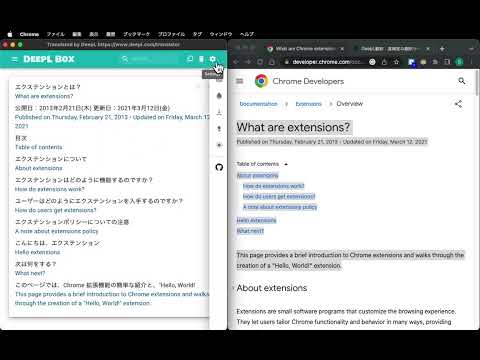
Save previous translations, show index, compare one by one, search by keyword, copy to clipboard and provide keyboard shortcut.
This extension provides the translation history management which saves all of the previous translations, shows index of the translations, compares the source and translation sentences one by one, searches by keyword, copies to clipboard and prepares keyboard shortcut `Command-b` (macOS) or `Alt-b` (other OS) to translate. ## Usage - Select text by mouse or keyboard. - Press `Command-b` (macOS) or `Alt-b` (other OS). - Or right click to open context menu and choose `DeepL Translate`. − Translation window will open. ## Settings ### Change keyboard shortcuts - Open extensions setting page `chrome://extensions`. - Open menu by clicking `hamburger button` "☰" (triple bar icon) on the left of `Extensions`. - Click `Keyboard shortcuts`. - Click the pencil icon on the right of `Open DeepL page and send selected text`. - Input key stroke. Default is `Command-b` (macOS) or `Alt-b` (other OS). ### Change settings by popup dialog You can change source/translation language and split on punctuation option by extension popup dialog. - Click the DeepL Box icon `D` (if you "pinned" icon). - Change settings by selections and buttons. - `Source Language` specify the language of the text to be translated. > **_Note:_** in most cases, DeepL automatically detects source language. - `Target Language` specify the language into which the text should be translated. - `Splits on punctuation` may improve the readability of long text without newlines, such as PDF. ## Limitations - Keyboard shortcut does not work for local PDF files. In that case, use context menu instead. - When you use context menu, Chrome removes newlines from selected text because `info.selectionText` removes newlines. See [Linebreaks/newlines missing from chrome.contextMenus selectionText](https://bugs.chromium.org/p/chromium/issues/detail?id=116429) ## TODO - Support keyboard shortcut for local PDF files. ## Source code https://github.com/susumuota/deeplbox ## Author Susumu OTA
0 de 5Nenhuma nota
Detalhes
- Versão3.7.11
- Atualização13 de janeiro de 2025
- Oferecido porSusumu OTA
- Tamanho433KiB
- Idiomas2 idiomas
- Desenvolvedor
E-mail
ota.s.apps@gmail.com - Não negocianteEsse desenvolvedor não se identificou como comerciante. Caso você seja da União Europeia, observe que os direitos do consumidor não se aplicam a contratos firmados entre você e esse desenvolvedor.
Privacidade

O desenvolvedor declara que seus dados
- Não são vendidos a terceiros, exceto nos casos de uso aprovados
- Não são usados ou transferidos para fins não relacionados à função principal do item
- Não são usados ou transferidos para informações de crédito ou empréstimo
Suporte
Para receber ajuda com perguntas, sugestões ou problemas, abra esta página no seu navegador para computador