Item logo image for Decoy

Decoy

5.0(

3 ratings

)
Item media 6 (screenshot) for Decoy
Item video thumbnail
Item media 2 (screenshot) for Decoy
Item media 3 (screenshot) for Decoy
Item media 4 (screenshot) for Decoy
Item media 5 (screenshot) for Decoy
Item media 6 (screenshot) for Decoy
Item video thumbnail
Item media 2 (screenshot) for Decoy
Item media 3 (screenshot) for Decoy
Item media 4 (screenshot) for Decoy
Item media 5 (screenshot) for Decoy
Item media 6 (screenshot) for Decoy

Overview

Chrome DevTools network sampler and API mocker

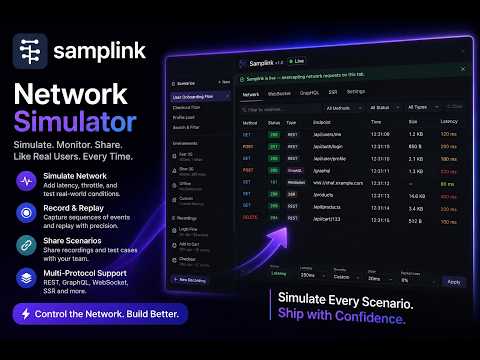
Decoy — Chrome DevTools Network Sampler & API Mocker Decoy is a Chrome DevTools panel that lets you capture, save, and replay real API responses — without touching your backend or writing any mock servers. What it does Open the Decoy panel in DevTools, click Live, and it silently intercepts every fetch and XHR request your page makes. Pick any captured request, save it as a preset, then toggle it on to have Decoy serve that exact response the next time the same endpoint is called — complete with original headers, status codes, and response body. Key features Zero-config capture — no proxy, no browser flags, no code changes. Works on any page, any framework. Preset library — save responses by endpoint and method. Edit the status code, latency, headers, or body inline before replaying. Persistent mocks — active mocks survive DevTools panel close and reopen, so your session isn't disrupted. Latency simulation — set artificial delays to test loading states and timeout handling. Live mode — bulk-activate all presets at once to mock an entire API surface during development or demos. Snapshot import/export — share captured sessions as JSON files with teammates. Works with MV3 — built on Manifest V3, no deprecated background pages, no persistent background processes. Who it's for Frontend developers who need to test edge cases (errors, empty states, slow responses) without coordinating with a backend team, and QA engineers who want to reproduce exact API conditions reliably across machines.

Details

  • Version
    3.2.0
  • Updated
    July 23, 2026
  • Offered by
    samplink
  • Size
    747KiB
  • Languages
    English
  • Developer
    Darshan BS
    Valagerahalli, Subash Nagar, Kengeri Satellite Punam mandara apartment Banglore, Karnataka 560060 IN
    Email
    darshanhosahalli@gmail.com
    Phone
    +91 77950 09180
  • Trader
    This developer has identified itself as a trader per the definition from the European Union and committed to only offer products or services that comply with EU laws.

Privacy

Manage extensions and learn how they're being used in your organization

Decoy has disclosed the following information regarding the collection and usage of your data. More detailed information can be found in the developer's privacy policy.

Decoy handles the following:

Personally identifiable information

This developer declares that your data is

  • Not being sold to third parties, outside of the approved use cases
  • Not being used or transferred for purposes that are unrelated to the item's core functionality
  • Not being used or transferred to determine creditworthiness or for lending purposes

Support

Related

Network Overrides API (DevTools)

0.0

Debugging tool that intercepts and overrides network API responses from DevTools panel or popup. For developers only.

API Monitor

5.0

Monitor web API requests without opening DevTools.

CORS Unblock

4.4

Temporarily unblock CORS for development and testing purposes

Lightstreamer Workbench

0.0

Unified Chrome DevTools workspace for inspecting Lightstreamer Web Client activity.

XApi HTTP Client - API Tool, Modify Header & Response

0.0

Intercept, debug, modify header & response, replay HTTP requests. Comprehensive API client & cURL support in Chrome DevTools.

MoEngage Assist

5.0

View and debug your MoEngage Web SDK integration and implementation using this developer tool.

Network Deepscan

5.0

Search through all network requests and responses in DevTools.

mockforme

5.0

AI-based API simulation in Chrome — reproduce latency, errors, dynamic & conditional responses. No code, no mock server.

Mokku

4.1

Adds the API mocker MOKKU to Chrome Developer Tools for seamless integration & testing.

Wirepeek

0.0

The WebSocket inspector DevTools forgot — live capture & decode of WebSocket traffic.

[Experiment] Edit and Resend: Ajax Request Debugger in Chrome DevTools

3.8

Enhance Chrome DevTools with a new tab. Edit and resend fetch() / XHR requests. Efficiently debug or test your web applications.

Network++

5.0

Enhanced Chrome DevTools network panel with powerful search, GraphQL insight, and export tools.

Network Overrides API (DevTools)

0.0

Debugging tool that intercepts and overrides network API responses from DevTools panel or popup. For developers only.

API Monitor

5.0

Monitor web API requests without opening DevTools.

CORS Unblock

4.4

Temporarily unblock CORS for development and testing purposes

Lightstreamer Workbench

0.0

Unified Chrome DevTools workspace for inspecting Lightstreamer Web Client activity.

XApi HTTP Client - API Tool, Modify Header & Response

0.0

Intercept, debug, modify header & response, replay HTTP requests. Comprehensive API client & cURL support in Chrome DevTools.

MoEngage Assist

5.0

View and debug your MoEngage Web SDK integration and implementation using this developer tool.

Network Deepscan

5.0

Search through all network requests and responses in DevTools.

mockforme

5.0

AI-based API simulation in Chrome — reproduce latency, errors, dynamic & conditional responses. No code, no mock server.

Google apps