


Overview
Hide Google AI Overview, AI Mode and People also ask. Remove Copilot, sponsored blocks and telemetry. No tracking.
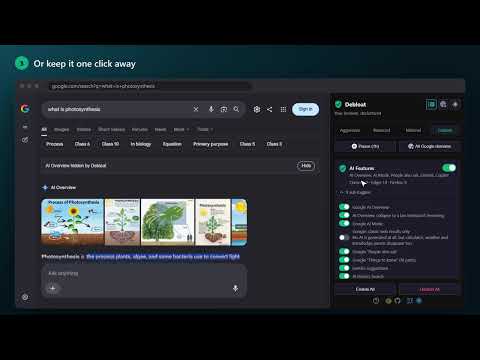
Tired of scrolling past an AI summary to reach real search results? Debloat hides Google AI Overview, AI Mode and the AI answers inside "People also ask" — and also removes Copilot, Gemini, sponsored blocks and telemetry from Chrome, Edge and Firefox. One extension, three browsers, zero bloat. Works out of the box, every switch can be tuned. GOOGLE SEARCH WITHOUT AI • Hide AI Overview — including localized versions ("Übersicht mit KI", "Aperçu IA", "Обзор от ИИ", "AI による概要" …) • Hide the AI Mode tab and buttons • Hide "People also ask" (its answers are AI Overviews) and the AI parts of "Things to know" • Prefer to peek sometimes? Collapse AI Overview into a slim bar with a Show button instead of removing it • Classic web results mode (optional): open every search in Google's plain "Web" view, so no AI is generated at all. Calculator, weather and knowledge panels are not part of that view — one click shows AI for the current search • Works on the 18 largest Google domains out of the box, and on every Google country domain with one click ALSO REMOVES AI features — Copilot sidebar, "Help Me Write", Visual Search overlay and text prediction in Edge. Gemini suggestions and AI tab organization in Chrome. AI chatbot sidebar, link previews and tab group suggestions in Firefox. Blocks websites from experimental Web AI APIs (window.ai). Sponsored content — MSN news feed, sponsored tiles and Spotlight recommendations on the Edge new tab page. Discover-style cards in Chrome. Sponsored stories and top sites on Firefox Home. Shopping tools (Edge) — Shopping Assistant, price comparison pop-ups, coupon notifications and express checkout suggestions. Telemetry — diagnostic data, usage reports and crash reporting endpoints for Chrome, Edge and Firefox; Firefox Studies. Annoyances — Microsoft Rewards prompts, "Set as default browser" nags, feature banners, DALL-E themes, "Edit with Acrobat" button, Bing redirect on the Edge new tab search, auto sign-in prompts. HOW IT WORKS 1. Network-level blocking with the browser's built-in declarativeNetRequest API. 2. CSS injected at page start — AI blocks are hidden before they can flash on screen. 3. A small page monitor that finds AI blocks Google loads later, and never hides organic results. Settings apply instantly — no page reload. FEATURES • 5 categories, 42 individual switches • 3 presets (Aggressive, Balanced, Minimal) • Per-site allow list and a 1-hour pause • Badge counter and activity log • Works in the browser side panel (sidebar in Firefox) • Dark & light theme • 21 interface languages • Zero data collection — no accounts, no analytics, no server calls • No admin rights needed — installs like any other extension • Open source: https://github.com/investblog/debloat SUPPORTED BROWSERS Google Chrome 116+ · Microsoft Edge 116+ · Mozilla Firefox 142+ PRIVACY Debloat does not collect, store or transmit any user data. All settings stay in your browser. Privacy policy: https://debloat.click/privacy Made by 301.st — https://301.st
5 out of 59 ratings
Details
- Version1.1.2
- UpdatedNovember 25, 2026
- Size164KiB
- Languages21 languages
- DeveloperWebsite
Email
contact@spintax.net - Non-traderThis developer has not identified itself as a trader. For consumers in the European Union, please note that consumer rights do not apply to contracts between you and this developer.
Privacy

This developer declares that your data is
- Not being sold to third parties, outside of the approved use cases
- Not being used or transferred for purposes that are unrelated to the item's core functionality
- Not being used or transferred to determine creditworthiness or for lending purposes
Support
For help with questions, suggestions, or problems, please open this page on your desktop browser