

DeArrow - Better Titles and Thumbnails

Descripción general
Crowdsourcing titles and thumbnails to be descriptive and not sensational
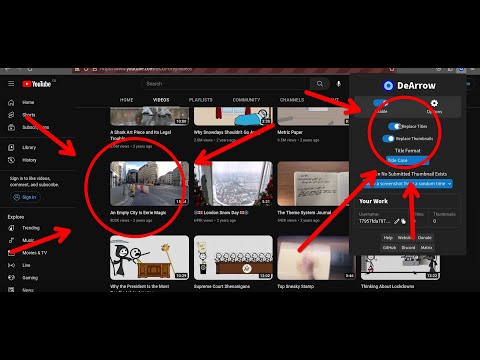
DeArrow is a browser extension for crowdsourcing better titles and thumbnails on YouTube. The goal of DeArrow is to make titles accurate and reduce sensationalism. DeArrow is a paid (if you want) browser extension. You can purchase an unlimited-use license key for 1$. However, if you cannot, or do not want to pay, you can use the extension by clicking the "I can't/don't want to pay" button. Titles can be any arbitrary text. Thumbnails are screenshots from specific timestamps in the video. These are user submitted and voted on. By default, if there are no submissions, it will format the original title to the user-specified format, and set a screenshot from a random timestamp as the thumbnail. This can be configured in the options to disable formatting, or show the original thumbnail by default. If the original thumbnail is actually good, you can still vote for it in the submission menu, and then it will act like a submission. No more dealing with clickbait, arrows, or annoying faces. Users can submit better titles and thumbnails for each video and vote on them. --- How does DeArrow differ from Clickbait Remover for YouTube - Unlike Clickbait Remover, DeArrow's main purpose is for crowdsourcing better titles and thumbnails - When a crowdsourced title is not available, DeArrow will auto-format it according to your setting, but does it in a more sophisticated way than Clickbait Remover. Instead of only setting all words to lower case, or capitalizing every word, DeArrow supports casing systems such as "Title Case" and "Sentence case". These will still allow acronyms and proper names to remain capitalized. - When a crowdsourced thumbnail is not available, DeArrow by default shows a screenshot at a random timestamp in the video. Clickbait Remover's thumbnails use YouTube auto-generated thumbnails, and while they are seemingly random, they are chosen by a machine learning algorithm to favor faces with expressions, and other overstimulating features. DeArrow uses truly random timestamps generated by its own server. DeArrow will also check the SponsorBlock database to ensure the randomized thumbnail is not inside of a sponsor segment. --- Source code: https://github.com/ajayyy/DeArrow Permissions: Access your data for youtube.com, www.youtube-nocookie.com: - Used to modify the YouTube webpage
4.3 de 5295 calificaciones
Detalles
- Versión2.3
- Fecha de actualización9 de marzo de 2026
- FuncionesOfrece compras directas desde la aplicación
- Tamaño1.32MiB
- Idiomas47 idiomas
- DesarrolladorSitio web
Correo electrónico
dev@ajay.app - No comercianteEl desarrollador no se identificó como comerciante. Si eres un consumidor de la Unión Europea, ten en cuenta que los derechos de los consumidores no aplican a los contratos entre el desarrollador y tú.
Privacidad

Este desarrollador declara el siguiente tratamiento de tus datos:
- No se venden a terceros, excepto en los casos de uso aprobados
- No se utilizan ni transfieren para fines no relacionados con la funcionalidad principal del elemento
- No se utilizan ni transfieren para determinar tu solvencia ni ofrecer préstamos
Asistencia
Si tienes preguntas, sugerencias o problemas, visita el sitio de asistencia del desarrollador