Item logo image for De-Markdownify

De-Markdownify

5.0(

2 ratings

)
Item media 3 (screenshot) for De-Markdownify
Item video thumbnail
Item media 2 (screenshot) for De-Markdownify
Item media 3 (screenshot) for De-Markdownify
Item video thumbnail
Item media 2 (screenshot) for De-Markdownify
Item media 3 (screenshot) for De-Markdownify

Overview

Markdown to Plain Text Converter

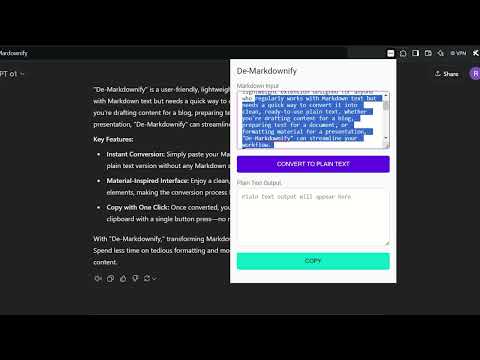
De-Markdownify is a streamlined Chrome Extension designed to remove the complexity of Markdown formatting from your copied text. Whether you’re a writer, a student, a researcher, or simply someone who frequently copies text from online resources that use Markdown, this tool saves you time and effort. Key Benefits: 1. Instant Plain Text Conversion: With a single click, paste Markdown-heavy content into De-Markdownify’s interface and instantly transform it into easy-to-read plain text—no extra styling or characters to remove manually. 2. Clean and Uncluttered Output: Bold markers, italics, code blocks, hyperlinks, and headings are all neatly stripped away, leaving only readable, straightforward text you can readily use in emails, documents, or notes. 3. Simple, Intuitive Interface: The interface is minimalistic, ensuring you spend less time navigating menus and more time focusing on what matters—obtaining clean text. 4. Enhance Your Workflow: Stop wrestling with formatting tags and enjoy a smoother workflow. De-Markdownify helps you effortlessly prepare content for reports, presentations, or any platform that requires plain text input. Whether you’re gathering research materials, compiling excerpts for content creation, or just tidying up your daily notes, De-Markdownify makes the transition from messy Markdown to crisp plain text effortless.

Details

  • Version
    1.0
  • Updated
    December 20, 2024
  • Offered by
    rudranilbhattacharjee0
  • Size
    124KiB
  • Languages
    English
  • Developer
    Email
    rudranilbhattacharjee0@gmail.com
  • Non-trader
    This developer has not identified itself as a trader. For consumers in the European Union, please note that consumer rights do not apply to contracts between you and this developer.

Privacy

The developer has disclosed that it will not collect or use your data.

This developer declares that your data is

  • Not being sold to third parties, outside of the approved use cases
  • Not being used or transferred for purposes that are unrelated to the item's core functionality
  • Not being used or transferred to determine creditworthiness or for lending purposes

Related

ChatGPT Markdown Remover

0.0

A Chrome extension that removes common Markdown formatting.

WebInk: Intelligent Web to Markdown Converter

4.8

Transform web pages into Markdown with AI conversion, smart TOC generation, multi-language translation, and seamless reading.

Copy as Markdown

5.0

Convert and copy text as Markdown with formatting preserved

Markdown Reader

4.8

The best way to preview Markdown in your browser.

Copy as Markdown

4.0

Browser extension to copy hyperlinks, images, and selected text as Markdown

Copy as Markdown

4.3

Copy Link or Image as Markdown code

TabStack

3.3

A new tab page replacement with visual bookmarks and tab management, built for how people actually use the web.

HTML to Markdown

4.6

Translate a selected HTML text to equivalent markdown format

网页转Markdown - Web to Markdown | url2md助手

4.2

一键网页转 Markdown,轻松提取文章内容!支持一键将网页文章(包括微信公众号、掘金等平台)转换为 Markdown 格式,方便保存、编辑和管理。支持自定义样式,助你轻松归档网页内容!适用于开发者、写作者和知识管理爱好者。

LectureCapture Tube

5.0

Capture, save, and manage YouTube video screenshots with timestamps.

ChatGPT to MarkDown plus

4.8

Export chat history from ChatGPT and Grok websites to normal format as Markdown, which can be opened via typora exactly.

MarkSnip - Markdown Web Clipper

4.7

A web clipper to download articles in markdown format. Turndown & Readability are used as core libraries.

ChatGPT Markdown Remover

0.0

A Chrome extension that removes common Markdown formatting.

WebInk: Intelligent Web to Markdown Converter

4.8

Transform web pages into Markdown with AI conversion, smart TOC generation, multi-language translation, and seamless reading.

Copy as Markdown

5.0

Convert and copy text as Markdown with formatting preserved

Markdown Reader

4.8

The best way to preview Markdown in your browser.

Copy as Markdown

4.0

Browser extension to copy hyperlinks, images, and selected text as Markdown

Copy as Markdown

4.3

Copy Link or Image as Markdown code

TabStack

3.3

A new tab page replacement with visual bookmarks and tab management, built for how people actually use the web.

HTML to Markdown

4.6

Translate a selected HTML text to equivalent markdown format

Google apps