

Orvisign — E-signature and identity verification
Overview
E-signature with your smart card on connected websites (e.g. Orvisign, Optifora), made by the Orvisign helper on your computer.
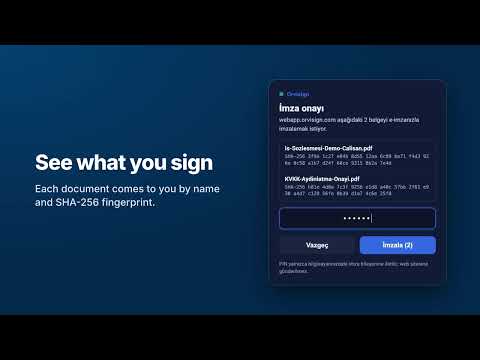
Orvisign is an e-signature bridge that lets you sign documents and Medula e-Prescriptions with your smart card (e-signature token) right from your browser, on connected websites such as Optifora. INSTALL THE HELPER APP FIRST The extension does not sign on its own: the signature is created inside your card by the Orvisign helper app installed on your computer. The helper app is available for Windows (10/11) and Mac; on Mac it comes with the Orvisign desktop app. Download and setup: https://orvisign.com/en/apps.html After installing, click the extension icon and press "Test the Connection". When you see "Ready — token signing is available.", the extension is ready to use. ORVISIGN DESKTOP APP (WINDOWS AND MAC) • Signs and verifies the PDFs and files on your computer. • Shows the card's status as soon as you insert it; recognises the card type even without a driver and tells you which driver to install. • Warns you 30 days before your certificate expires; lets you change the card PIN in a window that shows the attempts left. • Health Check tests the reader, card, driver and local signing service in one go. The signature is created inside your card, through the small Orvisign helper on your computer. The document stays between the website and your computer; your PIN is asked in Orvisign's own window and goes only to your card. HOW IT WORKS • When you choose "sign" on the website, Orvisign takes over. • Your PIN is entered in the extension's own window; the web page receives only the signed result. • The signature is created on your card in line with Turkish e-signature law 5070: inside the PDF (PAdES), as a detached signature (CAdES) or as XML (XAdES — Medula e-Prescription). • Works with Kamu SM cards with EC384 (ECDSA P-384) keys and with RSA cards. WHY ORVISIGN • The browser talks to the helper on your computer through Chrome's native messaging channel. • Runs only on the websites it is allowed on. • The helper runs only while signing. • Installs into your user account; administrator rights are optional. REQUIREMENTS • A smart card reader and your card's driver (Akia for Kamu SM cards). • The Orvisign helper app, for Windows or Mac (https://orvisign.com/en/apps.html). Support: info@orvisign.com · https://orvisign.com/en/support.html
0 out of 5No ratings
Details
- Version1.3.3
- UpdatedNovember 23, 2026
- Offered byEGEROBOT
- Size31.87KiB
- Languages2 languages
- DeveloperEGEROBOT OTOMASYON MUHENDISLIK PROJE DANISMANLIK SANAYI VE TICARET LIMITED SIRKETI
Mansuroglu Mh. 1593/1 Sk. B:4/1 D:5 BAYRAKLI Izmir, İzmir 35535 TREmail
info@egerobot.com.trPhone
+90 533 548 45 69 - TraderThis developer has identified itself as a trader per the definition from the European Union and committed to only offer products or services that comply with EU laws.
- D-U-N-S751152606
Privacy

This developer declares that your data is
- Not being sold to third parties, outside of the approved use cases
- Not being used or transferred for purposes that are unrelated to the item's core functionality
- Not being used or transferred to determine creditworthiness or for lending purposes
Support
For help with questions, suggestions, or problems, visit the developer's support site