

PostThisDraft

Overview
Turn rough technical notes into polished LinkedIn posts, without leaving LinkedIn.
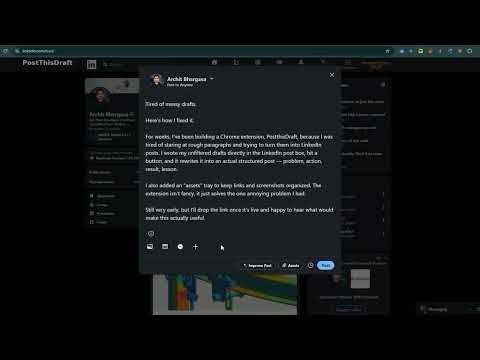
Turn a rough draft into a publish-ready LinkedIn post — without leaving the composer. Writing a good LinkedIn post usually means drafting a messy paragraph, copying it into a separate AI tool, editing the result, and pasting it back in. That round trip breaks your train of thought and adds friction to every single post. PostThisDraft removes it. IMPROVE POST Write your draft directly in the LinkedIn post composer, then click Improve Post. Your draft is restructured into a clear, well-organized post — problem, action, result, lesson — right where you wrote it. No tab switching, no separate tools, no losing your voice in the process. POST ASSETS Save links, images, and screenshots to a project-scoped tray as you come across them — right-click anything on the web and add it, or capture the current tab in one click. When you sit down to write, everything you've collected is right there inside the composer, organized by project. SCOPED TO LINKEDIN PostThisDraft only activates on the LinkedIn post composer. It's not a general-purpose writing tool that inserts itself into every text box you click into — it stays out of the way until you're actually writing a post. YOUR DATA Draft text you submit through Improve Post is processed to generate the rewritten post — see the privacy policy for full detail on what's collected and why. Items you save to the Post Assets tray are stored locally in your browser and are never transmitted anywhere
0 out of 5No ratings
Details
- Version1.0.0
- UpdatedAugust 16, 2026
- Offered byArchit Bhargava
- Size39.37KiB
- LanguagesEnglish
- Developer
Email
architbhrgv@gmail.com - Non-traderThis developer has not identified itself as a trader. For consumers in the European Union, please note that consumer rights do not apply to contracts between you and this developer.
Privacy

PostThisDraft has disclosed the following information regarding the collection and usage of your data. More detailed information can be found in the developer's privacy policy.
PostThisDraft handles the following:
This developer declares that your data is
- Not being sold to third parties, outside of the approved use cases
- Not being used or transferred for purposes that are unrelated to the item's core functionality
- Not being used or transferred to determine creditworthiness or for lending purposes
Support
For help with questions, suggestions, or problems, please open this page on your desktop browser