


Overview
Countdown or stopwatch over your Google Slides slideshow. Nothing to insert in your slides. No account. Pro: alerts, sequences.
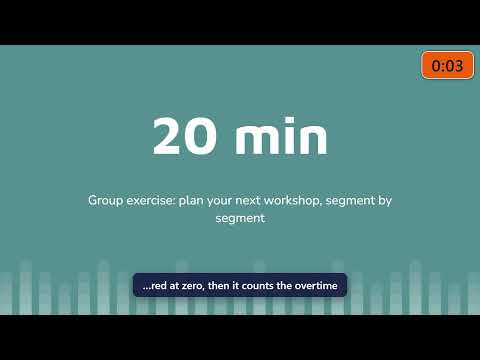
Timer for Google Slides™: a large, clear countdown or stopwatch on top of your slideshow, so you and your audience always see how much time is left. Nothing to insert in your slides, no account. Made for teachers, trainers and speakers: classes, exams, workshops, talks, pitches and meetings. HOW IT WORKS • Start your Google Slides slideshow: SlidePace appears in a corner of the screen. It also works in tabs that were already open when you installed it, with no reload. • Start, pause or reset with the on-screen buttons (shown on hover) or with keyboard shortcuts. • The display turns orange before the end, then red when time is up, and keeps counting the overtime. FEATURES • Countdown or stopwatch mode • An alert threshold: choose how many minutes before the end the color changes • Three sizes and four corner positions • Keyboard shortcuts: Alt+Shift+S (start/pause), Alt+Shift+0 (reset), Alt+Shift+H (show/hide), and with Pro Alt+Shift+→ (next step of a sequence); change them in chrome://extensions/shortcuts • Add or remove a minute during the talk with the +1 / −1 buttons • Stays visible in full screen, and keeps its time if you leave and restart the slideshow • Clicking it never moves your slides • In English, French, Spanish, Portuguese (Brazil), German, Italian and Japanese SLIDEPACE PRO (OPTIONAL, PAID) • Up to 3 warnings before the end: the color changes at each one, with an optional beep. • Workshop sequences: time each part of your session (for example 10 min talk, 20 min exercise, 5 min debrief); steps move on by themselves or at your signal. • Try Pro free for 30 days with one click: no card, no account, nothing sent during the trial. Your Pro settings are kept afterwards. • Launch price: €12/year or €39 one-time payment, VAT included in the EU. Secure payment by Paddle.com, our online reseller and Merchant of Record. • New Pro features are included at no extra cost for Pro customers. PRIVATE BY DESIGN • No account, no sign-up • Free version: no data collected, nothing is sent. • Pro version: still no account. About once a month, the extension checks only your license ID — never your name, your email or the content of your presentations. • Payment is handled entirely by Paddle.com, our online reseller and Merchant of Record: we never see your bank details. • Your settings are stored only in your browser. • Minimal permissions: storage of your settings and access to docs.google.com/presentation pages only, to display SlidePace there (including in tabs that are already open). SlidePace does not read the content of your presentations. For Pro customers only: an optional permission, requested at activation and which you can decline, lets the extension check the license about once a month on api.slidepace.com. Website: https://slidepace.com/?utm_source=store&utm_medium=listing&utm_campaign=en Privacy policy: https://slidepace.com/privacy.html Contact: contact@slidepace.com SlidePace is not affiliated with or endorsed by Google. Google Slides is a trademark of Google LLC. Use of this trademark is subject to Google Permissions.
0 out of 5No ratings
Details
- Version1.2.1
- UpdatedOctober 29, 2026
- FeaturesOffers in-app purchases
- Size76.32KiB
- Languages7 languages
- DeveloperPIERRE-PHILIPPE CONSEIL & COACHINGWebsite
18 Rue Waldeck Rousseau Vitry-sur-Seine 94400 FREmail
contact@slidepace.comPhone
+33 6 20 65 04 81 - TraderThis developer has identified itself as a trader per the definition from the European Union and committed to only offer products or services that comply with EU laws.
- D-U-N-S276561806
Privacy

SlidePace – Timer for Google Slides™ has disclosed the following information regarding the collection and usage of your data. More detailed information can be found in the developer's privacy policy.
SlidePace – Timer for Google Slides™ handles the following:
This developer declares that your data is
- Not being sold to third parties, outside of the approved use cases
- Not being used or transferred for purposes that are unrelated to the item's core functionality
- Not being used or transferred to determine creditworthiness or for lending purposes
Support
For help with questions, suggestions, or problems, visit the developer's support site